22
Installation
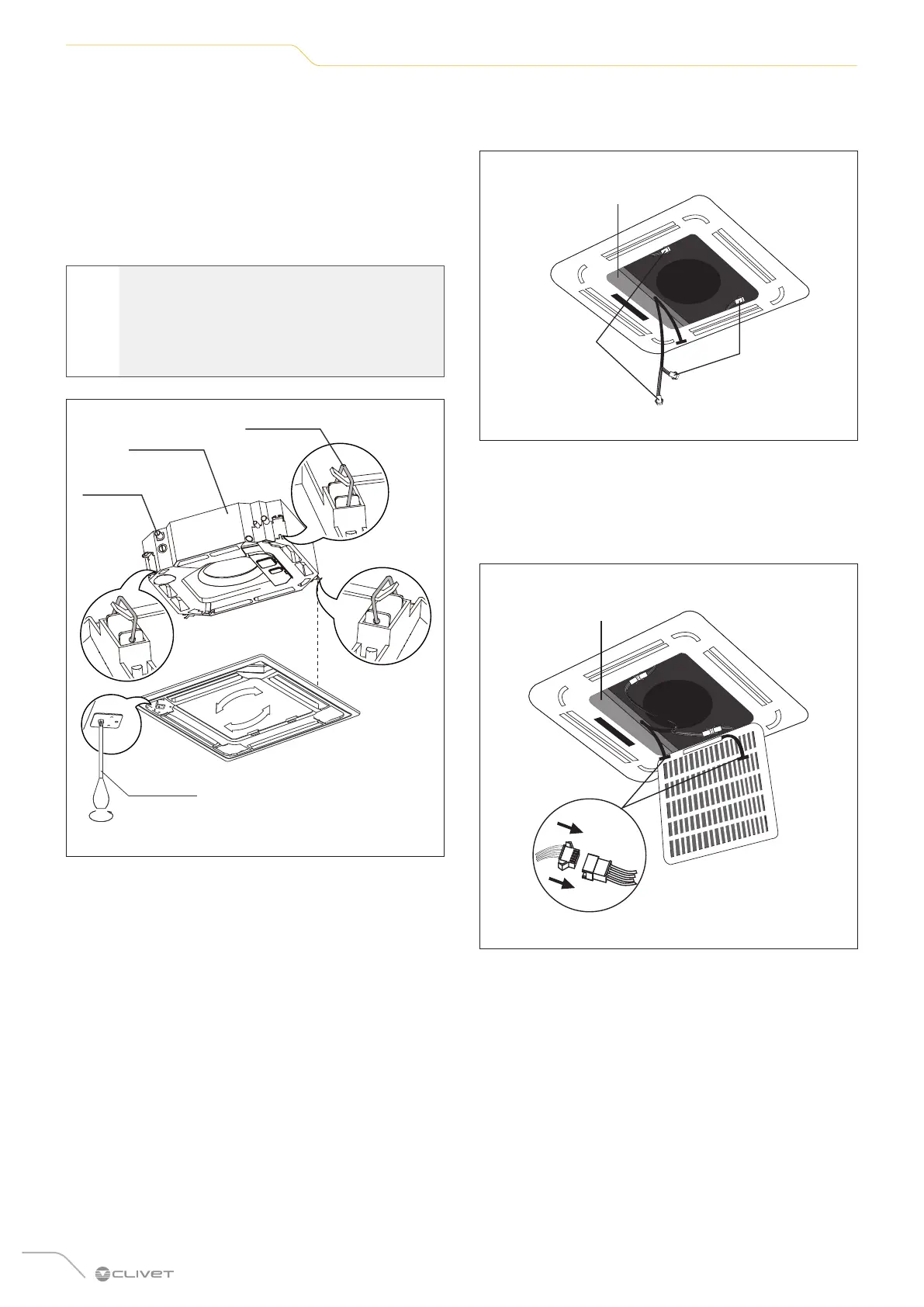
3 Install the panel
– Align the front panel with the main body, taking
into account the position of the pipes and the drain
side.
– Attach the four decorative panel rings to the indoor
unit hooks.
– Tighten the screws of the panel hooks in the four
corners equally.
m
CAUTION
Tighten the screws until the thickness of the
spongy material between the main body and
the panel is down to 4-6 mm. The edge of the
panel must fully touch the ceiling.
Pipe side
Ring
Screwdriver
Drain
side
Fig. 30
– Adjust the panel by turning it to completely cover
the opening in the ceiling.
– Connect the two connectors of the ventilation slit
motor to the corresponding cables in the electrical
panel.
Electrical panel
Connect the
ventilation slit
motor
Connect the
ventilation slit
motor
Fig. 31
– Remove the foam stoppers from inside the fan.
– Fasten the side of the front grille to the panel.
– Connect the display panel wire to the corresponding
connector on the main body.
Electrical panel
Fig. 32
– Close the front grille.


 To Next Page
 Loading...