5
Functional Overview
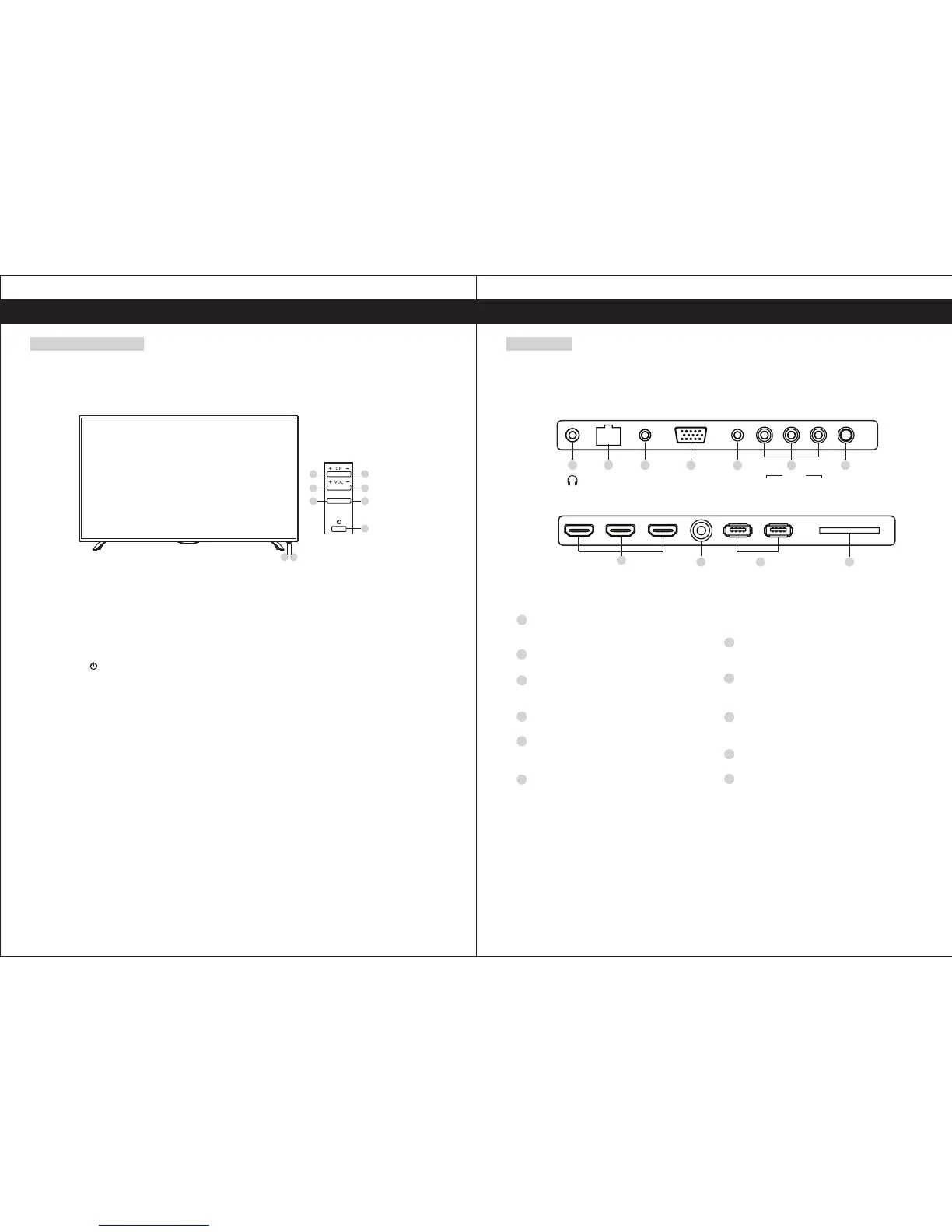
Front and Side Panel
1. Power Light
On Standby Mode, the light turns red.
2. Infrared Remote Sensor
Receives the signals from the remote control.
3. POWER
Press to turn TV on or turn to standby mode.
4. MENU
Press to display the setup menu on the TV screen.
5. SOURCE
Press to select TV or all video input modes.
6-7. VOL+, VOL-
Press to adjust the volume level, or press to select or adjust a menu item.
8-9. CH+, CH-
Press to select desired channels, or press to select or adjust a menu item.
MENU
SOURCE
4
3
6
5
8 9
7
21
CLOUD TV 55SU
CLOUD TV 65SU
6
Rear Panel
Functional Overview
USB2.0 SD
USB3.0
RF IN
HDMI2
HDMI1
HDMI3
8
1110
9
LINE IN YPBPR INVGA
RJ 45
CVBS L R
AV IN
COAXIAL
1
4
3
5 76
2
CLOUD TV 55SU
EARPHONE
Connects audio amplifier or other device
with that audio input.
RJ45 Ethernet
Connect to the Internet.
LINE IN Input terminal
Connect to equipment using HDMI-DVI
connection or PC with audio output.
VGA(PC IN) Input terminal
Connect to PC.
YPBPR Input terminals
Connect to equipment with component
video output.
AV IN
Video and Audio(L/R)input Terminal
Audio(L/R)can be used as YPBPR Audio
input.
COAX
Connection for Digital Coaxial input for
Audio Amplifier.
HDMI1/HDM2/HDM3 Input terminal
Connect to equipment with HDMI output.
Antenna lnput terminal
Connect to equipment with antenna
output or wall antenna socket.
USB
Connect your external storage devices.
SD
Connect your external storage devices.
1
4
3
6
5
7
2
8
10
11
9
CLOUD TV 65SU


 To Next Page