9
It takes approximately 10 seconds for the picture to appear after the TV is turned on.
The TV will switch to standby mode automatically if there is no signal input for 10 minutes.
If the TV will not be used for a long periods of time, unplug the TV from the wall outlet.
Remote Control & Basic Operation
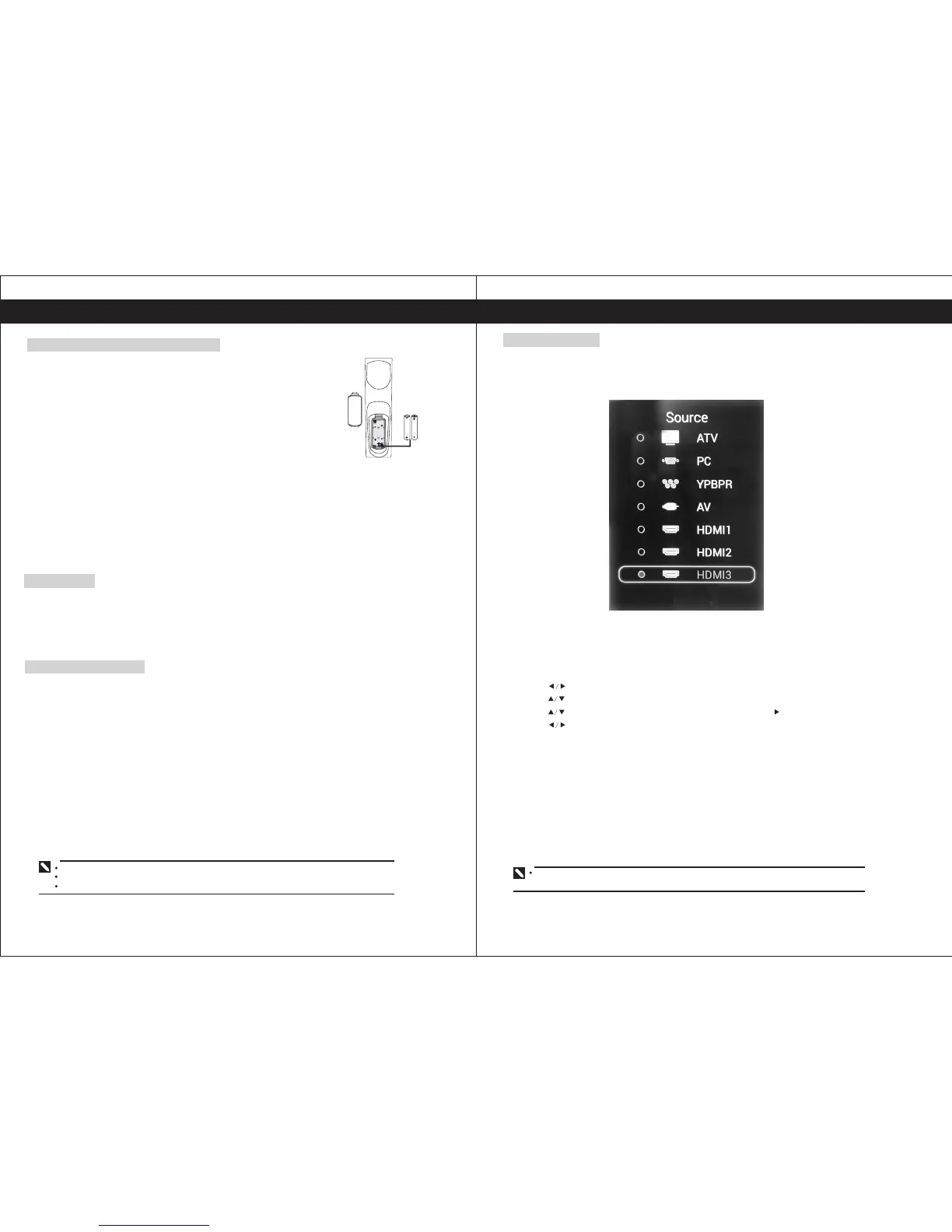
1. Open the battery cover.
2. Insert batteries (two size-AAA batteries).
Place batteries with their terminals observing the(+) and (-) indications.
3. Replace the cover and press down until the lock snaps closed.
If the remote control is not used for an extended period of time, remove
the batteries from the remote control as damage may result due to
electrolyte leakage from the batteries.
Installing The Remote Control Batteries
10
Basic Operation
Select Input Source
You can select the source by pressing the SOURCE button on the side of the panel or
pressing the SOURCE button on the remote control. Press button to select the input source
you want to watch. Then press ENTER to confirm.
On-Screen Display (OSD) Selection and Adjustment
1. Press "MENU" to display the main menu.
2. Press to select a menu. The selected menu page displays.
3. Press to set your selection.
4. Press to choose an item on the menu page and press to set your selection.
5. Press to adjust an item value or choose options.
6.Press "MENU" to return to the menu, press "MENU" again to exit.
The OSD menu screen will be closed automatically when no operation has been made for
the set OSD menu display time.
Note: 1.The batteries shall not be exposed to excessive heat such as sunshine and fire.
2.Danger of explosion if battery is incorrectly replaced. Replace only with the same or
equivalent type.
3.Risk of explosion if battery is replaced by an incorrect type. Dispose of batteries
according to the instructions.
4.Do not dispose of batteries in a fire, danger of explosion.
Power On/Off
Turning on the TV
1. Plug the TV’s power cord into a wall outlet (after this step, the main unit will turn on and enter
standby mode automatically).
2. Press the (Power) button on the TV, or press the (Power) button on the remote control. The
TV will turn on.
Placing In Standby Mode
Your TV can be placed in Standby mode in order to reduce the power consumption,
The standby mode can be useful when you wish to interrupt viewing temporarily (during a meal,
for example).
1, Press the Power button.
2. To switch back on, simply press power button.
Remark: Do not leave your TV in Standby mode for long periods of time. (when you are away
on holiday, for example). It is the best to unplug the set from the ma/ns and aerial.


 To Next Page