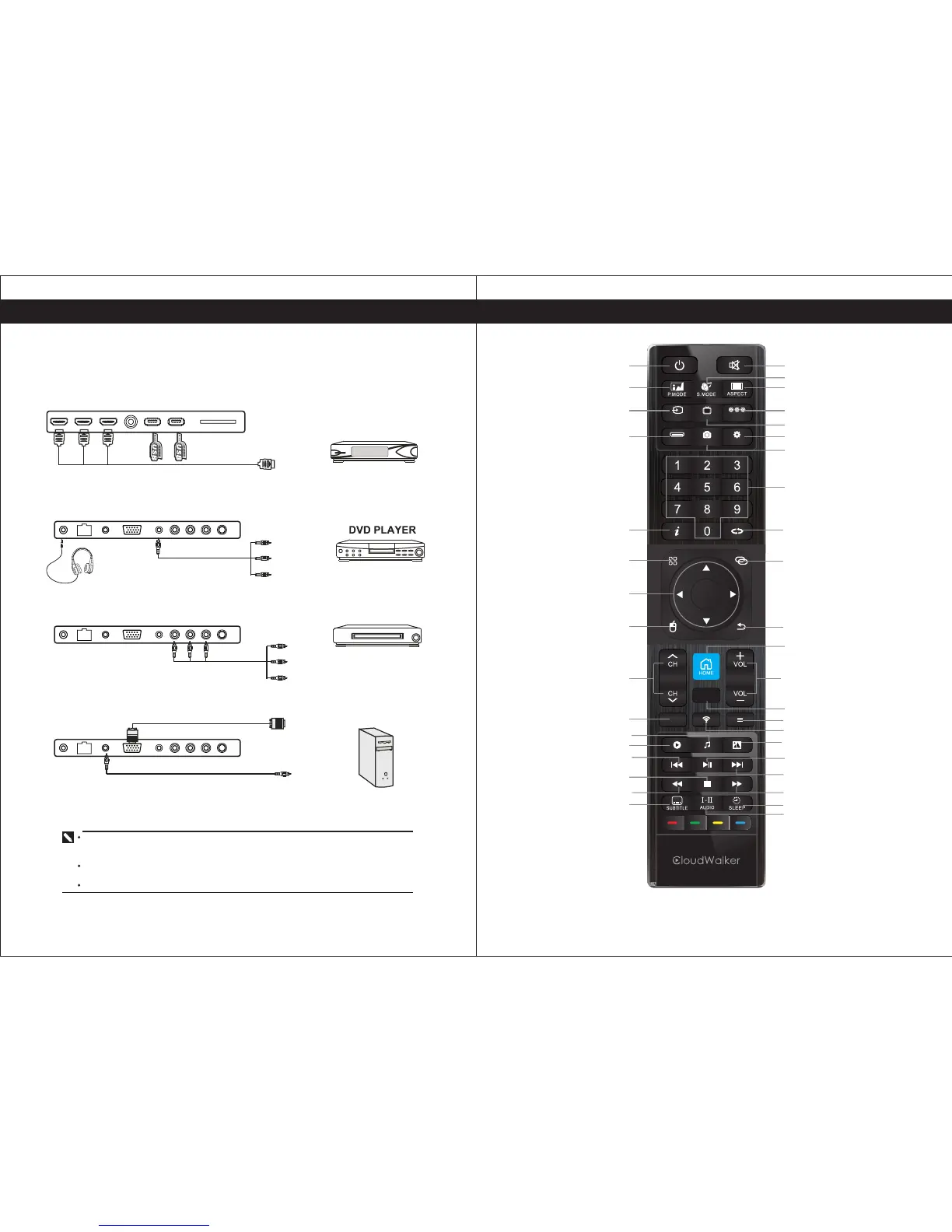
You can connect VCR, DVD player, set-top box, computer or other video equipment to the TV.
To view external source images, press to select the input source.
Connecting an AV Equipment with HDMI Connector
7
Connections
Computer
VCR
Connecting an AV Equipment with Composite Connector
Connecting an AV Equipment with Composite(YPbPr) Connector
Connecting an AV Equipment with VGA Connector
Set-Top Box
If the external equipment has DVI output, you can connect it to the HDMI terminal using a
HDMI-DVI cable. In case of using the HDMI-DVI cable, connect analog audio signal to
RGB/HDMI Audio Input terminal.
Please refer to the user manual of t he external equipment for more information on the
connection to the TV.
Please disconnect all the power supplies to the equipment and TV before connection.
?
HDMI
OK
CDE
AV
SETTINGS
SOURCE
ATV
SCREENSHOT
TV ON/OFF
PICTURE MODE
INPUT SOURCE
HDMI SOURCE
INFORMATION
ALL APPS
AIRMOUSE ON/OFF
CHANNEL UP/DOWN
VOLUME UP/DOWN
NETWORK
IMAGE
VIDEO
SUBTITLE
MUTE
SOUND MODE
ASPECT RATIO
AV SOURCE
ATV SOURCE
SETTINGS
SCREENSHOT
PREVIOUS CHANNEL
NOT AVAILABLE
BACK/RETURN
HOME
CDE
MENU
NUMBER
MUSIC
SLEEP TIME
AUDIO
NAVIGATE ARROW
PLAY / PAUSE
NEXT
FAST REVERSE FAST FORWARD
STOP
PREVIOUS
NOT AVAILABLE
8
Remote Control


 To Next Page