6
Install Apps & Customize your device
Install apps and access the App Market
After entering your activation code, your apps should begin installing.
Please wait until the install process is complete.
You can customize your Clover by installing additional apps in Clover’s
App Market.
Customize your PIN, tip, and signature settings
We will be customizing your device for the rst time. Remember, you can
always make changes to these settings in the Setup app.
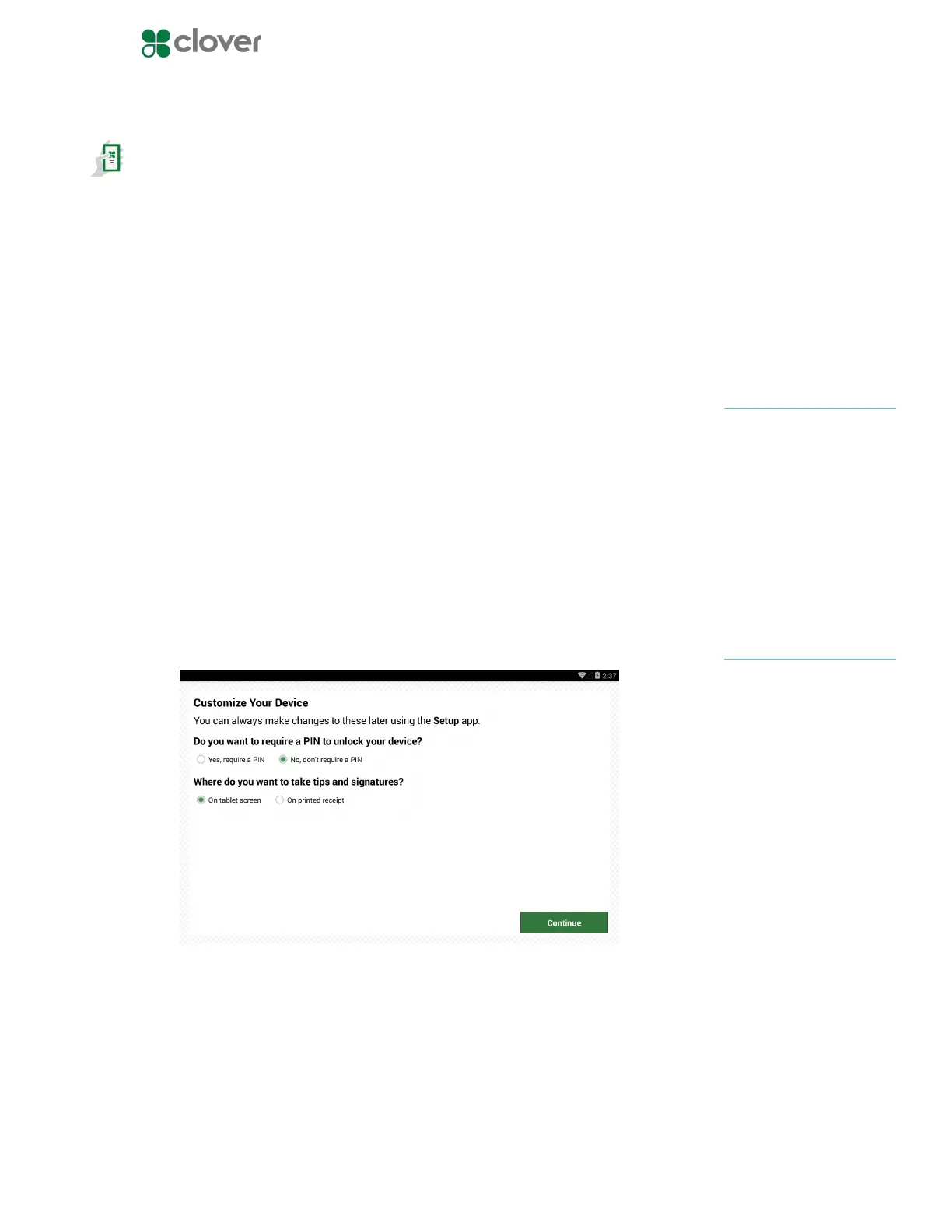
Customize your device with the following questions:
1. Do you want to require a PIN to unlock your device?
• Yes, require a PIN
• No, don’t require a PIN
2. Where do you want to take tips and signatures?
• On tablet screen
• On printed receipt
3. Tap Continue to complete customization
If you plan to accept tips,
please make sure the closeout
time is at least an hour after
your business has entered
tips for the day.
NOTE
If you do not see an option
for tips, your account is not
yet tip enabled. Call Support
and request to enable tips.
NOTE



 To Next Page