USE ONLY HAYWARD GENUINE REPLACEMENT PARTS
Page 10 of 14 Pump
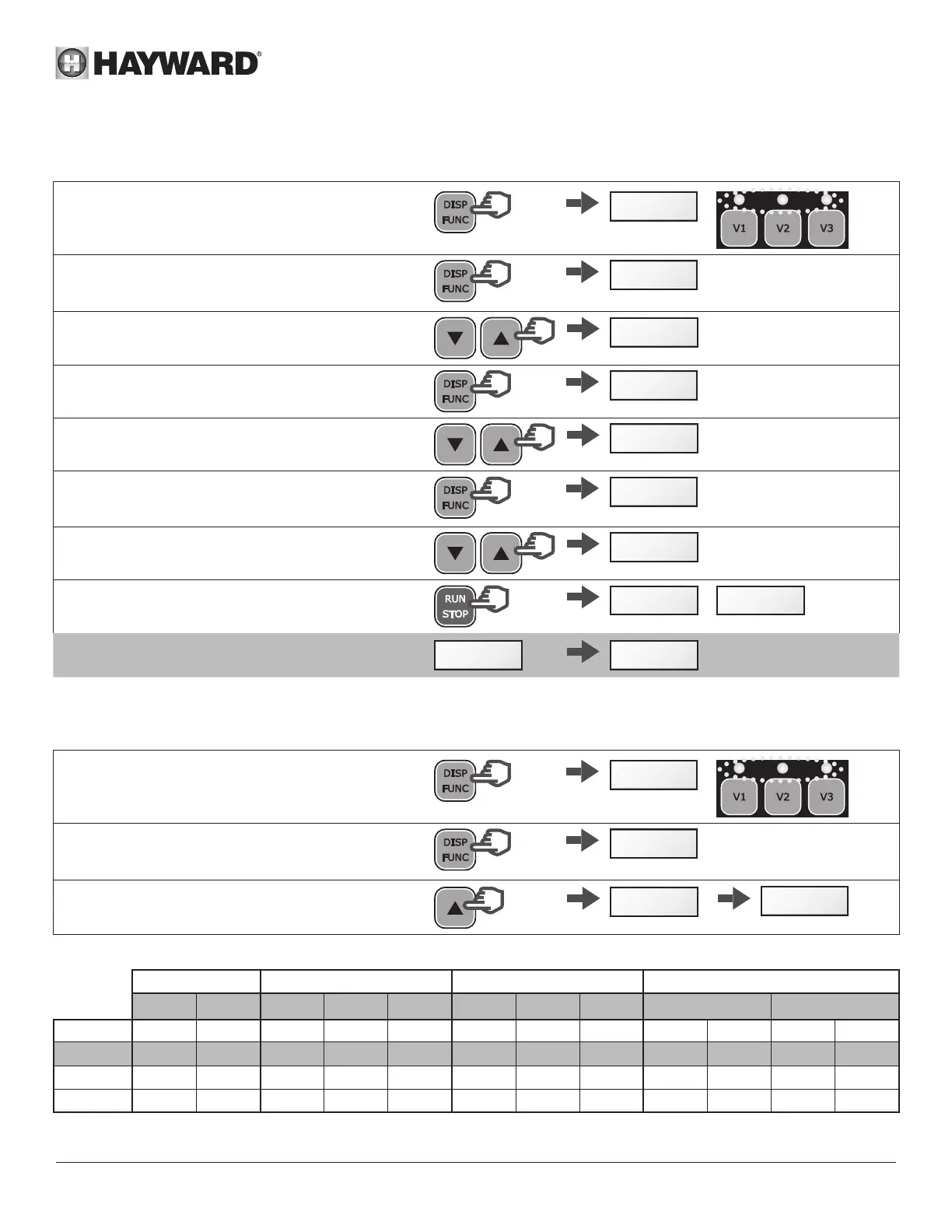
4.3 Setting the Skimmer function
See section 2.2 for an introduction to this function
• Press and hold DISP/FUNC for three seconds
All three LEDs will blink and the screen will display
"ConF"
>3s
ConF
• Press DISP/FUNC repeatedly until 'SFO.15' is
displayed on screen: this is the default Skimmer
time (in minutes)
x n
SfO15
.
• Press the up / down buttons to set the desired
value (0 to 30 minutes)
SFO20
.
• Press DISP/FUNC: the screen will display "St 1hr"
- this is the default Skimmer cycle period
St1h
• Press the up / down buttons to set the Skimmer
cycle period to 1hr, 2hrs or 3hrs
St2h
• Press DISP/FUNC: the screen will display "S2800"
- this is the default speed of the Skimmer function
(rpm)
S2800
• Press the up/down buttons to display the desired
speed (600 to 3000 rpm)
S2680
• Press RUN/STOP to exit and save
The display will show the current speed or StoP
StoP
/
1640
Note: To deactivate the Skimmer and set the time to
zero - display reads "SFoFF"
SFoFFSF000
4.4 Restoring the settings
To restore the default settings and erase the Timer mode settings, do the following:
• Press and hold DISP/FUNC for three seconds
All three LEDs will blink and the screen will display
"ConF"
>3s
ConF
• Press DISP/FUNC repeatedly until the screen
displays the message 'Init'
x n
Init
• Press and hold the 'up' button for 3 seconds. The
screen will read "donE" once the reset is complete
StoP
dOnE
>3s
Reminder: default settings and their value ranges
Priming Speed preset buttons Skimmer function Timer function
Pr o___
V1 V2 V3
SF St S___ t0 t1 _ t5
Units s rpm rpm rpm rpm min h rpm hh-min rpm hh-min rpm
Default 240 3000 1500 2400 3000 15 1 2800 06-00 2400
oFF
0
Mini
0 (
oFF)
600 600 600 600
0 (
oFF)
1 ... 600 00-00 — 00-00 0/ 600
Maxi 300 3000 3000 3000 3000 30 ... 3 3000 24-00 — 24-00 3000



 To Next Page