USE ONLY HAYWARD GENUINE REPLACEMENT PARTS
Page 11 of 14 Pump
4.5 Setting the Timer mode
The control panel allows you to program multiple sequences
(see section 2.3) or Timers t0 to t5, which do not need to follow a
chronological order.
Unused Timer settings will be deactivated.
Timer 't0' can be set to 00:00, 06:00 (by default), 12:00 or 18:00. It
cannot be deactivated.
You cannot adjust the speed of t0, it is set at 2400 rpm
speed
time
t0
t1
t3
(t2)
t4
t5
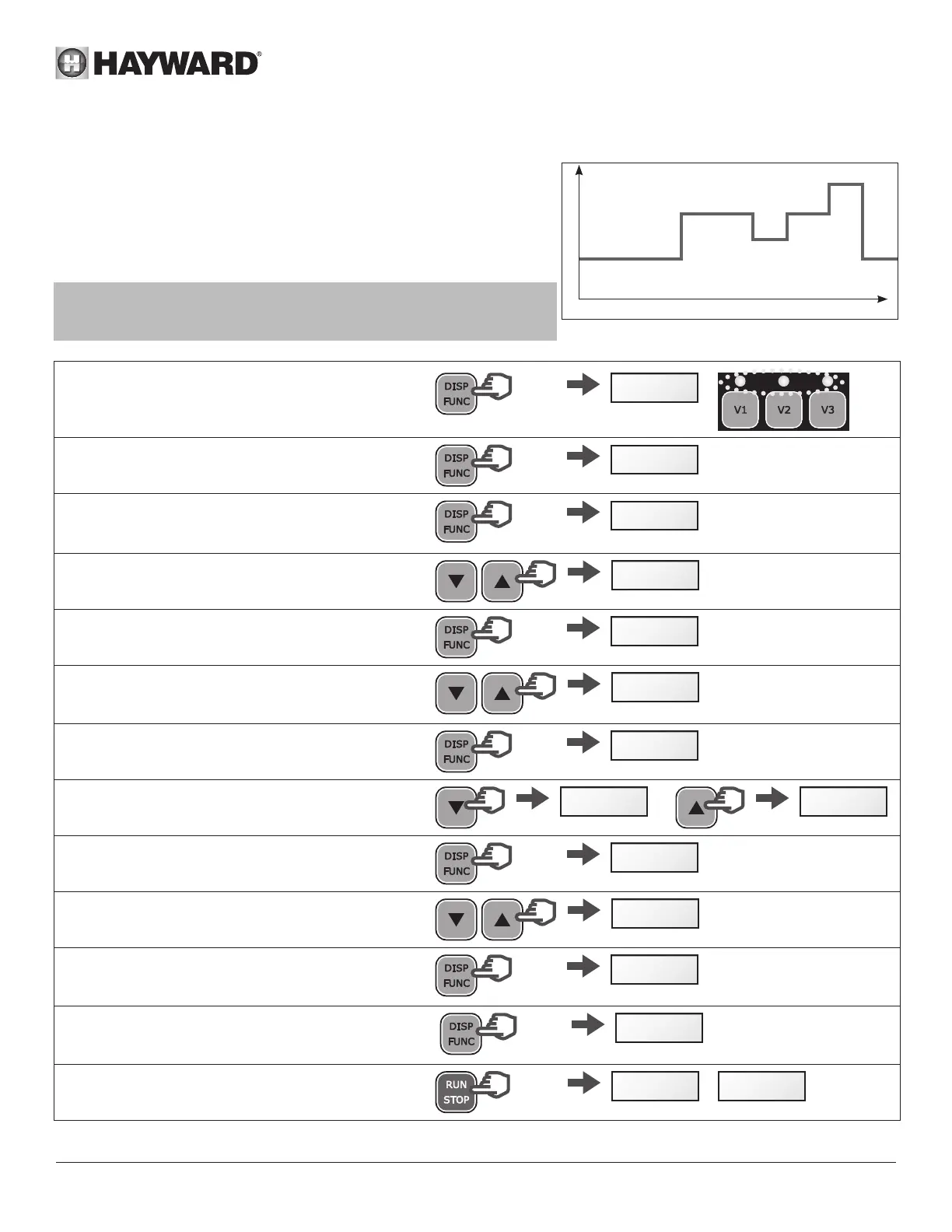
• Identify the speed profile you would like to program.
The image opposite is shown as an example.
• Check whether the internal clock has been set correctly.
• Press and hold DISP/FUNC for 3 seconds
All 3 LEDs will blink and the screen will display
"ConF"
>3s
ConF
• Press DISP/FUNC twice and the screen will
display "t0"
x 2
t 0
• Press DISP/FUNC: the screen will display "06-00" -
this is the default value of t0
06-00
• Press the up / down buttons to set the value you
would like for t0 (00-00, 06-00, 12-00 or 18-00)
18-00
• Press DISP/FUNC: the screen will display "t1oFF"
t1off
• To activate this Timer setting (as an example),
press the 'up' button. The screen will display "t1
on"
t1 on
• Press DISP/FUNC: the screen will display "00-00"
00-00
• Press the up / down buttons to set the desired
timetable (hh-mm)
20-00 20-15
• Press DISP/FUNC: the screen will display "0"
0
• Press the up / down buttons to display the desired
speed (600 to 3000 rpm or 0)
2740
• To go to the next Timer setting, press DISP/FUNC:
the screen will display "t2off". In this example the
Timer setting stays deactivated
t2off
• Press DISP/FUNC to go to the next Timer setting
and repeat the steps (activation, timetable, Timer
setting and speed)
etc ...
t3off
• Press RUN/STOP to exit and save
The display will show the current speed or StoP
StoP
/
1640



 To Next Page