USE ONLY HAYWARD GENUINE REPLACEMENT PARTS
Page 9 of 14 Pump
4. SETTINGS
Note: To adjust the settings the pump must be powered on and in Manual mode (section 2.4), switched off or running
(post priming phase).
If no button is pressed for 2 minutes, the display will go back to normal (showing the speed or StoP) and the
settings will not be saved.
4.1 Setting the clock
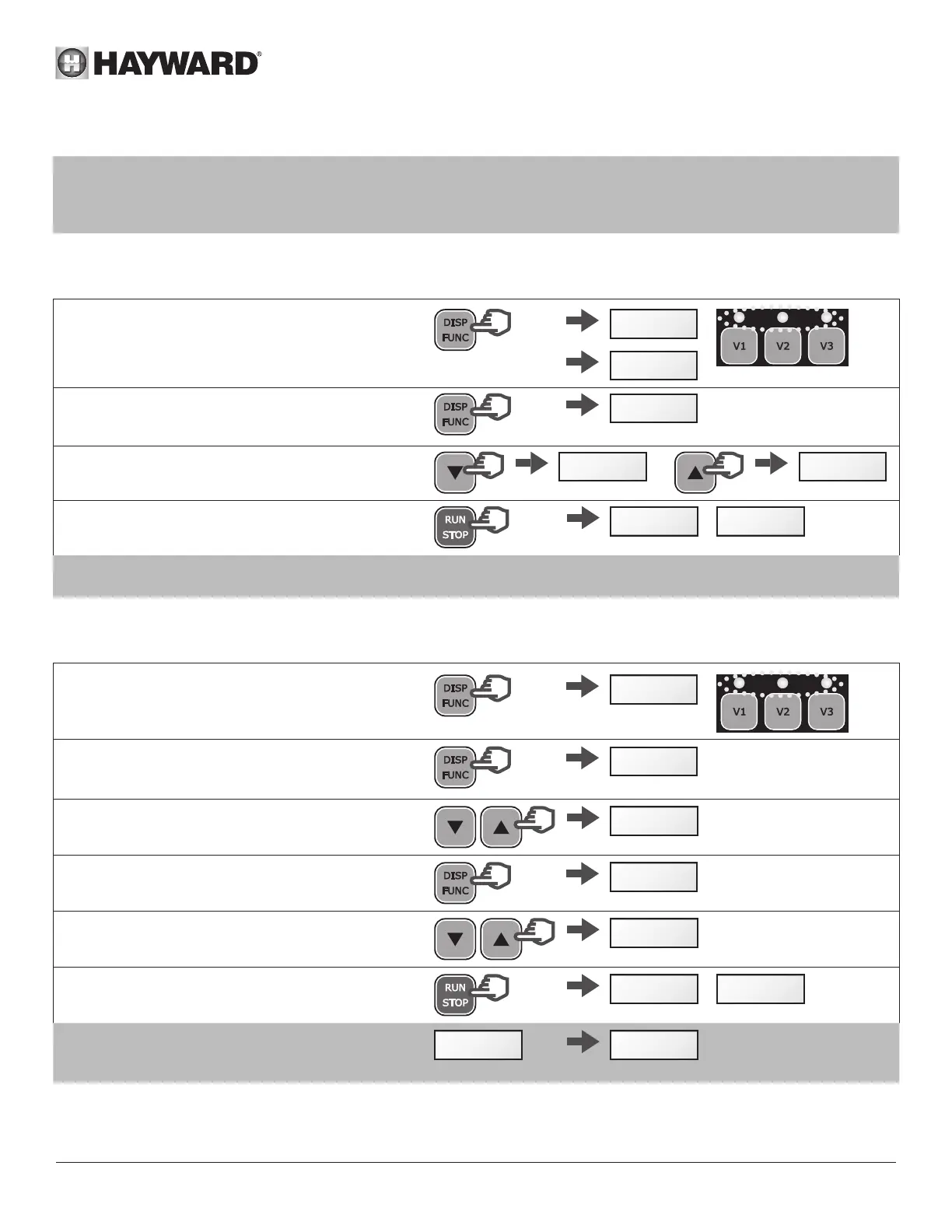
• Press and hold DISP/FUNC for 3 seconds
All three LEDs will blink
• The screen will display "ConF" and then "hr"
>3s
ConF
h r
• Press DISP/FUNC to show the time on the internal
clock (hh-min)
07-38
• Press the up / down buttons to adjust the hours /
minutes
15-38 15-10
• Press RUN/STOP to exit and save
The display will show the current speed or StoP
StoP
/
1640
Note: Adjusting the time on the internal clock is important in Timer mode.
It will remain saved if the pump is switched off.
4.2 Setting the priming phase
• Press and hold DISP/FUNC for 3 seconds
All 3 LEDs will blink and the screen will display
"ConF"
>3s
ConF
• Press DISP/FUNC repeatedly until 'Pr 240' is
displayed on screen - the default priming time
(seconds)
x n
Pr240
• Press the up / down buttons to set the desired
value (0 to 300 seconds)
Pr 80
• Press DISP/FUNC: the screen will display "o3000"
as default priming speed (rpm)
o3000
• Press the up / down buttons to display the desired
value (max. 3000 rpm)
o2660
• Press RUN/STOP to exit and save
The display will show the current speed or StoP
StoP
/
1640
Note: If the priming time is set to zero the screen
will display "ProFF": priming has been
deactivated
ProFFPr 0



 To Next Page