Operating
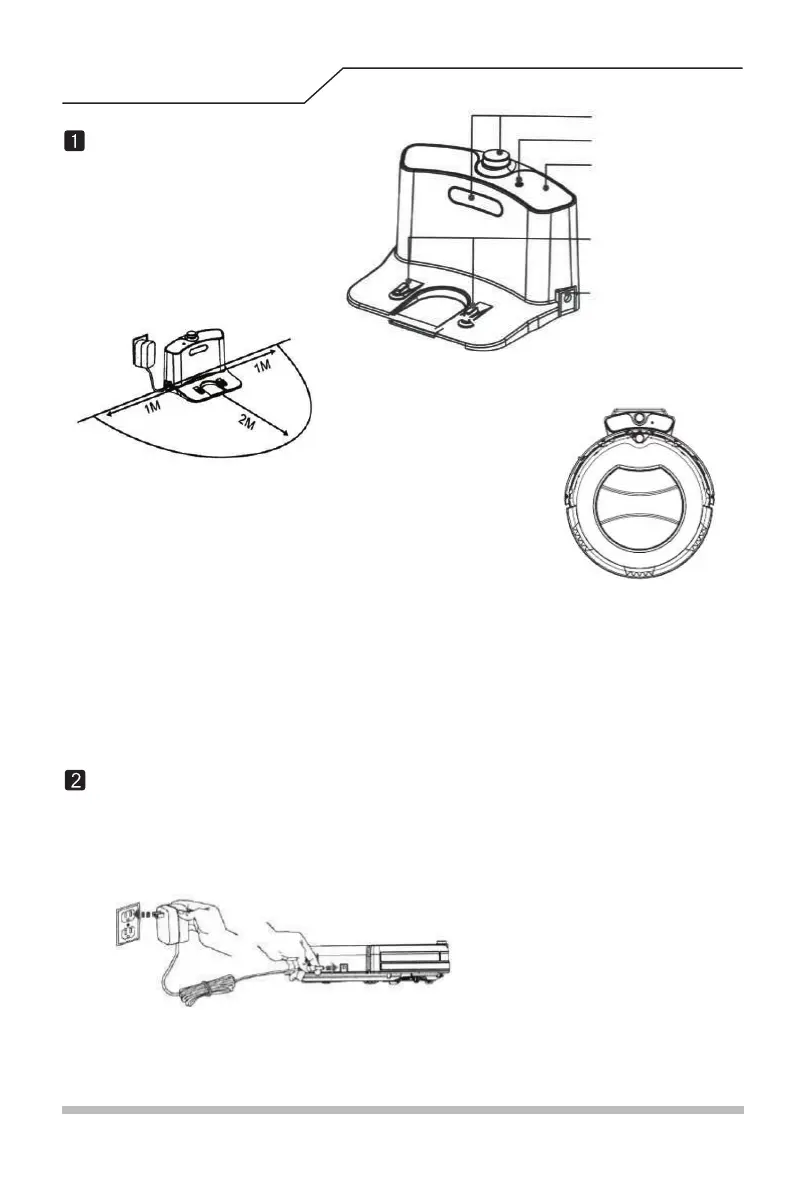
1. As shown above, the dock should be pushed against the with no obstacle
two meters in front of and one meter to the left and right of the dock.
2. Turn on the power switch on the bottom, then the screen will flash and enter selection mode.
A. Directly plug the adaptor on the robot and then connect to power, as shown in the left picture below;
Infrared signal
window
Signal indicator
Recharging
terminals
Power jack
Charging Dock
Set the charging dock
Other methods for recharging the robot:
(Leaving the device untouched for 20 seconds will result in the device entering sleeping mode.)
Caution: A. Make sure to turn on the power or it will not work.
B. Removing the plug will clear the selected modes.
Top cover
B. Under selection mode, press self-recharging button on the remote to control the robot for self-recharging.
12



 To Next Page