EasyManua.ls Logo

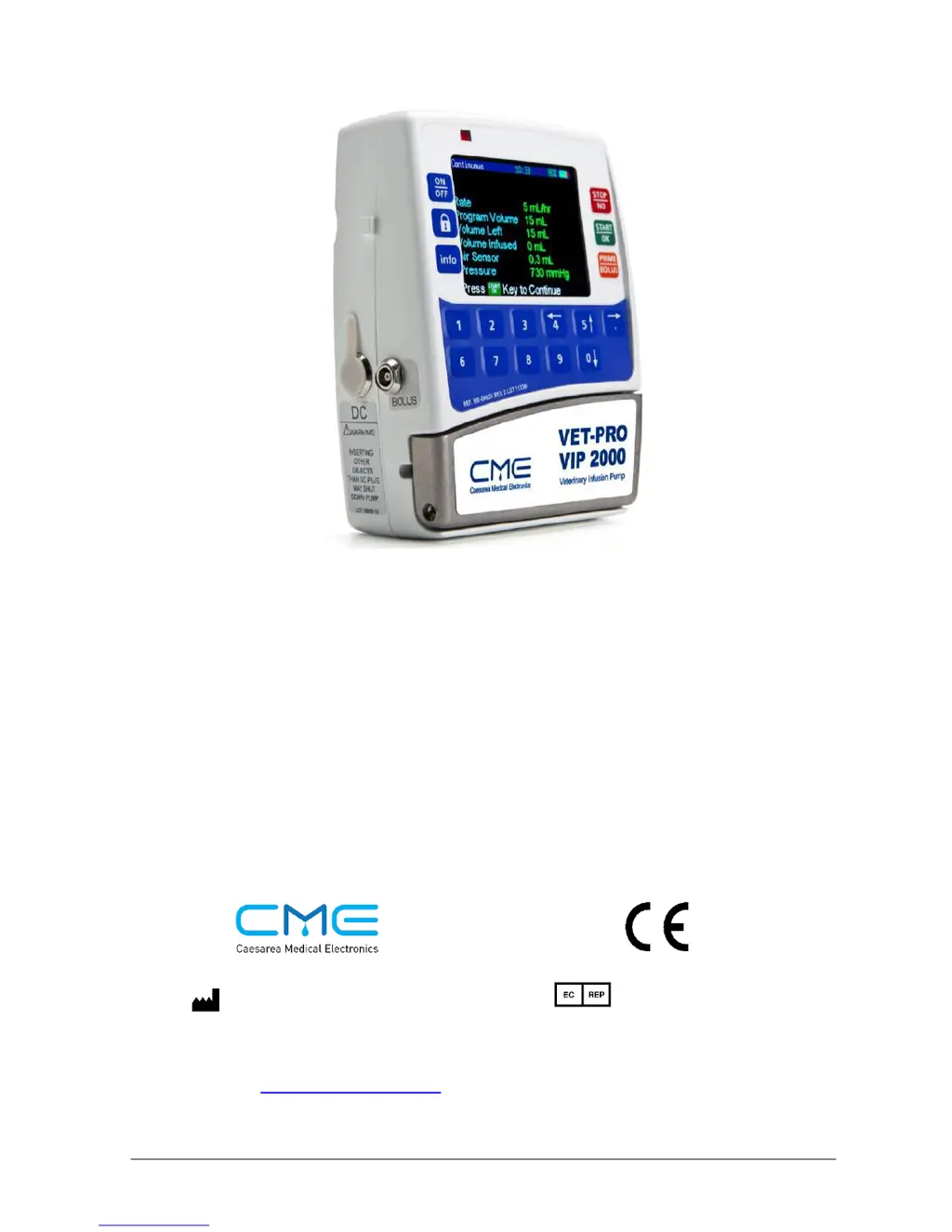
CME VET-PRO VIP 2000 - User Manual

CME VET-PRO VIP 2000
98 pages
Print Icon
To Next Page IconTo Next Page
Loading...
100-090XCVV Rev. 1.0
January 2015
VET-PRO VIP 2000
Color Vision
Veterinary Infusion Pump System
Operator Manual
MedNet GmbH.
Borkstrasse 10
48163 Muenster
Germany
T: +49 251 32266 0
Caesarea Medical Electronics Ltd.
16 Shacham street
Industrial Park Caesarea North
P.O.Box 4294 Caesarea 38900, Israel
E: sales@cme-infusion.com
W: www.cme-infusion.com
0344

Questions and Answers

  • J
    Jennifer RileyAug 17, 2025
    What to do if my CME VET-PRO VIP 2000 Medical Equipment shows a 'Down Occlusion' error?
    • W
      wendy35Aug 17, 2025
      If the CME Medical Equipment displays 'Down Occlusion', it could be due to a closed roller or clip downstream of the pump. Ensure the clamp/clip is open. Alternatively, the administration set may be kinked; straighten it out. A blocked cannula could also be the cause, requiring a cannula change. Finally, check if the IV line is loaded correctly; if not, reload it.
  • J
    Joseph LarsonAug 19, 2025
    Why is there air in the line of my CME VET-PRO VIP 2000?
    • J
      Jennifer HensleyAug 19, 2025
      If the CME Medical Equipment displays 'Air in Line', it could be because air is present in the administration set. Disconnect the line from the patient and remove the air as described in the priming section. It could also be that the roller or clip on the administration set is closed upstream of the pump; open the clamp/clip. Another possibility is that the line was not loaded correctly; try reloading the IV line.
  • B
    Brian BennettAug 22, 2025
    What to do if my CME VET-PRO VIP 2000 Medical Equipment displays a 'Fatal Error'?
    • S
      Shawn YoungAug 22, 2025
      If the CME Medical Equipment displays 'Fatal Error', restart the pump. If the alarm persists, pack the pump properly in its original packaging and send it for service.
  • S
    Stephen RiversAug 25, 2025
    What does 'Missing Key' mean on my CME VET-PRO VIP 2000 Medical Equipment?
    • A
      Amanda HarringtonAug 26, 2025
      If your CME Medical Equipment displays 'Missing Key', it might be because the administration set was loaded incorrectly, with the key not located in its correct place. Reload the set into the pump as per the instructions. Alternatively, the administration set may not have been loaded at all or loaded incorrectly. In this case, change the set and load it according to the instructions.
  • G
    glenn90Aug 28, 2025
    What to do if my CME VET-PRO VIP 2000 Medical Equipment shows 'Door Open'?
    • B
      Brian HuntAug 28, 2025
      If the CME Medical Equipment displays 'Door Open', ensure that the door of the pump is closed properly. If the door opened accidentally during operation, send the pump for service.
  • A
    Allen BakerAug 30, 2025
    What to do if my CME VET-PRO VIP 2000 Medical Equipment shows 'End Battery'?
    • S
      Steven StarkAug 30, 2025
      If the CME Medical Equipment displays 'End Battery', place the pump in the charger and connect it to the mains. Wait 2 minutes before operating.
  • M
    Michele WatsonSep 2, 2025
    What to do if my CME VET-PRO VIP 2000 shows 'Low Battery'?
    • M
      Mandy RushSep 2, 2025
      If the CME Medical Equipment displays 'Low Battery', place the pump in the charger and connect it to the mains.
  • W
    Wendy TaylorSep 5, 2025
    What does 'Pump Unattended' mean on my CME Medical Equipment?
    • S
      Sheri MooreSep 5, 2025
      If the CME Medical Equipment displays 'Pump Unattended', it means two minutes have passed without a button press during programming. Press any button to resume.
  • T
    Tasha CisnerosSep 7, 2025
    What does 'Program Lock Out' mean on my CME VET-PRO VIP 2000 Medical Equipment?
    • R
      Robert HillSep 7, 2025
      If the CME Medical Equipment displays 'Program Lock Out', no action is required as the Lock Out mode is turned on. If changing the program is necessary, unlock the pump and refer to the lock section for further instructions.
  • J
    Joseph MarshallSep 12, 2025
    What does 'Keypad Lock Mode' mean on my CME Medical Equipment?
    • C
      Crystal JonesSep 12, 2025
      If the CME Medical Equipment displays 'Keypad Lock Mode', no action is required as the Lock Out mode is turned on. If changing parameters is required, unlock the keys and refer to the lock section for further instructions.

Summary

Introduction to the VET-PRO VIP 2000

Overview of System Features

Details the key features of the VET-PRO VIP 2000 infusion system.

Keypad and Display Functions

Explains the buttons, keys, and display elements of the VET-PRO VIP 2000 infusion pump.

Pump Components and Charger Overview

Illustrates and describes the pump's components when the door is open and the charger.

System Safety Checks

Outlines the safety checks integrated into the VET-PRO VIP 2000 infusion system.

Pump Accuracy and Performance

Discusses pump accuracy, start-up curves, and trumpet curves for rate accuracy.

Symbols, Warnings, and Cautions

System Symbols and Labels

Defines and explains the various symbols used on the VET-PRO VIP 2000 system and manual.

Manual Terms and Intended Use

Clarifies terms used in the manual and specifies the intended use of the infusion pump.

Critical Safety Warnings

Lists essential warnings to prevent personal injury or death during pump operation.

Equipment Protection Cautions

Provides cautions to prevent damage to the infusion pump and its components.

Installation and Setup Procedures

Unpacking and Contents Verification

Instructions for unpacking the VET-PRO VIP 2000 pump and verifying all included items.

Pump Charging Instructions

Detailed steps for charging the pump's battery using the charger unit.

Operating the VET-PRO VIP 2000

Pre-Operation Tests and Alarms

Covers tests before patient attachment and describes alarm behavior.

Administration Set Loading and Priming

Provides instructions for loading the IV set and performing priming functions.

Programming Modes Overview

Details the five different programming options available on the infusion system.

Continuous Infusion Setup

Instructions for programming the continuous infusion mode, including rate and volume.

Intermittent Infusion Setup

Guide for setting up intermittent infusions with dose delivery at set intervals.

25 Steps Program Configuration

Explains how to program up to twenty-five sequential steps for drug delivery.

TPN Infusion Setup

Details the Total Parenteral Nutrition (TPN) mode with trapezoid program.

PCA Infusion Setup and Bolus Options

Covers Patient Controlled Analgesia (PCA) programming and bolus functionalities.

Using History and Event Logs

Describes how to access and interpret infusion history and event logs.

Setting Pressure Defaults and Lock Modes

Instructions for setting pressure defaults and managing pump lock modes.

Info Mode and Setup Adjustments

Explains how to use Info Mode and access various setup adjustments.

Changing Pump Setup Parameters

Guide to accessing and modifying adjustable parameters via Change Set up.

Alarm Conditions and Troubleshooting

Alarm Identification and Muting

Describes what occurs when an alarm is detected and how to mute it.

Troubleshooting Common Issues

Provides a table of common problems, possible causes, and required actions.

Technical Specifications

Pump Performance Specifications

Lists key performance metrics including pumping mechanism, rates, volume, accuracy, and alarms.

Environmental and Operating Conditions

Details the non-operating and operating temperature, humidity, and air pressure requirements.

Service and Maintenance

Cleaning and Storage Guidelines

Provides instructions for safely cleaning and storing the pump and charger.

Periodic Maintenance Procedures

Outlines recommended periodic maintenance tasks performed by certified technicians.

Battery Operation and Care

Details pump operation on battery power and provides battery care recommendations.

Limited Warranty Information

Warranty Terms and Conditions

Specifies the warranty period, coverage, exclusions, and purchaser responsibilities.

CME VET-PRO VIP 2000 Specifications

General IconGeneral
BrandCME
ModelVET-PRO VIP 2000
CategoryMedical Equipment
LanguageEnglish

Related product manuals