5
24
25
26
27
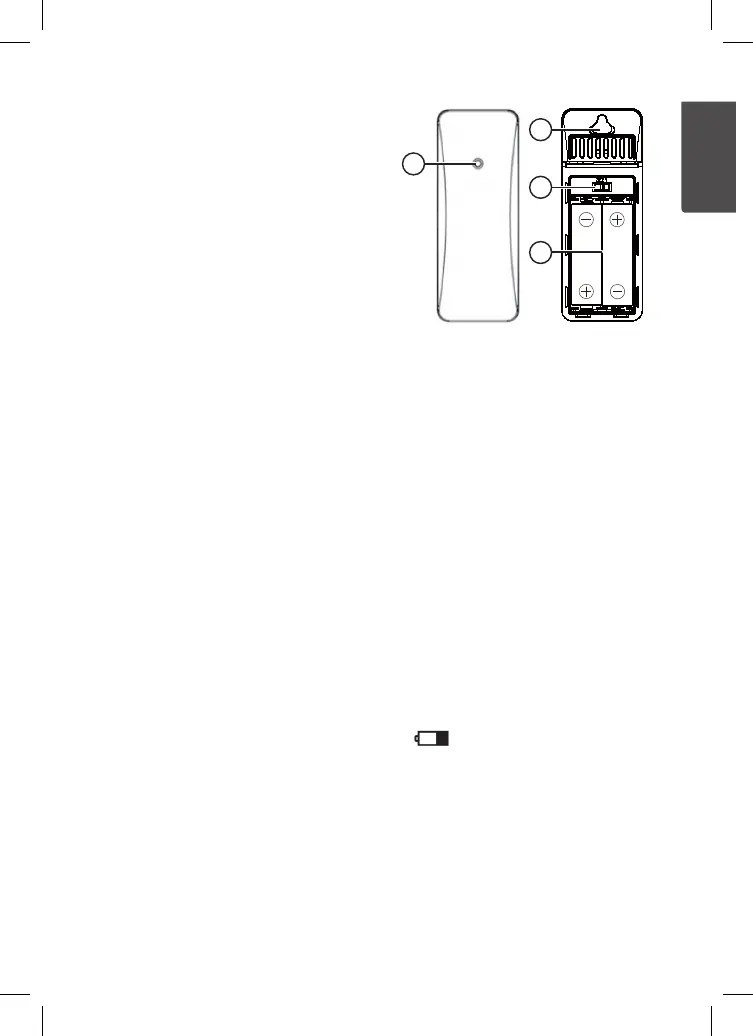
Sensorunit
24. LED indicator (flashes when data is
being sent to theweather station)
25. Wall mount eyelet
26. Channel selector
27. Battery holder
Installation
Batteries
Note: Usefresh, high quality alkaline batteries. Nevermix old and new batteries.
Change all batteries at thesametime. Nevercombine rechargeable batteries with
standard batteries.
Mainunit
1. Fold out thetable stand (23) and locate thebatterycover.
2. Slide thebattery cover in thedirection of thearrow.
3. Observe themarkings on thebottom of thebattery compartment and insert
2×AAA/LR03 batteries.
4. Slide thebattery cover back on until it clicks intoplace.
Sensorunit
1. Slide sensor’s battery cover in thedirection of thearrow.
2. Observe themarkings on thebottom of thebattery compartment and insert
2×AA/LR6 batteries.
3. Slide thebattery cover back on until it clicks intoplace.
Handytip: Thelow-battery indicator will show whenever thebatteries in either
theweather station or sensor start becoming low (14 and 16). Change batteries
in order to ensure thedevice’s continued uninterrupted performance.


 To Next Page