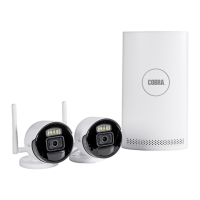
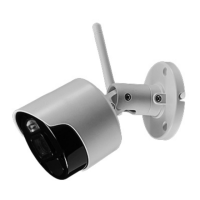
The COBRA 4K INDOOR/OUTDOOR NVR SECURITY CAMERA is a robust surveillance device designed for both indoor and outdoor use, providing high-resolution video capture for security monitoring. This camera is part of a larger Network Video Recorder (NVR) system, indicating its integration into a comprehensive security setup where it connects to an NVR for power, video transmission, and recording.
Function Description
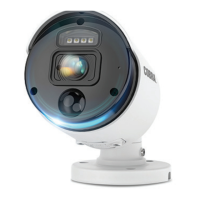
The primary function of the COBRA 4K Security Camera is to capture and transmit video footage for surveillance purposes. It is designed to operate within an NVR system, which manages the recording, storage, and viewing of the camera's feed. The camera is capable of capturing high-definition video, ensuring clear and detailed images. Its indoor/outdoor designation means it is built to withstand various environmental conditions, making it versatile for different installation locations. The camera's ability to provide night vision ensures continuous surveillance even in low-light or no-light conditions, automatically switching to an infrared mode to capture black and white footage. Power to the camera is supplied through the RJ45 cable from the NVR, simplifying installation by eliminating the need for a separate power source at the camera's location. This Power over Ethernet (PoE) functionality streamlines wiring and reduces clutter. The camera's design includes a lens for capturing images and a mounting base for secure attachment to a surface. It also features adjustable components that allow users to precisely orient the camera's view, ensuring optimal coverage of the desired area.
Usage Features
The COBRA 4K Security Camera is designed for straightforward integration into an existing NVR system. Before permanent installation, users are advised to connect the camera to the NVR and test its functionality to ensure proper operation. This pre-installation check helps confirm that the camera is working correctly and that its intended mounting location provides the desired viewing angle and coverage. When selecting a mounting location, several factors should be considered. The length of the provided RJ45 cable is a practical limitation, and the cable should be routed to avoid creating a tripping hazard. For optimal security and to prevent tampering, the camera should be mounted high enough to be out of reach of children. The camera's hood should be positioned above the lens to avoid mounting it upside down, which could affect image orientation. Additionally, strong direct light should be avoided from shining into the camera lens, as this can impair image quality.
The camera's mounting base serves as a template for marking drilling locations on the installation surface. Depending on the surface type, different mounting methods are employed. For solid surfaces, pilot holes are drilled slightly smaller than the screws, and the camera is then secured by driving screws through the mounting base into these pilot holes. For hollow surfaces, larger holes are drilled to accommodate anchors, which are then tapped flush with the surface before the camera is secured with screws. This ensures a stable and secure installation regardless of the wall or ceiling material.
Once mounted, the camera's view can be adjusted to achieve the desired coverage. This involves loosening specific screws—position screws, a vertical screw, and a horizontal screw—to rotate, tilt, and pan the camera. An Allen wrench (not included) is required for these adjustments. The position screws allow for rotation to ensure the recorded image is properly oriented. The vertical screw enables tilting the camera up or down, while the horizontal screw allows for panning left or right. After achieving the desired angle, all screws must be securely tightened to maintain the camera's position.
The RJ45 cable is crucial for connecting the camera to the NVR. This single cable handles both power delivery and video signal transmission, simplifying the wiring process. It is important to route the cable carefully to prevent tripping hazards and to ensure a secure connection. The camera operates continuously as long as the RJ45 cable is plugged into the NVR. When the camera is not in use, unplugging the RJ45 cable will power it down. The service cable, also present on the camera, is intended for factory service only and is not for normal user interaction.
Maintenance Features
Regular inspection and maintenance are essential to ensure the COBRA 4K Security Camera continues to operate safely and effectively. Periodically, users should inspect the general condition of the camera. This includes checking for any loose hardware, which could affect the camera's stability or alignment. The RJ45 cable and any associated electrical wiring should be examined for damage, such as fraying or cuts, which could pose an electric shock risk or interrupt functionality. Any cracked or broken parts on the camera body or mounting components should also be noted, as these could compromise the camera's integrity or performance. Any other condition that might affect the camera's safe operation should be addressed promptly.
To prevent serious injury from electric shock, it is crucial to unplug the RJ45 cable from the NVR before performing any inspection, maintenance, or cleaning tasks on the camera. This disconnects power to the camera, making it safe to handle.
External surfaces of the camera should be wiped periodically with a clean cloth to remove dust, dirt, and other debris that can accumulate, especially in outdoor environments. Keeping the lens clean is particularly important for maintaining good image quality. If the image quality appears poor, a dirty camera lens is a common culprit and can often be resolved with a simple cleaning.
Maintaining the area surrounding the camera is also important. Obstacles such as overgrown bushes or tree branches should be kept clear, as they can interfere with the camera's field of view and potentially block important surveillance areas. This ensures that the camera has an unobstructed line of sight and can capture clear footage.
If the camera is not working, troubleshooting steps include checking that the NVR is powered on and that the RJ45 cable is securely connected at both ends. If the image is undesirable or appears upside down/sideways, this indicates that the camera is out of adjustment or not mounted correctly. In such cases, the adjustment screws should be loosened, the camera repositioned as needed, and then the screws retightened to secure the new orientation. These maintenance practices help prolong the life of the camera and ensure its consistent performance as a reliable security tool.


 To Next Page
 General