
 Need help?
Do you have a question about the Cobra MicroTalk MT 615 and is the answer not in the manual?
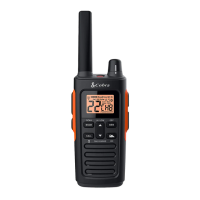
The microTALK MT 615 is a two-way radio designed for communication over distances up to 5 km (3 miles), making it suitable for various outdoor activities and professional uses. It operates on PMR 446 frequencies and incorporates several features to enhance communication and user experience.
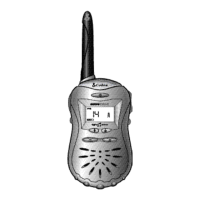
The primary function of the microTALK MT 615 is to enable two-way radio communication. Users can transmit and receive messages by pressing and holding the Talk button and speaking into the microphone. The radio is always in listening mode unless the Talk, Call, or Mode/Power buttons are pressed, ensuring that incoming transmissions are not missed.
The device includes a Mode/Power button for turning the radio on and off. A series of audible tones confirms when the radio is powered on, indicating it's ready for use.
For initiating a call, a dedicated Call button sends a two-second ringing tone to the other party, alerting them to an incoming communication. During this call tone, transmissions cannot be sent or received.
The radio features a Lock button to prevent accidental operation of the Channel Up, Channel Down, and Mode/Power buttons. Pressing and holding this button for two seconds activates or deactivates the lock, confirmed by a double beep and the display of a Lock icon.
An External Speaker/Microphone/Charge Jack allows for the connection of an optional external speaker/microphone, offering hands-free operation. This jack also serves as a charging port.
The microTALK MT 615 offers 8 channels for communication, with a note that channels 1 and 2 may be restricted in France due to licensing regulations. To ensure communication, both radios must be tuned to the same channel and privacy code.
Privacy Codes: The radio supports both CTCSS (Continuous Tone Coded Squelch System) and DCS (Digital Coded Squelch) privacy codes. There are 38 CTCSS privacy codes and 83 DCS privacy codes available, which help reduce interference from other users on the same channel. When a privacy code is used, both communicating radios must have the same channel and privacy code selected. The radio remembers the last selected privacy code for each channel.
Volume Control: Volume Up and Volume Down buttons allow users to adjust the listening volume. A dual beep indicates when the minimum (1) or maximum (8) volume level has been reached.
Display and Backlight: The radio features a backlit LCD display for improved visibility in low-light conditions. The Light/Max Range button illuminates the display for 10 seconds with a single press.
Auto Squelch/Maximum Range Extender: The Auto Squelch feature automatically mutes weak transmissions and unwanted noise, especially when signals are at the edge of the radio's range. Users can temporarily turn off Auto Squelch or activate the Maximum Range Extender to receive all signals and extend the radio's range. Pressing the Light/Max Range button for less than five seconds turns off Auto Squelch, while holding it for at least five seconds turns on the Maximum Range Extender, both confirmed by two beeps.
Channel Scan: The radio can automatically scan channels 1 to 8. During scanning, the radio ignores specific CTCSS or DCS privacy codes. When an incoming transmission is detected, the scan pauses on that channel for 10 seconds. Users can communicate on the detected channel or resume scanning.
Privacy Code Scan: The device also supports scanning for CTCSS and DCS privacy codes within a selected channel. Similar to channel scanning, it pauses on a code when a transmission is detected, allowing users to communicate or resume scanning.
Voice Activated Transmit (VOX): For hands-free operation, the VOX mode automatically transmits when the user speaks. The VOX sensitivity level can be adjusted from 1 to 5 (5 being most sensitive) to match the user's voice volume and minimize background noise triggers.
Call Tones: Users can choose from five different call tones to send a unique alert to the other party. The selected call tone sounds for one second when chosen.
"Roger Beep" Confirmation Tone: An audible tone, known as the "Roger Beep," is emitted when the Talk button is released. This signals to the other party that the transmission has ended and they can now speak. This feature can be turned on or off.
Battery Low Indicator: An icon on the display blinks when battery power is low, indicating that the batteries need to be replaced.
Battery/Power Saver: To conserve battery life, the radio automatically switches to Battery Save mode if there are no transmissions within 10 seconds. The "Power Saver" icon appears on the display, and this mode does not affect the radio's ability to receive incoming transmissions.
The manual provides general advice for caring for the radio to ensure years of trouble-free service. These suggestions include handling the radio gently, keeping it away from dust, avoiding water or damp places, and protecting it from extreme temperatures.
For battery insertion, the belt clip must be removed, followed by the battery cover. Batteries should be inserted according to polarity markings. The manual does not specify rechargeable batteries as included, but the External Speaker/Microphone/Charge Jack implies charging capability for compatible battery types.
The microTALK MT 615 is designed to be a robust and user-friendly communication device, offering a range of features to adapt to different communication needs and environments.
 General
| Channels | 22 |
|---|---|
| Power Output | 0.5W |
| Range | Up to 20 miles |
| NOAA Weather Channels | Yes |
| VOX | Yes |
| Call Alert | Yes |
| Battery Saver | Yes |
| Waterproof | No |
| Backlit Display | Yes |
| Keypad Lock | Yes |
| Scanning | Yes |
| Vibrate Alert | No |
| Auto Squelch | Yes |
| Low Battery Alert | Yes |
| Channel Scan | Yes |
| Belt Clip | Yes |
| Battery Type | AAA (3) |
| Privacy Codes | 38 CTCSS |
| Frequency Range | 462-467 MHz |



 To Next Page