EasyManua.ls Logo

Coby MP-705-1G - Now Playing Controls (Music Playback)

Coby MP-705-1G
58 pages
Print Icon
To Next Page IconTo Next Page
To Previous Page IconTo Previous Page
Loading...
Page 20 Coby Electronics Corporation
www.cobyusa.com Page 21
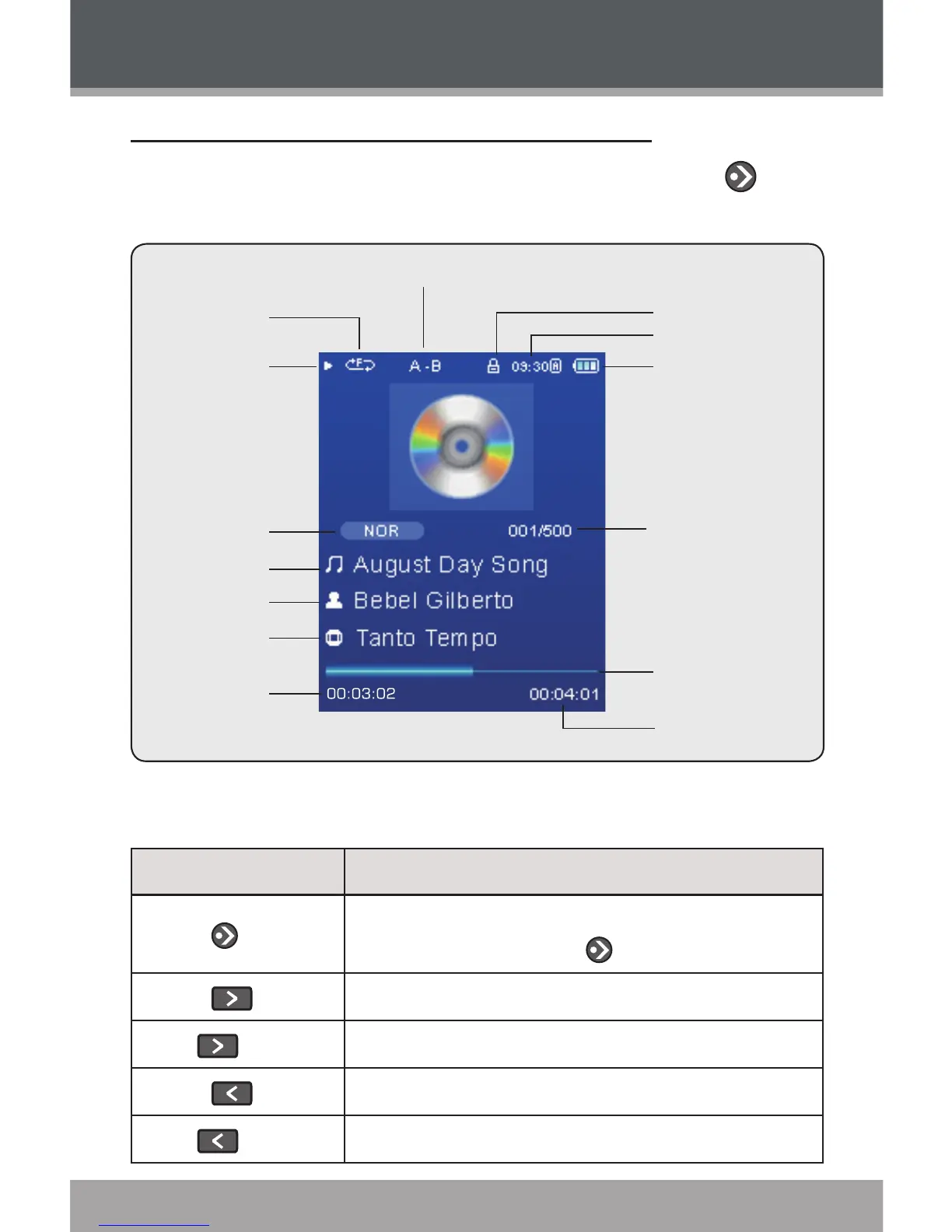
Now Playing Controls (Music Playback)
Select a track from the Music Explorer and touch to
start playback. The Now Playing screen will appear.
Play Status
Play Mode
A-B Repeat Indicator
Lock Icon
Time Clock
Battery Level
Equalizer
File Name
Artist
Album
Elapsed Time
Total Time
Progress Bar
Current Track /
Total Tracks
Use the following controls during music playback.
Key Function
Touch
Start/Resume track playback.
During playback, touch to pause playback.
Touch
Play the next track.
Hold
Fast-forward through the current track.
Touch
Play the previous track.
Hold
Reverse through the current track.
Music Mode

Related product manuals