www.cobyusa.com Page 31
Remote Key Function
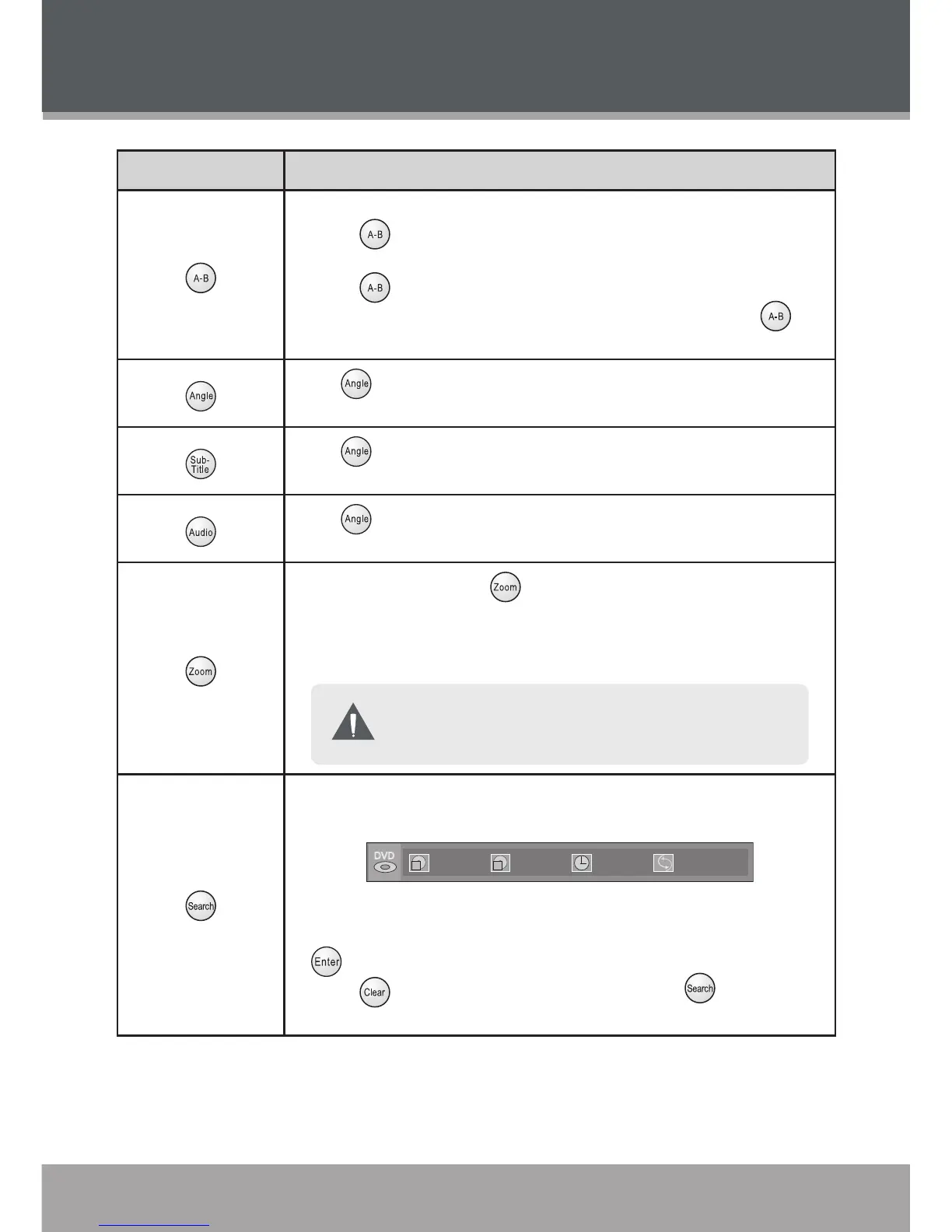
Repeat a specic section of a disc (play on a loop).
Press to set the desired start point (“A”) of the section to be
repeated.
Press again to set the desired end point (“B”).
The section “A-B” will now play repeatedly as a loop. Press
again to resume normal playback.
•
•
•
Press to view alternate camera angles of a DVD, if available. A
DVD has may be mastered with up to 9 selectable camera angles.
Press to view alternate subtitle tracks, if available. A DVD has
may be mastered with up to 9 selectable subtitles.
Press to hear alternate language/audio tracks, if available. A DVD
has may be mastered with up to 8 selectable language/audio tracks.
Each successive press of will change the magnication level of
the picture: 2x, 3x, 4x, 1/2x.
When the magnication level is 2x or higher, use the Navigation
Keypad to pan around the enlarged picture.
The picture quality will decrease as the zoom level (mag-
nication) increases.
•
Access the Search bar to skip directly to a time point or track/chapter
number.
Use the Navigation Keypad to move between input elds .
Use the Numeric Keypad to input data to the elds and then press
to execute the search.
Press to cancel any input mistakes, or press to exit the
Search bar.
•
•
•
PLAYER FUNCTIONS


 To Next Page