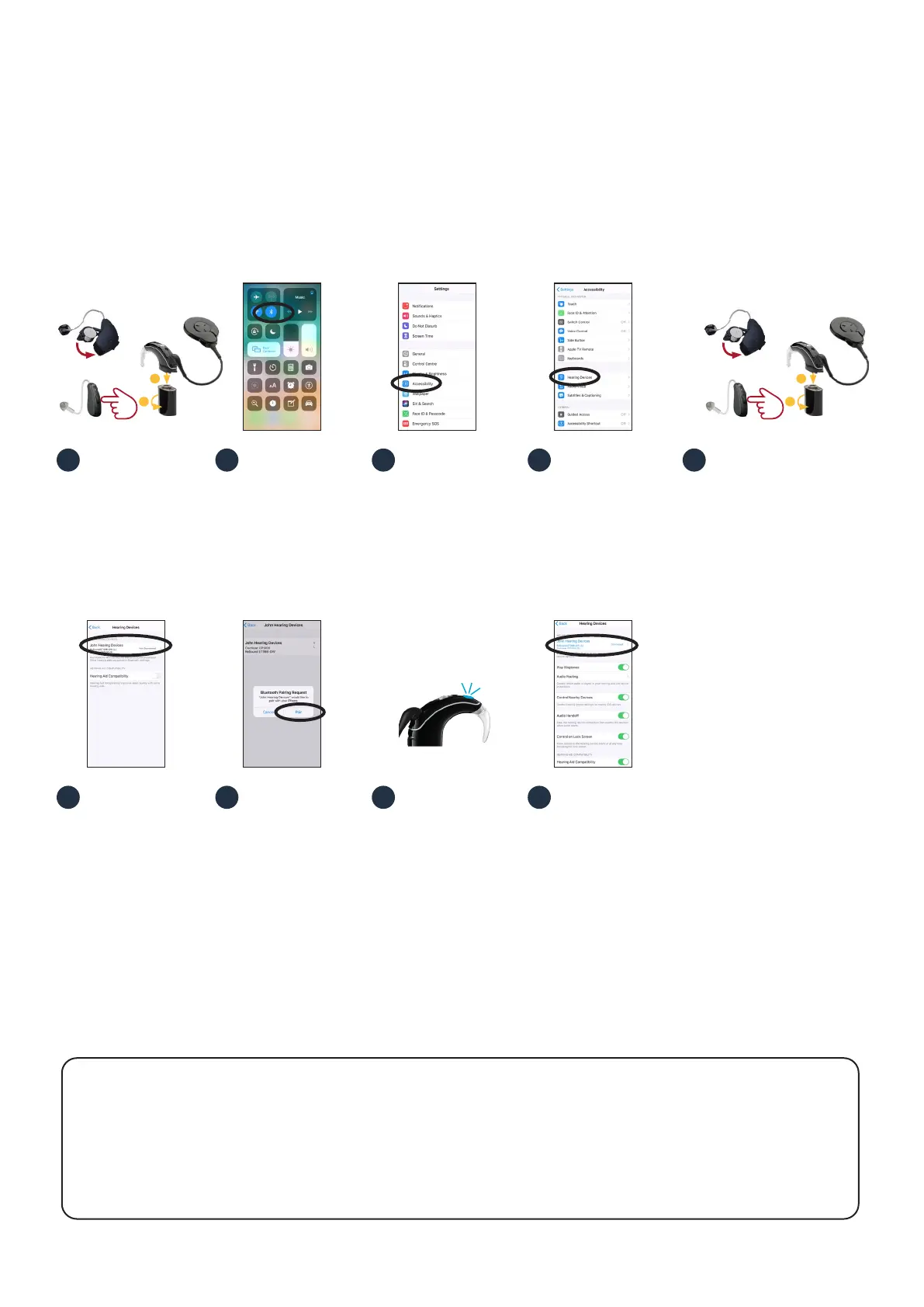
Turn o ReSound
hearing aid and
Nucleus 7 Sound
Processor.
To pair your sound
processor and hearing
aid with your
compatible Apple
device, ensure
Bluetooth
®
is enabled.
Then, open the
‘Settings’ menu.
Select ‘Accessibility’. Scroll down and select
‘Hearing Devices’.
Turn on your hearing
aid and then turn on
your sound processor.
Your Apple device will
then search for your
hearing devices and
display them in the
‘Devices’ section.
Select your name
when it displays on
the screen.
Select ‘Pair’ to confirm
pairing. You will see
this message twice.
When pairing starts:
• blue flash for
4 seconds
• 6 beeps.
Pairing may take up to
2 minutes.
When pairing is
finished:
• blue flash for
4 seconds
• ripple tone.
Note: Don’t start to
stream audio until
pairing is finished.
Your sound processor
and hearing aid will
both be listed under
‘your hearing device
name’ and you should
now be able to stream
sound directly to both.
2 3 4 5
6 7 8 9
1
* For compatibility information and devices visit cochlear.com/compatibility and resound.com/compatibility
Pairing to more than one iPhone, iPad or iPod touch
You can pair your sound processor and hearing aid with up to five compatible Apple devices, but you can only
control them from one Apple device at a time. To manually change connection between devices you have
previously paired to, turn o Bluetooth on the connected device, and turn on Bluetooth on the device you want
to connect to. Your hearing devices will then automatically connect to the second device.
Smart bimodal pairing with an Apple device
You can stream sound simultaneously to your Nucleus
®
7 Sound Processor and compatible ReSound hearing aid
from a compatible Apple device
*
.
Important: your clinician must link your hearing devices and assign your hearing aid to the correct ear before you can pair to
your Apple device.
Pairing your sound processor and hearing aid to your compatible Apple device
1
2
5
sec
Rechargeable
Non-rechargeable
1
2
5
sec
Rechargeable
Non-rechargeable





 To Next Page