* For compatibility information and devices visit cochlear.com/compatibility and resound.com/compatibility
Smart bimodal pairing with an Android
™
device
You can stream sound simultaneously to your Nucleus
®
7 Sound Processor and compatible ReSound hearing aid
from a compatible Android device
*
. Each hearing device should be individually paired for Android streaming.
Important: your clinician must link your hearing devices and assign your hearing aid to the correct ear before you
can pair to your Android device.
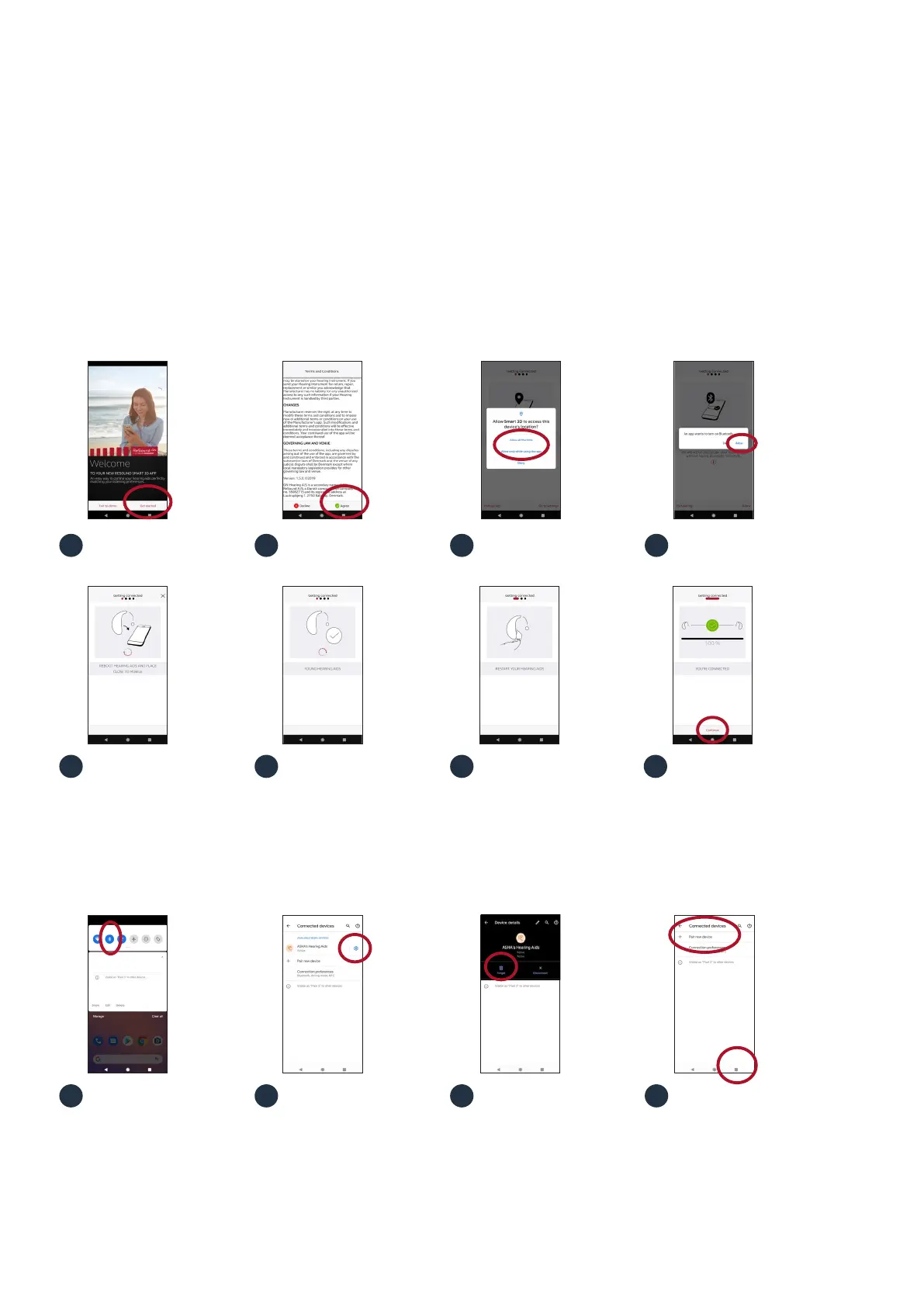
Open the app and select
‘Get Started’.
Review and agree to the
Terms and Conditions.
Enable location services. Enable Bluetooth.
Swipe down from the top on
the screen to open the
Settings menu, then hold the
Bluetooth icon for 2 seconds.
Hold the settings icon for
‘ASHA’s Hearing Aids’ for
2 seconds.
Select ‘Forget’.
Turn hearing aid ‘OFF’
and ‘ON’.
The app will identify your
hearing aid.
Restart your hearing aid
(if rechargeable press button
for 5 seconds).
Tap ‘Continue’.
Your hearing aid is now paired
and ready to stream.
2
2
7
3
3 4
8
41
1
65
ReSound hearing aid
To pair with a compatible Android device you will need the ReSound Smart 3D
™
app version 1.5.0 or higher and ReSound
firmware version 10042.4200 or later. You can find your firmware version in the Smart 3D app by selecting My ReSound, then
Hearing aid software updates.
New users of the ReSound Smart 3D app
Existing users of the ReSound Smart 3D app v. 1.5.0
If you are already using ReSound Smart 3D v. 1.5.0 with a paired Android device when your phone manufacturer enables
the enables the Audio Streaming for Hearing Aids (ASHA) functionality, follow these steps.
Open the ‘More’ menu
and select ‘Pair new hearing
aids’, then go to step 5 in the
instructions above for New
users of the ReSound Smart
3D app.





 To Next Page