EasyManua.ls Logo

Cocoon HE161512 - Using the Cocoon360 App

Default Icon
20 pages
Print Icon
To Next Page IconTo Next Page
To Previous Page IconTo Previous Page
Loading...
12
After Sales Support
1300 663 907
Model Number HE161512
09/2016
customercare@winplus.com.au
Operation
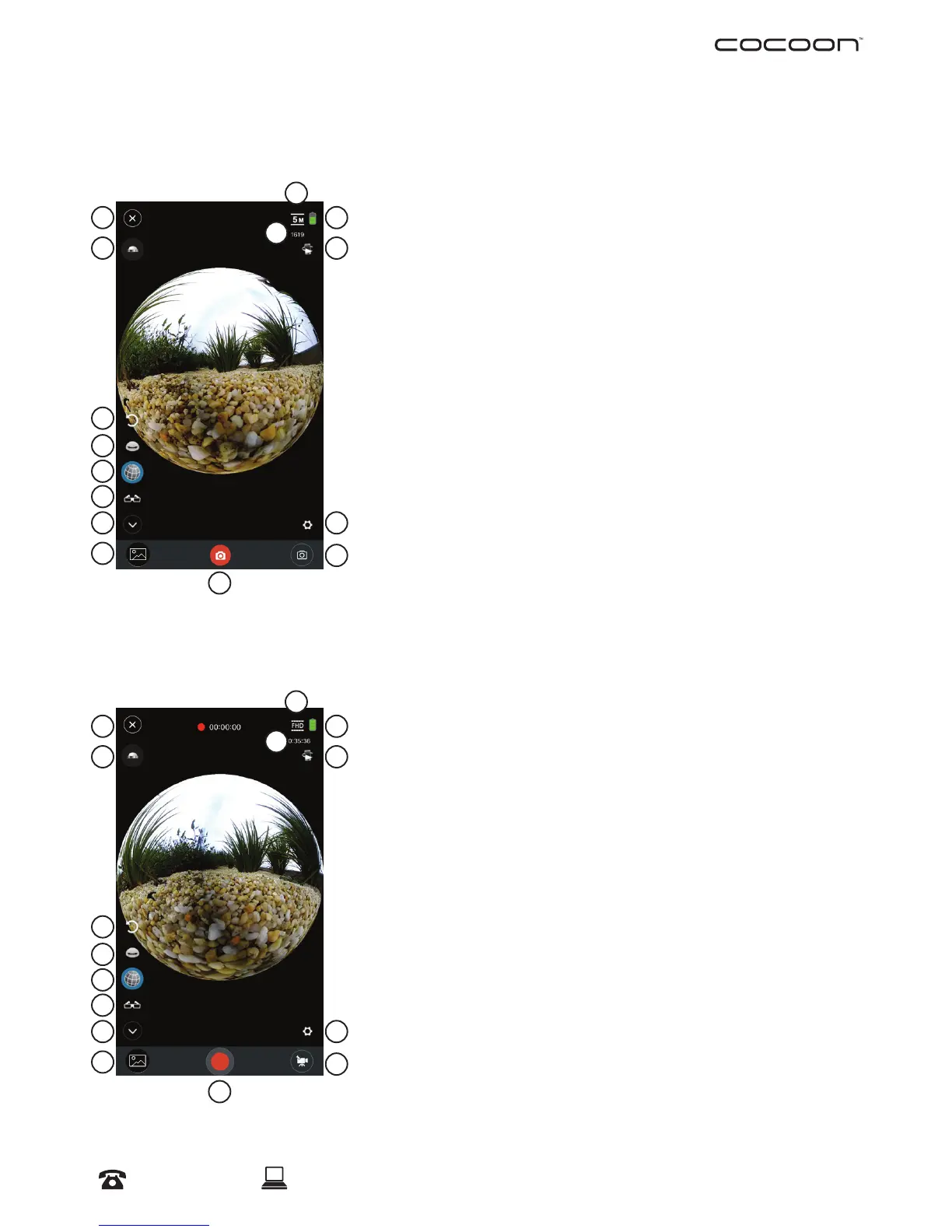
3.2 Cocoon360 APP Interface
Photo Mode Overview:
1. Disconnect Camera
2. Flip Camera 180
Degrees
3. Reset Camera Angle to
Default
4. 360 Degrees Mode
5. Spherical Mode
6. VR Mode
7. Minimise
8. Gallery
9. Shutter Button
10. 5 Mega Pixels
11. Battery Life
12. Photos Remaining
available for Storage on
Micro SD Card
13. Motion Panning
Function
14. Settings
15. Mode Switch
Video Mode Overview:
1. Disconnect Camera
2. Flip Camera 180
Degrees
3. Reset Camera Angle to
Default
4. 360 Degrees Mode
5. Spherical Mode
6. VR Mode
7. Minimise
8. Gallery
9. Record Button
10. Full High Denition
11. Battery Life
12. Remaining time available
to record for Storage on
Micro SD Card
13. Motion Panning
Function
14. Settings
15. Mode Switch
1
10
2
11
3
12
4
13
5
6
7 14
9
8
15
1
10
2
11
3
12
4
13
5
6
7 14
9
8
15

Other manuals for Cocoon HE161512