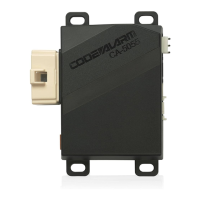
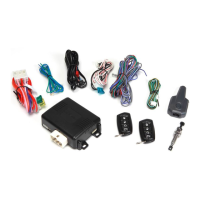
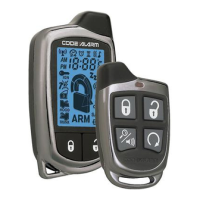
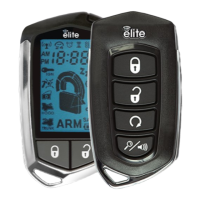
This document is an owner's guide for the Code Alarm Elite Series Model ca6555E, a Deluxe Vehicle Security and Remote Start System with a 2-Way Confirming LCD Remote Control.
Function Description:
The Code Alarm Elite Series ca6555E is a comprehensive vehicle security and remote start system designed to enhance vehicle safety and convenience. It offers a range of features including arming and disarming the security system, passive arming bypass, shock sensor bypass, hidden alarm function, two-stage door unlock, trunk release, and multiple auxiliary outputs for controlling various vehicle functions. The remote start feature allows users to start their vehicle remotely, preheating or precooling the interior, and includes specialized modes for manual transmission vehicles, a "Quick-Stop" feature, Turbo Timer mode, and scheduled start-up timers (2/3 Hour Start Up Timer and Daily Start Timer). The system also incorporates temperature-based starting and various remote start safety features. For security, it includes a Carjack Mode (Anti-Hijack Mode) and programmed transmitter notification to alert users of unauthorized transmitters.
Important Technical Specifications:
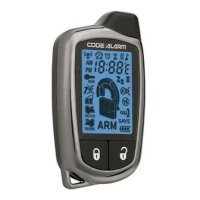
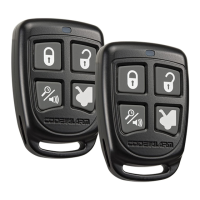
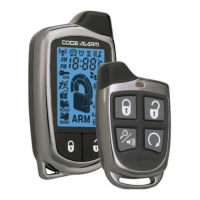
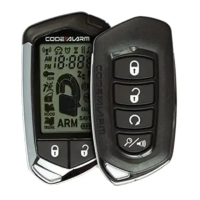
While specific technical specifications like frequency, power output, or battery type for the main unit are not detailed in this manual, it does provide information regarding the remote controls. The 4-button transmitter (Model CAT4ME) uses batteries that should last approximately 1 year. The 2-way LCD remote control (Model CATLCDE) uses an AAA battery, expected to last about 6 months. The system supports up to 4 transmitters in memory. The LCD remote control features various icons to display vehicle status, including lock/unlock, armed/disarmed, valet mode, transmitting, ignition on/trigger, trunk/hood/door/shock/tilt triggers, system trigger, time count down, battery indicator, battery save mode, vibrate/silent mode, melody mode, time display, alarm clock, timer/temp. start modes, AUX mode, and specific AUX outputs (AUX 1-5).
Usage Features:
- Arming and Disarming: Press the lock button to arm (parking lights flash 2 times, starter disable activated, LED blinks once per second). Press the unlock button to disarm (parking lights flash 1 time, doors unlock). Silent Choice allows for an audible response with a second press of the button.
- Passive Arming Bypass: If passive arming is enabled, press lock + car find/panic to temporarily bypass it.
- Shock Sensor Bypass: Press car find/panic, then within 5 seconds press lock + car find/panic to bypass the shock sensor for one arm cycle.
- Hidden Alarm Function: Press car find/panic, then within 3 seconds press lock to arm the system with the siren/horn silenced if triggered.
- Two-Stage Door Unlock (Optional): Press unlock once for the driver's door, press again within three seconds for remaining doors.
- Trunk Release (Optional): Press and hold the trunk button for 3 seconds.
- AUX 1 Output (Optional): Press lock and unlock simultaneously.
- Additional AUX Outputs (AUX 2-5): Enter AUX Mode by pressing and holding car find/panic and start for 2 seconds (4-button transmitter) or F for 2 seconds (LCD transmitter). Then press the corresponding button for 3 seconds (AUX 2: lock, AUX 3: unlock, AUX 4: car find/panic, AUX 5: start).
- Progressive Car Finder: Press car find/panic to flash parking lights and sound 5 chirps, increasing in volume with each press.
- Personal Protection Alarm (Panic): Press and hold car find/panic for 3 seconds. Press and hold again for 3 seconds to stop.
- Programmed Transmitter Notification: Status LED flashes the number of programmed transmitters when ignition is turned on.
- Valet Mode: Turn ignition ON, push and hold the programming/valet button (located on the antenna) until the LED turns solid to enter/exit. Disables security and remote start functions.
- User Selectable Notification Chirps: Turn ignition ON then OFF, press valet/programming button 3 times (1 chirp for ON, 2 chirps for OFF).
- User Selectable LED: Turn ignition ON, OFF, ON, OFF, press valet/programming button 3 times (1 chirp for ON, 2 chirps for OFF).
- Manual System Override: Open door (alarm sounds), turn ignition key to ON, press and release valet button within 10 seconds.
- Carjack Mode (Anti-Hijack Mode): While ignition is ON, press and hold unlock + car find/panic for 2 seconds. Siren chirps for 15 seconds, then full sound and flashing parking lights, then starter kill. Override by turning ignition OFF then ON and pressing valet button within 10 seconds.
- Remote Start Ready Mode (Manual Transmission): With engine running by key, transmission in neutral, parking brake set. Foot off brake, press start to activate remote start. Remove keys (vehicle stays running). Exit vehicle, close doors. Within 1 minute of step 1, press lock (vehicle shuts down, 2 short chirps, 1 long chirp confirms ready mode).
- Cancelling Remote Start Ready Mode: Open any door, hood, or trunk; press brake; release parking brake; turn ignition ON.
- Remote Starting Vehicle: Press start 2 times within 2 seconds. Parking lights flash 1 time. System attempts to start up to 4 times.
- Remote Start Shutdown: Press and hold start for 3 seconds.
- Entering Vehicle while Remote Started: Unlock doors, enter vehicle (DO NOT PRESS BRAKE), insert key and turn to ON or RUN, press brake pedal.
- Enter & Exit Vehicle (Manual Transmission, Ready Mode Active): With Ready Mode set, activate remote start. Open door, retrieve items. Exit, close doors. Press lock (unit waits 3 seconds, shuts down, 2 short/1 long tone confirms Ready Mode).
- "Quick-Stop" Feature (Automatic Transmission): Stop vehicle, place in PARK. Foot off brake, press start 2 times within 2 seconds. Remove keys, exit. Press lock to lock doors.
- "Quick-Stop" Feature (Manual Transmission): With engine running, foot off brake, parking brake set ON. Press start to activate remote start. Exit vehicle, close all doors. Press lock. Within 3 seconds press start.
- Preheating or Precooling: Set temperature controls before exiting.
- User Programmable Run Time / Run Time Extension: While remote start is active, press start 4 times to reset run time.
- Turbo Timer Mode (Optional): With vehicle running by key, foot off brake. Engage parking brake, press lock and start simultaneously. Turn ignition key OFF.
- 2 / 3 Hour Start Up Timer Mode: Turn ignition ON then OFF. Press and hold valet button. Press start 4 times. (3 Hour: 2 chirps, 4 parking light flashes; 2 Hour: 1 chirp, 2 parking light flashes). Exit by turning ignition ON or activating remote start.
- Daily Start Timer: From remote, press lock and unlock together. Turn ignition ON/OFF (disarmed). Within 10 seconds, press brake, press and release start twice.
- Temperature Start Mode: Vehicle must be armed. Press lock and unlock together.
- LCD Remote Control Functions:
- Check Vehicle Status: Press F 2 times, then press start within 3 seconds.
- Display Illumination: Press and hold F for 1 second.
- Melody / Vibration Mode: Press F, then press and hold start for 2 seconds.
- Button Beeps: Press F, then press and hold start for 2 seconds.
- Battery Save Mode: Press and hold F for 5 seconds.
- Clear Flashing Icons and Melody Sound: Press F 3 times within 3 seconds.
- Stopping LCD Trigger Melody: Press any button once (does not disarm system).
- Button Lock: Press F, then press hold unlock for 2 seconds.
- Illumination: Press F 2 times, then press and hold unlock for 2 seconds.
- 2 Car Mode: Press F, then press unlock and car find/panic together for 3 seconds.
- Parking Meter Countdown: Press F, then press and hold car find/panic for 2 seconds. Each additional press of car find/panic increases countdown time.
- Adjusting Clock and Timer Settings: Press and hold F for 3 seconds to access the Function Menu. Use F to scroll, car find/panic to increase, start to decrease. Press and hold F for 2 seconds to exit.
Maintenance Features:
- Replacing Remote Control Batteries:
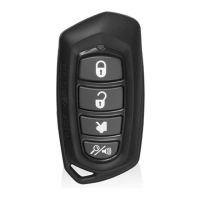
- 4-Button Transmitter (CAT4ME): Remove 1 screw, disassemble halves, replace old battery (observing +/- symbols), reassemble, reinstall screw, test.
- 2-Way LCD Remote Control (CATLCDE): Gently slide battery cover off, remove old AAA battery (observing +/- symbols), replace with new AAA battery, gently slide battery cover on, test.
- Programming Replacement Remote Controls:
- Turn ignition ON.
- Press and hold the valet/override button (on antenna).
- Within 10 seconds, system chirps 3 times.
- Press 1 button of each transmitter to program.
- System chirps 1 time for each accepted transmitter.
- Turn ignition OFF to exit.
- Notes: System exits programming after 15 seconds of inactivity. Supports up to 4 transmitters; programming a 5th erases the oldest. Pressing valet/override button during programming advances to feature bank programming.
- 2 Car Mode Programming (LCD remote only): Enter transmitter into 2 Car Mode, then follow the above programming steps. Requires an additional 2-way LCD system in a second vehicle.
- Warranty Information: Limited Lifetime Warranty for control modules, sirens, sensors, and relays. Transmitters are warranted for 12 months. Does not cover vehicle electrical system damage, batteries, broken LCD/OLED screens, or damage from alteration, improper installation, mishandling, misuse, abuse, neglect, accident, or defacement of serial number/bar code.

 Need help?
 General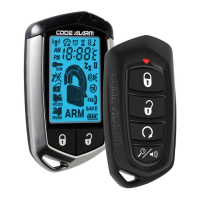


 To Next Page