D033150_01 Cerner Millenium Integration Guide
Cerner Custom Settings
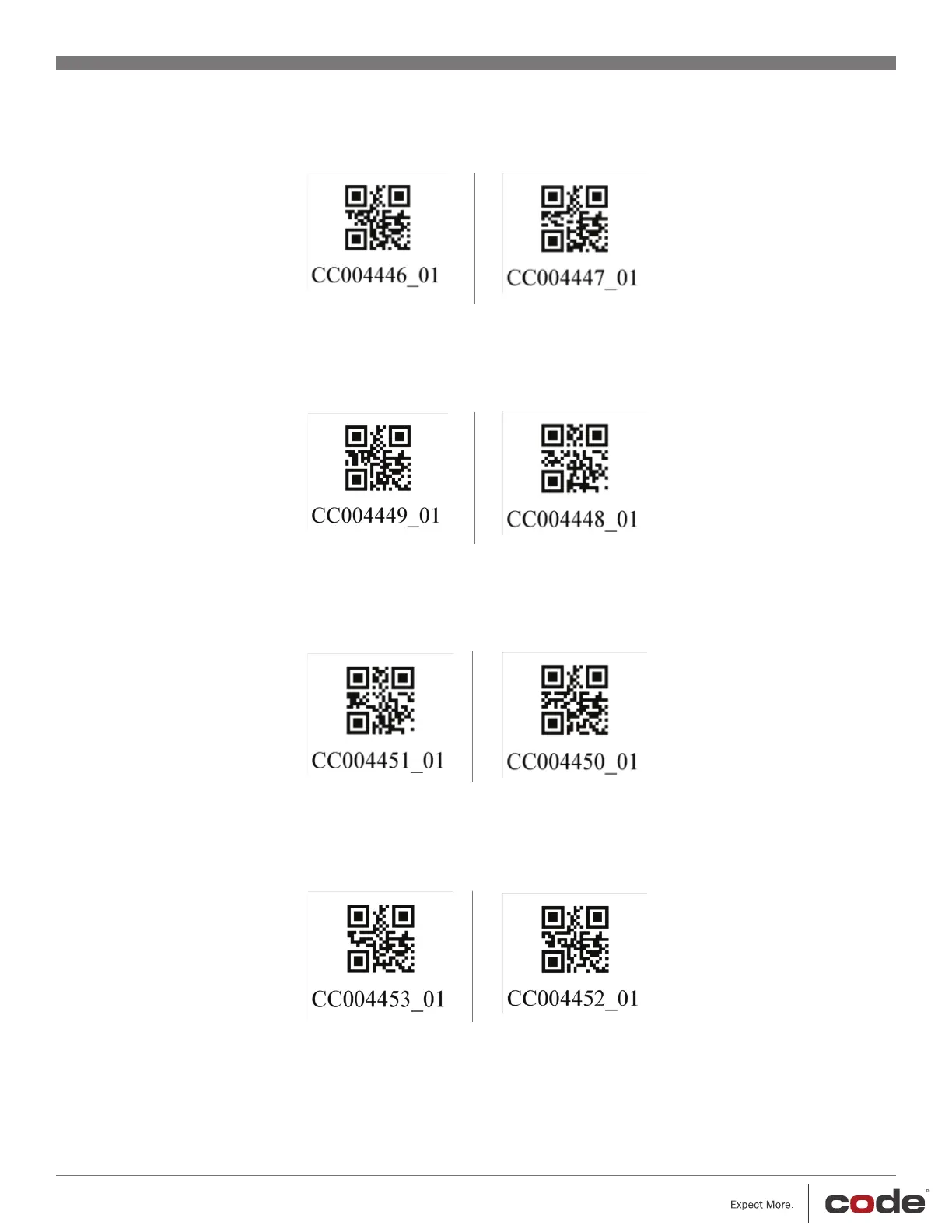
1. Scan the appropriate barcode to enable the desired software specific formatting:
CareAware/Cerner HS/Bridge
(ALT[ + Scanned Data + TAB)
(Default)
Farpoint/Pathnet/Blood Bank
(Scanned Data + Enter)
2. Scan the appropriate barcode to toggle lowercase Codabar:
Lowercase Codabar
Disabled
(Default)
Lowercase Codabar
Enabled
3. Scan the appropriate barcode to toggle ISBT128 Concatenation:
ISBT 128 Concatenation
Disabled
(Default)
ISBT 128 Concatenation
Enabled
4. Scan the appropriate barcode to toggle Pharmacy conversion of <GS> to “|”
Pharmacy Character
Conversion Disabled
(Default)
Pharmacy Character
Conversion Enabled


 To Previous Page