Pag.21
7 - RUN PROGRAMS
Tosend oneprogram in execution you have to exitthe programming stage andto push the relevant push-button (1-16).
In this stage you also have the following functions available :
a) scene changing by a given STAND time or by musical impulse (internal MIC or on LINE - see SETUP).
b) temporary black-out of the program (shutter closing of all projectors)
c) temporary STOP of the programs (projectors stopped with open shutter)
d) manual use of some projectors even if they are used in the program
Function a)
It is possible to set a general time coefficient called KTS (STAND time) or KTC (CROSS time) to adjust the program exe-
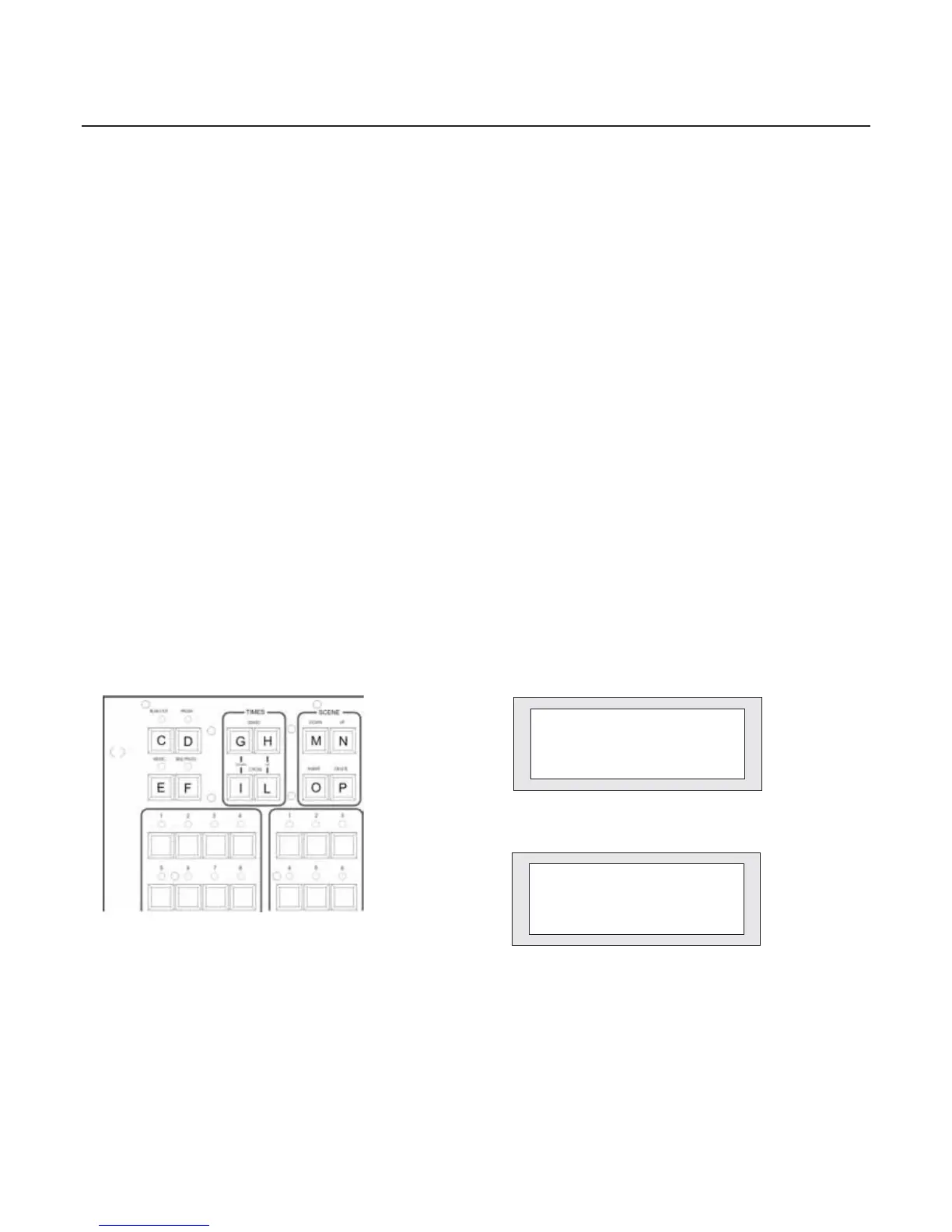
cution by means of the push-buttons inserted in the TIMES section (part. G-H-I-L fig.56). It is also possible to set the scene
change by musical impulse enabling the MUSIC push-button (part E fig. 56). The choice of the musical source must be setted
in the SETUP stage. Press the push-button again to go back to the “time” function.
Function b)
By pressing the BLACK-OUT push-button (part. C fig. 56) you will stop the scene in execution and the shutters will be clo-
sed. Press the button again to restart the program.
Function c)
By pressing the PAUSA push-button (part D Fig. 56) you will temporary stop the execution of the program but keeping the
shutters open.
Function d)
While the program is in execution you can select one or more projectors in order to obtain the complete manual control.
The projectors that are inserted in the program (whose LEDS are quickly flashing) will be released (the LEDS will than flash
moreslowly) and available to manual control. Bypressing the projector push-button again it willbe reinserted in the program.
Figure 56
Progr. 1 KTS:1.0
Program Running
Sc: 1/1 KTC:1.0
Figure 57
Progr. 1 KTS:1.0
Sc: 1/1 KTC:1.0
[087] 105 000 X:000
000 --- --- Y:124
Figure 58
In order to send in execution the programs following the setting given in the function SEQUENCER you have to press the
push-button SEQ.PROGR. (part. F fig.56) . The programs will be executed following the order given and to stop the execution
you simply have to push the same button again.


 To Next Page