Pag.7
3 - ACCENSIONE DELLA CONSOLE SWITCH TO POWER ON
Inserirenella relativa presa BNC la lampadaflessibile (l’accessorio è un optional, non è fondamentaleper il funzionamento
della console, e deve essere acquistato a parte). Accendere il Master Disco 96 tramite l’ interruttore presente sul pannello
frontale sopra il display a matrice. L’apparecchiatura provvederà ad effettuare un check funzionale e sul display sarà indicata
per qualche secondo la versione del software attualmente installato.
Plug the flexible lamp in the relevant BNC socket ( this lamp is an optional, not essential to the console working: it’s
not provided with the console). Switch the Master Disco 96 on by means of the switch on the front panel above the matrix
display. The unit will make a functional check and the actually installed software version will appear for some seconds on the
display.
Ceck...
Revision x.xx
Figure 7
COEF
Master Disco 96
[PROGRAM] SETUP SEQ.
Figure 8
Le indicazioni che il display mostrerà saranno:
[PROGRAM] = Programmazione di uno dei 16 programmi disponibili
SETUP = Settaggio dei parametri di funzionamento della console
SEQ. = Programmazione del SEQUENCER per l’esecuzione automatica dei programmi.
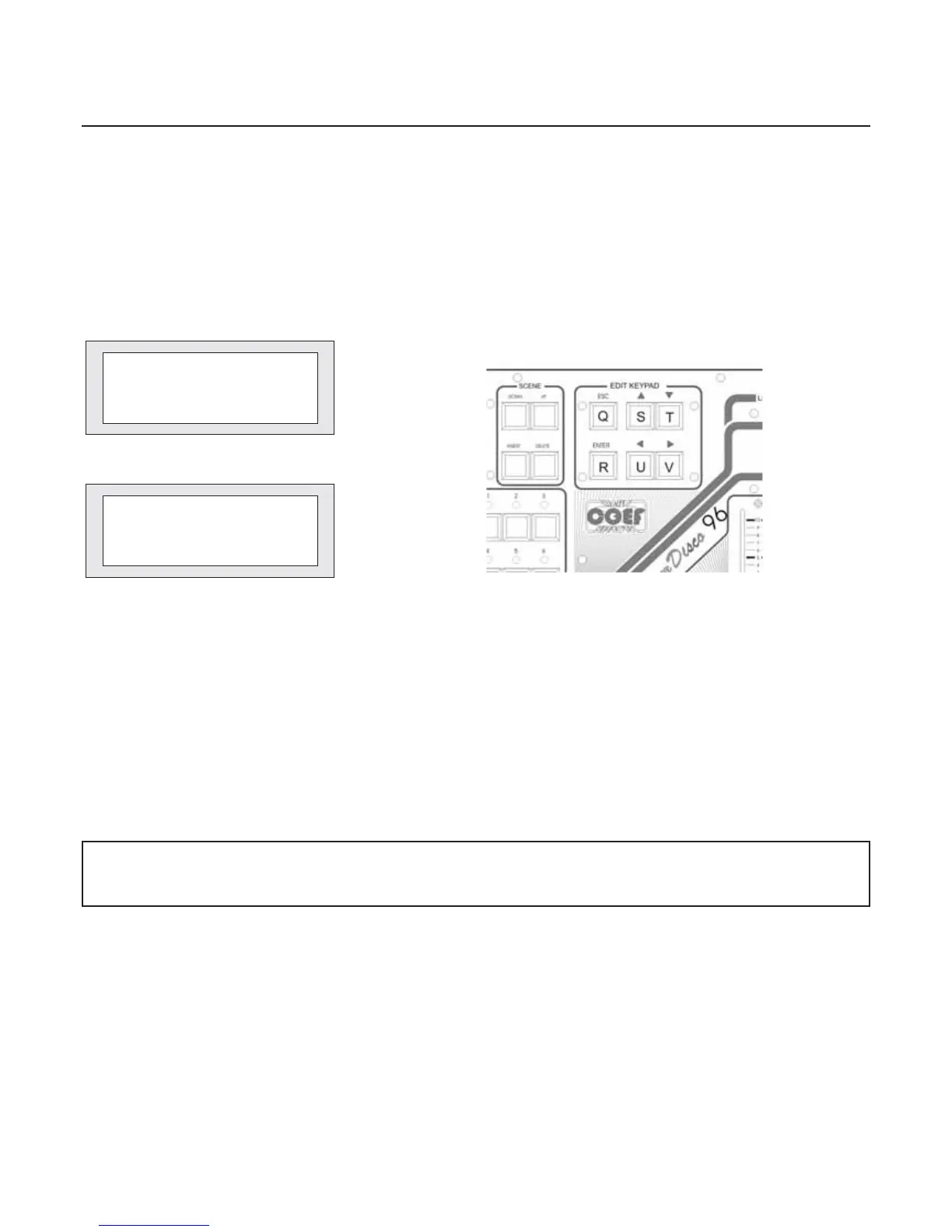
Tutte le impostazioni e le scelte si effettueranno attraverso i pulsanti della sezione EDIT KEYPAD (vedi fig.9).
Il tasto ENTER confermerà la scelta o la selezione, il tasto ESC annullerà ogni selezione e riporterà le indicazioni del Di-
splaynello stato precedente. La prima fase all’accensionedelMaster Disco 96 sarà quella del settaggiodeiproiettori collega-
ti alla console e della impostazione dei parametri di funzionamento; con il tasto freccia destra (part. V fig.9) porteremo la
selezione (le due parentesi quadre lampeggianti) sulla parola SETUP; premere ENTER (part.R fig.9) ed entriamo nella sezio-
ne di SETUP. Se al Master Disco 96 (dopo la prima accensione) è stata assegnata una PASSWORD di ingresso alle funzioni
di programmazione, inserire la PASSWORD alla richiesta.
Figure 9
The display will show the following indications:
[PROGRAM] = the programming of one of the 16 available programs
SETUP = setting of the operating parameters of the console
SEQ. = the SEQUENCER programming for the automatic execution of programs.
All the settings will be made by means of the EDIT KEYPAD section push-buttons (see fig.9). The ENTER push-button will
confirm the selection or the choice, the ESC push-button will cancel each selection and will restore the Display indications as
before. The first stage, after switching on the Master Disco 96, will be the setting of the projectors connected to the console
and the functioning parameters setting; by means of the right-arrow push-button (part. V, fig 9), you will select ( moving the two
flashing square brackets ) the word SETUP; press ENTER (part. R, fig.9) and enter the SETUPsection. If at the time of the first
switching you have assigned a PASSWORD to the Master Disco 96 to entry the programming functions, you must enter the
PASSWORD as requested.
LaPASSWORD impostatain fabbrica è: 1-2-3-4 dadigitareconi pulsanti della sezione PROGRAMS (fig.13pag.9)
Thedefault PASSWORD is: 1-2-3-4; youcan insert it using the PROGRAMSsectionpush-buttons (fig.13 pag.9)


 To Next Page