6
ENGLISH
Display symbols
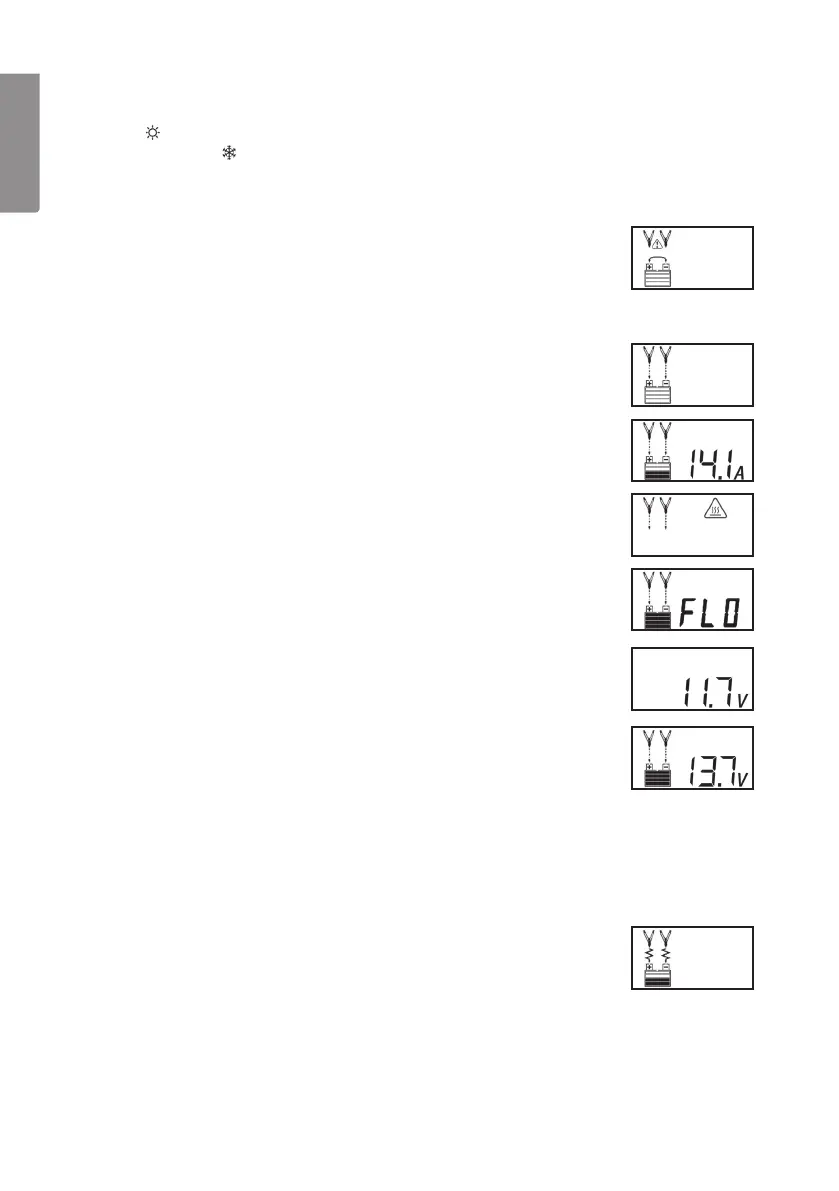
Note: will appear on thedisplay if theambient temperature
exceeds 40 °C. will appear if theambient temperature is
below 0 °C. This means that thedevice’s automatic temperature
compensation feature has been activated.
• If thecharger clamps are incorrectly connected in regards
to polarity thedisplay will show thefollowing symbol. The
plus and minus icon will flash and analarm will sound until
thecharger clamps are disconnected. Reconnect thecharger
clamps to thecorrect battery terminals.
• When thecharger clamps are correctly connected and
thecharger is connected to awall socket thedisplay will show
thefollowing symbol. Press [ Charge ] (6) to begin charging.
• The display will show theoutput current charging thebattery.
The battery level icon will change constantly during charging
and thearrows pointing to theplus and minus icons will flash.
• If thecharger is overheated thedisplay will show the
following icons:
• The display will show “FLO” to indicate that thecharger is in
float charge mode. The battery icon will display full charge and
thearrows pointing to theplus and minus icons will flash.
• Checking thebattery’s voltage. Press [ Battery Voltage ] (7).
The display will show:
• Checking thebattery’s voltage during charging.
Press [ Battery Voltage ] (7). The display will show:
• Reconditioning thebattery.
It is recommended that you periodically recondition your
battery for optimum use. This process takes about 24 hours.
To begin, press [ Battery Recond ] (8). You can interrupt
charging by pressing this button once again. Certain batteries
take more than 24 hours to recondition. If this is thecase
restart theentire process. Note: If after 5 tries your batteries
performance does not improve then it is time to change
thebattery. The display will show thefollowing during
reconditioning:


 To Next Page