4. Setting
1. Short press the SET bottom to enter settings menu.
2. Roll the Brightness Control Wheel to choose settings.
3. Press the setting bottom to adjust the corresponding setting(Short press
the setting bottom to adjust the wireless connection mode).
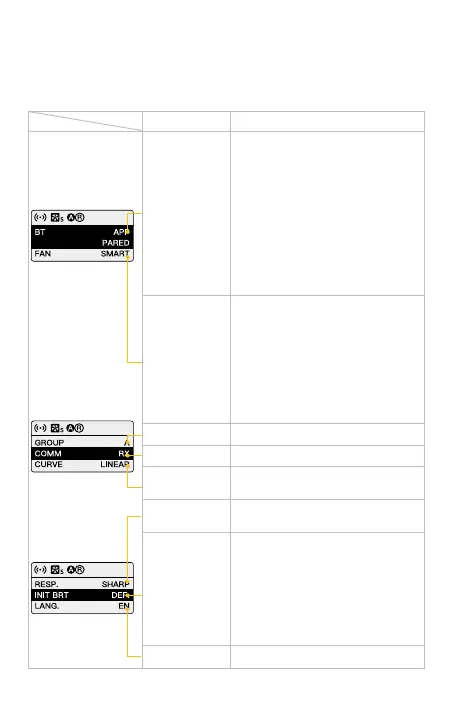
Fan Mode
Wireless
Connection
Communication
Settings Options
SMART/ QUIET/ PERFORMANEC
SMART: The product will detect
the current internal temperature to
adjust the fan speed by itself.
QUIET: The fan will run at up to 50%
output.
PERFORMANEC: Fan runs at
the highest speed to ensure heat
dissipation.
APP/Remote Control/Group
Short press the right knob to switch
the paring mode (One mode for each
time)
APP/Remote Mode:
Long press the SET button for
pairing.
Group Mode:
Rotate the right knob to choose the
group set(NULL/A~O *default NULL)
and communication (TX/RX/TXRX
*default :TXRX).
TX/ RX/ TXRX (TX by default)
Group NULL/ A~O (NULL by default)
Response
Initial brightness
setting
Language
SHARP/ SMOOTH (SMOOTH by
default)
Default Brightness: The brightness
set before power o.
Short press the SET button then
rotate the right knob to adjust the
brightness.
Short press the right knob to switch
the brightness between default, 0%,
25%, 50%, 75%, 100%
EN/ CN
Curve
LINEAR, L.CURVE, E.CURVE,
S.CURVE.



 To Next Page