EasyManua.ls Logo

COLDBUSTER FLOORHEATING CB - User Manual

COLDBUSTER FLOORHEATING CB
7 pages
Print Icon
To Next Page IconTo Next Page
Loading...
CB MANUAL
User Manual
Coldbuster Floor Heating
8/81 Frenchs Forest Road E
Frenchs Forest NSW 2086
Phone: +61 2 9982 5374 / Toll Free: 1800 85 75 65
Email: sales@coldbuster.com.au
Website: www.Coldbuster.com.au
Question and Answer IconNeed help?

Do you have a question about the COLDBUSTER FLOORHEATING CB and is the answer not in the manual?

Summary

Instruction and Technical Specifications

Instruction

Explains the CB Manual thermostat's function and benefits, including weekly programming and adaptive features.

Technical Specification

Details the thermostat's electrical specifications: supply voltage, load capacity, standby power loss, and cable diameter.

Function and Operation

On;Off Control

Describes how to turn the thermostat on or off using the designated button.

Temporary Override Temperature

Allows setting a temporary temperature override in auto mode without affecting the programmed schedule.

Mode Selection

Explains the available operating modes: Auto, Manual, and Anti-frozen.

Key Lock Functionality

Details how to lock and unlock the thermostat's controls to prevent accidental changes.

Weekly Program Parameter Setting

Schedule Configuration

Sets up the weekly heating schedule, supporting 5+1+1 or 7-day event parameters.

Event Temperature Settings

Defines temperature settings for specific events like 'Home' and 'Office'.

Thermostat Settings - Time and Unit

Time Setting

Allows setting and updating the thermostat's date and time.

Temperature Unit Selection

Configures the display to show temperature in Celsius (°C) or Fahrenheit (°F).

Sensor Type Configuration

Lists and allows selection of compatible floor sensor types.

Thermostat Settings - Sensor and Calibration

Sensor Selection Modes

Chooses how the thermostat uses sensors: Room, Floor, or Room.Limit.

Temperature Calibration

Adjusts the thermostat's temperature reading for improved precision.

Location Setup

Sets the thermostat's location (Home or Office) to adjust default parameters.

Adaptive Functionality

Enables adaptive heating start times to ensure required temperatures are met.

Thermostat Settings - Reset and Readout

Readout Function

Displays the percentage of time the heating system has been active over selected periods.

Factory Reset Procedure

Resets the thermostat to its original factory default settings.

Troubleshooting

Built-in Probe Failure (E1)

Indicates a fault with the thermostat's internal temperature probe.

External Probe Failure (E2)

Indicates a fault with the connection to the external floor sensor.

Overview

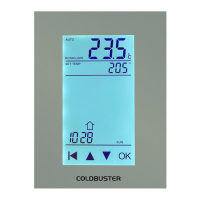
The Coldbuster CB Manual thermostat is designed to control a floor heating system, offering a blend of automated and manual control options to suit various user preferences and energy-saving goals. Its primary function is to regulate the floor heating based on a built-in weekly program, ensuring optimal comfort and energy efficiency.

Function Description

The thermostat operates on a weekly program, allowing users to set individual temperatures for up to four events or two events on different days of the week. This flexibility caters to diverse living habits, enabling personalized heating schedules. The default weekly program parameters are designed to satisfy most installations, but users have the option to update these parameters either directly on the thermostat or via an accompanying app if their habits differ.

A key energy-saving feature is the ability to lower the temperature when the home is unoccupied. This not only reduces energy costs but also maintains comfort by ensuring the heating system operates efficiently. The thermostat also incorporates an adaptive function, which automatically adjusts heating period start times. This intelligent feature learns over a few days when the heating needs to be switched on to ensure the desired temperature is reached at the scheduled time, further enhancing energy efficiency and user comfort.

The device offers three main operating modes:

  • Auto mode: In this mode, the thermostat automatically follows the predefined weekly program parameters, providing a hands-off approach to heating control.
  • Manual mode: This allows users to manually select a desired temperature, overriding the programmed schedule for continuous heating at a specific setting.
  • Anti-frozen mode: Designed for periods when the home is unoccupied, this mode maintains a lower set temperature, typically ranging from 5°C to 15°C, to prevent pipes from freezing while minimizing energy consumption.

The thermostat is equipped with both a floor sensor and built-in sensors to detect room temperature, offering three sensor application options:

  • Room: Controls room temperature based solely on the built-in sensors.
  • Floor: Controls the floor temperature based solely on the floor sensor.
  • Room.Limit: Controls room temperature using the built-in sensor while simultaneously monitoring the floor temperature to ensure it does not exceed an upper limit. This is particularly useful for sensitive flooring types like wood, where excessive floor temperatures could cause damage.

Usage Features

The user interface is designed for intuitive operation, primarily through a set of touch keys.

  • On/Off: A dedicated button allows users to easily turn the thermostat on or off.
  • Temporary Override Temperature: In auto mode, users can temporarily adjust the temperature using the up or down buttons. This temporary setting does not affect the scheduled 4-event program and can be confirmed with the OK button, after which the thermostat returns to the active display.
  • Mode Selection: To change modes, users activate the menu by pressing OK when the backlight is on. The MODE option flashes, and users can navigate through Auto, Manual, and Anti-frozen modes using the up or down buttons, confirming their selection with OK. If Manual or Anti-frozen mode is chosen, the temperature can then be set.
  • Key Lock: For security and to prevent accidental changes, the thermostat includes a key lock function. This can be activated through the menu, preventing unauthorized adjustments to the settings. To unlock, users press and hold two buttons simultaneously for three seconds.
  • Weekly Program Parameter Setting: In auto mode, the thermostat runs according to the weekly program, which includes "Schedule" and "Event" parameters.
    • Schedule: Users can choose between two schedule types: "5+1+1," where events are the same Monday to Friday, with separate parameters for Saturday and Sunday; or "7," where separate event parameters can be set for each day of the week. Schedule settings are accessed via the menu, allowing users to select and confirm their preferred schedule type.
    • Event: Events define specific heating periods and temperatures. For "Home" use, events include "wake up," "away at work," "come home," and "at night." For "Office" use, events include "at office" and "get off work." Users can set the temperature, start hour, and start minutes for each event within the chosen schedule. This is done by navigating through the menu, selecting the desired day and event, and then adjusting the parameters using the up or down buttons, confirming each step with OK.
  • Time Setting: The thermostat allows users to set the date and week. If connected to Wi-Fi, the date and week can be automatically updated from the internet.
  • Temperature Unit: Users can switch between Celsius (°C) and Fahrenheit (°F) for temperature display, accessible through the settings menu.
  • Sensor Type Selection: The thermostat supports different floor sensor types. If replacing an old thermostat, users can select the appropriate sensor type in the settings, eliminating the need to replace the existing floor sensor.
  • Location Setting: The thermostat is suitable for both homes and offices. Users can select the "Home" or "Office" location in the settings, which then applies the corresponding weekly program parameters.
  • Adaptive Function Activation: The adaptive function, which automatically adjusts heating start times, can be enabled or disabled in the settings menu.

Maintenance Features

The Coldbuster CB Manual thermostat includes several features that contribute to its ease of maintenance and troubleshooting:

  • Calibration: The thermostat has a built-in probe and floor sensor calibration function, allowing for higher precision in temperature readings. Users can calibrate the room or floor sensor through the settings menu, adjusting the real-time temperature to match a calibration instrument.
  • Readout: This feature allows users to view the percentage of time the heating has been active over specific periods (1 day, 30 days, or 365 days). This can be useful for monitoring energy consumption and system performance.
  • Factory Reset: If needed, the thermostat can be reset to its default factory settings. This option is available in the settings menu and can help resolve any configuration issues.
  • Troubleshooting Codes: The thermostat provides error codes for common issues:
    • E1: Indicates a built-in probe failure, prompting the user to contact a dealer or professional technician.
    • E2: Indicates an external probe failure, also requiring professional assistance.

These features collectively ensure that the Coldbuster CB Manual thermostat is not only a functional and energy-efficient heating control device but also user-friendly and easy to maintain.

COLDBUSTER FLOORHEATING CB Specifications

General IconGeneral
ApplicationFloor Heating
Maximum Load16A
TypeThermostat
Voltage230V
Temperature Range5°C - 40°C