6
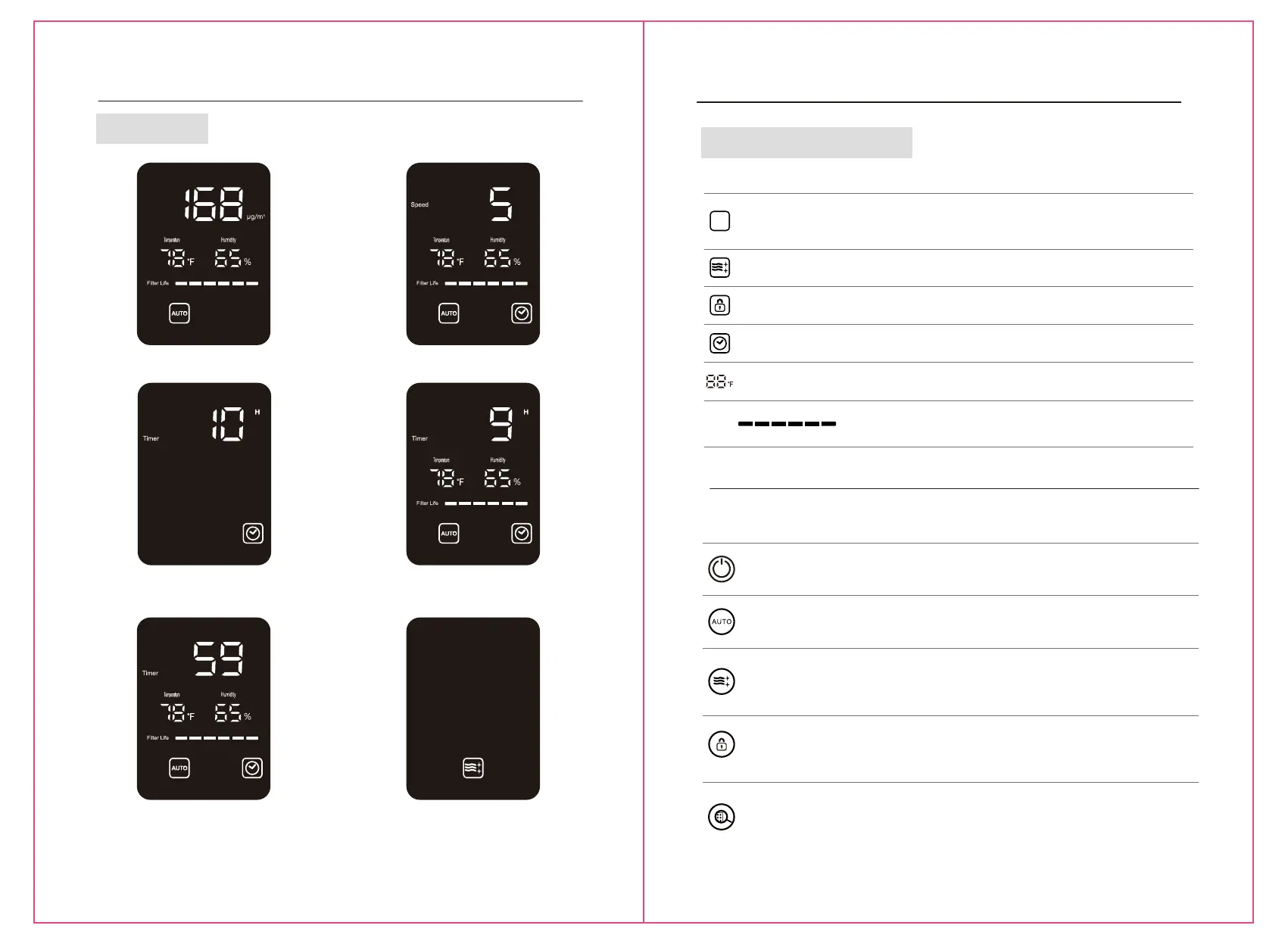
Display Status
Display Status
PM2.5 Value Status Wind Speed Status
Timed Start-up Status Timed Shutdown Status
Sleep StatusMinutes Shown When the
Remaining Time is Less
Than 1hour
7
Display Symbols and Meanings
Symbol Symbol Name
Auto mode
Sleep mode
Child lock
Timer
Meaning
Symbol lights on - childproof lock mode, and all buttons
unable to operate.
Symbol lights on - timer function is enabled. Symbol lights
off - timer function is off .
Display Symbols and Meanings
Symbol Meaning
When the machine is in standby state, touch the power switch button and the appliance
will turn on, and when it is in working state, touch such button and it will enter standby
state.
Name
Power
Child lock
Auto mode
Sleep mode
When the appliance is in working state, touch the auto mode button, and the working
mode will switch between auto and manual mode; when the appliance is in auto mode,
the wind speed will be automatically adjusted among Gear 1 “0-12”, Gear 2 “13-35”,
Gear 3 “36-55”, and Gear 4 “>55”.
Filter replacement
AUTO
If such symbol is lit on, it means auto mode is enabled, and
the wind speed will select corresponding gear automatically
according to the environmental pollution situation. If such
symbol is lit off, it means manual mode is enabled, and the
wind speed gear will be selected by user.
Symbol lights on - sleep mode, the screen all lights off, but
sleep symbol. And 10sec later, all lights off.
When the appliance is in working state, touch sleep mode button and the appliance will
enter sleep mode, and except the sleep mode icon and sleep indicator lamp, all indicator
lamps, icon signs, and numbers will be lit off. The fan will be running at Gear 1. 10sec
later, the sleep mode icon and sleep indicator lamp will be lit off. When the appliance
is in sleep mode, touch any function button to exit the sleep mode (except the button
of power switch.)
When the machine is in working state, long press child lock key (for more than 3sec)
and the machine will enter the child lock state, the child lock icon and child lock indicator
lamp will be lit on, and the functions of all operation keys will be invalid. When the
machine is in child lock state, long press child lock key (for more than 3sec) to remove
the child lock state, the child lock icon and child lock indicator lamp will be lit off, and
the functions of all operation keys will be recovered.
Usage period grid lefts one and flashes, please replace new filters and press and hold
the filter replacement button for more than 3s to reset the usage period of filter.
Usage period grids refilled.When the usage period off filter is more than 10%, it cannot
be reset.Forced to reset - If reset is required, press “Auto” and “Sleep” for more than 5
in standby state,there is “tinkle” sound, and LED flashes for six times, it is resettled.
PM2.5
Filter Life
Filter Life
Symbol will reduce one grid Every time the usage period of
filter is reduced for 500 hours, and when the remaining
usage period of filter is one, such symbol will flash to remind
user to replace with a new filter.
Operation of buttons
Temperature
When the temperature over 98℉, or under 1℉,it would staying
at 99℉ or 0℉.The unit indicate the temperature from 0℉ to 99
0℉ only.


 To Next Page
 Loading...