6
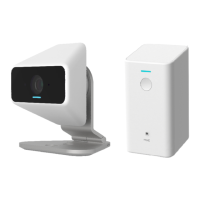
This Chapter provides information on how to install and configure the
xCam2 .
System Requirements
• To use the Wireless interface on the wireless model, other Wireless devices must be
compliant with the IEEE802.11abgnac specifications. All Wireless stations must use
compatible settings.
Mode: Infrastructure
SSID: ANY
Wireless Security: Disabled
Domain: USA
Channel No.: Auto
Installation
You must complete the following installation procedure when using the xCam2 for the first
time.
Step 1 - Adding an xCam2 to your network
Make sure the Router and the Touch Panel are both powered on and synchronized before
adding your xCam2 . This step is required when an xCam2 is used for the FIRST time. It only
needs to be done ONCE in order to configure the wireless settings for the xCam2 .
Note: Skip this section if the xCam2 has been set up already.
On the Touch Panel, click on setting icon on the home page.
2.
Enter the ΗMasterΗ code.
3. Enter the "Technical code/ID", then click the "Done" button.
4. Select "Home Devices". Then choose "Cameras-> Add a Camera".
5. Click the "Next" button to check network.



 To Next Page