H264 Digital Video Recorder art. 49807
5
LIVE MONITORING
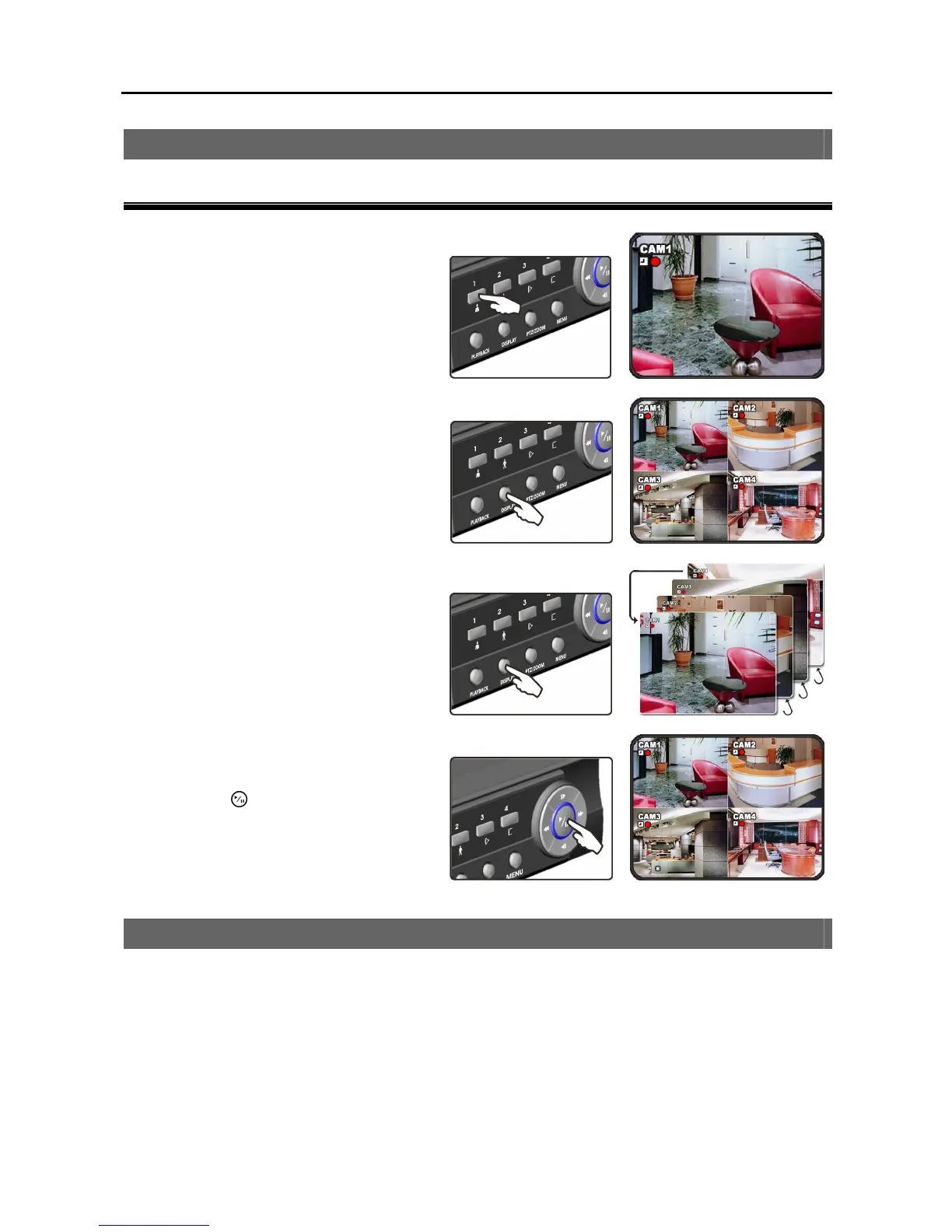
To Change Screen Mode
Full-screen
Pressing a camera button in quad screen
mode displays that camera in full screen.
Quad screen
Pressing the DISPLAY button in full screen
mode displays four cameras at once.
Sequence screen
Pressing the DISPLAY button in quad
screen mode displays four cameras in
sequence. Pressing the DISPLAY button
again in sequence screen mode returns to
the quad screen mode.
Freeze screen
Pressing the (Play/Pause) button freezes
the current screen. Pressing the button
again releases the freeze screen mode.
RECORDING
When you turn the DVR on, it starts recording according to the default recording schedule. You can configure
recording schedule. When the DVR is in the time-lapse recording mode, it records video during the scheduled
time. When the DVR is in the event recording mode, it records video when an event occurs within the
scheduled time. Refer to Chapter 3 – Configuration Main Menu, RECORD for details.



 To Next Page