21
4. ▲▼◄►: Direction key 11. ESC: Exit key
5. POWER led 12. MENU: main menu key
6. IR receiver 13. N.C.
7. REC: Manual recording key
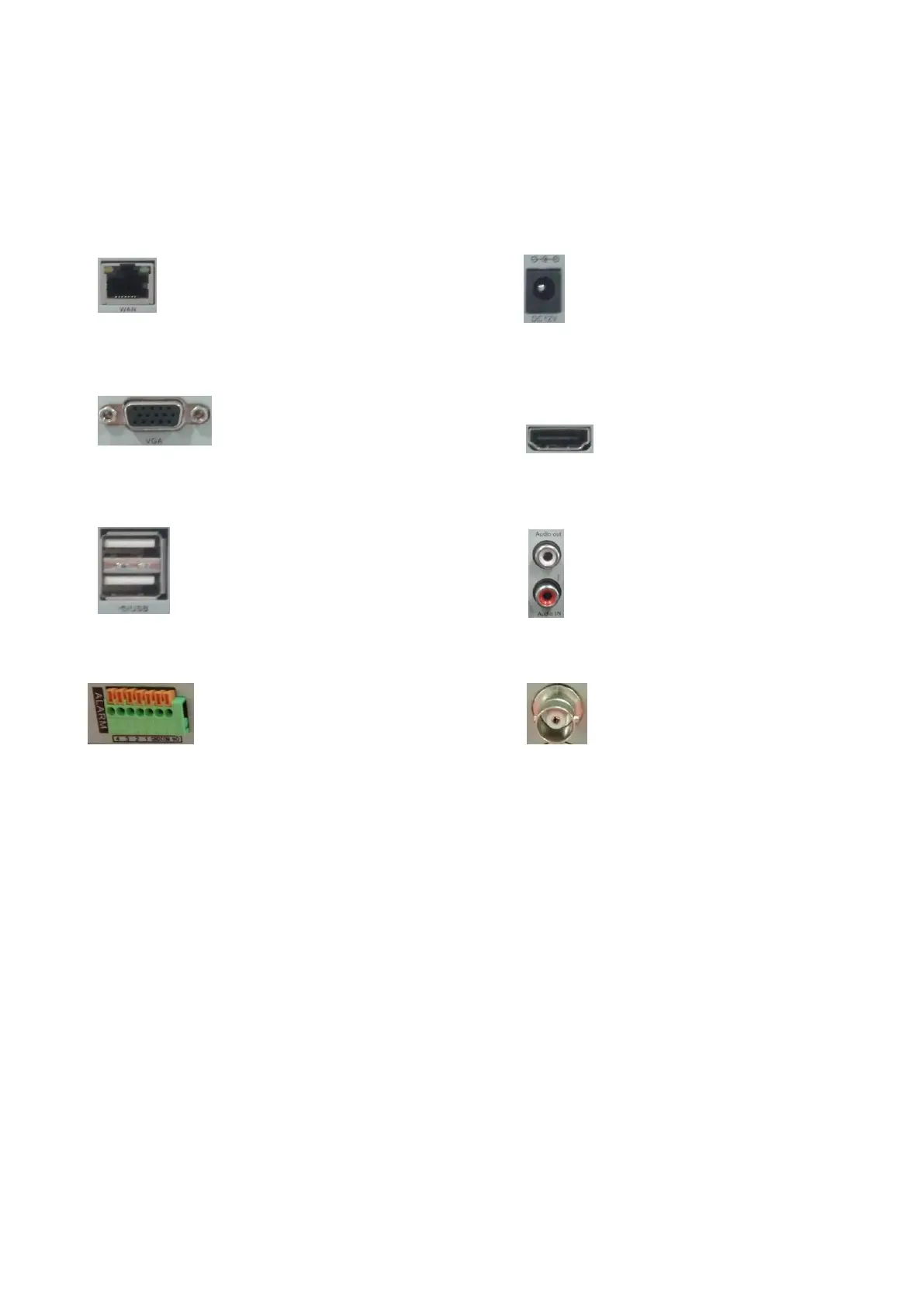
DVR rear panel
LAN: 10/100 Mbit/sec. standard Ethernet port DC12V: 12 VDC power supply connector
VGA: VGA video output connector HDMI video output
USB: USB connectors Audio IN/Audio OUT: audio input/output connectors
ALARM: alarm input/output VIDEO IN: video inputs
Turn ON / OFF
Confirm that AC voltage accessible matches with DVR. Ensure that the DVR power outlet connect with a good
middle ground grounding. After switching power, the device started, 【POWER】 light is on. Turn into system,
if the panel status light flashing, it's normal conditions.
After device start, preview interface can be seen immediately. In the preview interface you can see the system
date, time, channel name.
Note: Default password is empty, click "OK" can into menu directly.
Main Menu Introduction
Press MENU key or right mouse, it will pop-up the main menu. Main menu consists of the following
components:



 To Next Page