23
General setup
Choose the "General setup" and turn into it's setup interface.
Auto Logout: DVR will log off if there is no operation within 10 minutes, it needs login again.
Key Buzzer: Enable: there is sound with the controller or pressing key on front panel; Disable: without sound.
Language:There is multiple choice according to users
Standard:PAL and NTSC are available.
Choose the "Time setup" and turn into it's setup interface.
Date Format: YYYY/MM/DD, DD/MM/YYYY, MM/DD/YYYY
System date
System Time
After setting finished, click "Ok", the information will be saved. Click "Cancel" to exit without saving.
Record setup
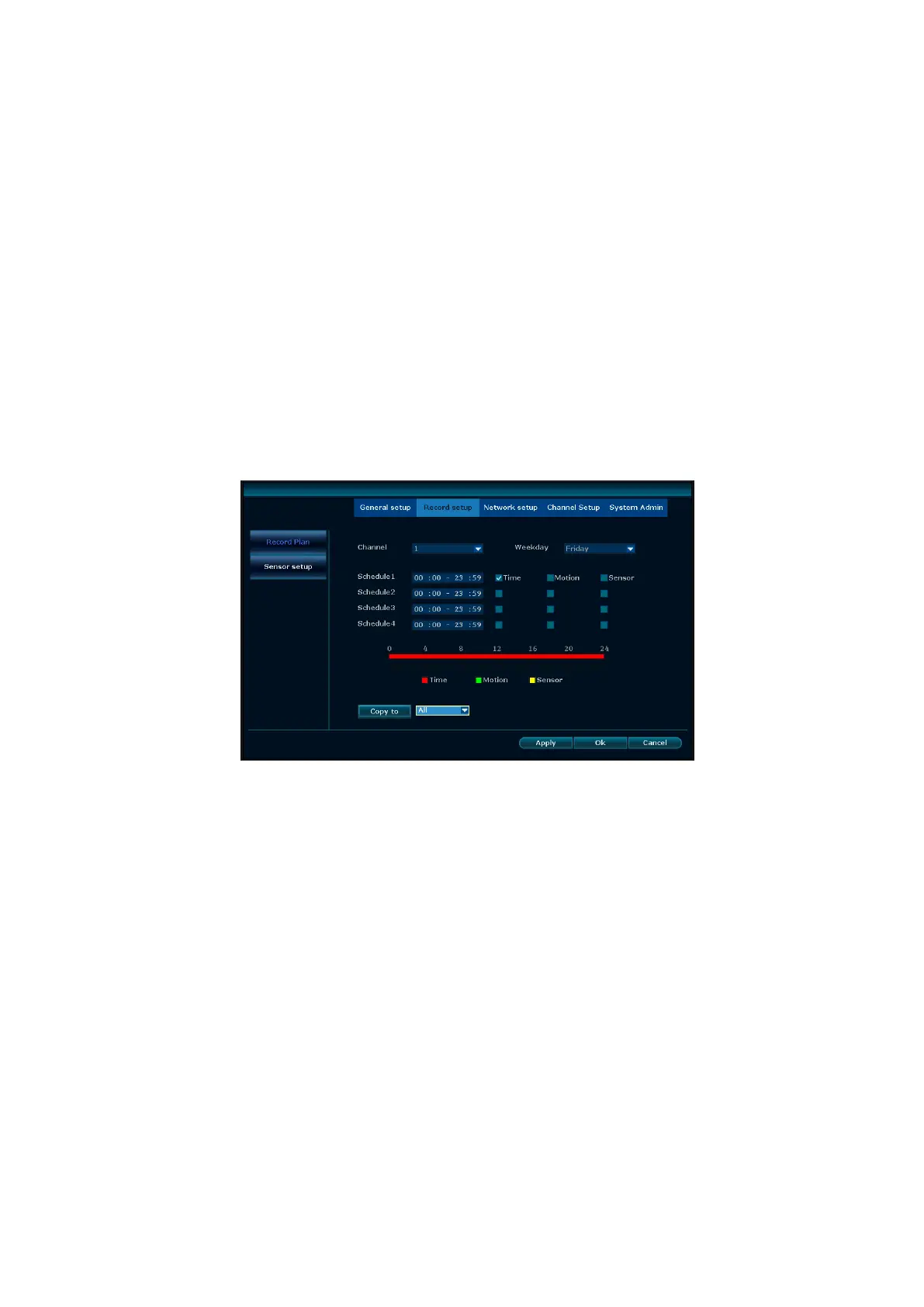
Select “Record setup” in system setup.
Channel:chose the target channel by clicking the select box
Weekday: chose the correspond day as user's need, "ALL" means record all date.
In the time edit box, user can set different time with different recoding mode. "Time": in red color , "Motion": in
green color , "Sensor": in yellow color ; “☑" means selected, “□” means invalid. There is times status display
which 0~24 hours for whole schedule.
Copy to: select the target channel on the right of "copy to "button ,click "copy to" and ''ok " then system will set
the current channel setup informations to other target video channel. Click button "cancel", the setup
informations is non-saved but to exit.



 To Next Page