24
Network setup
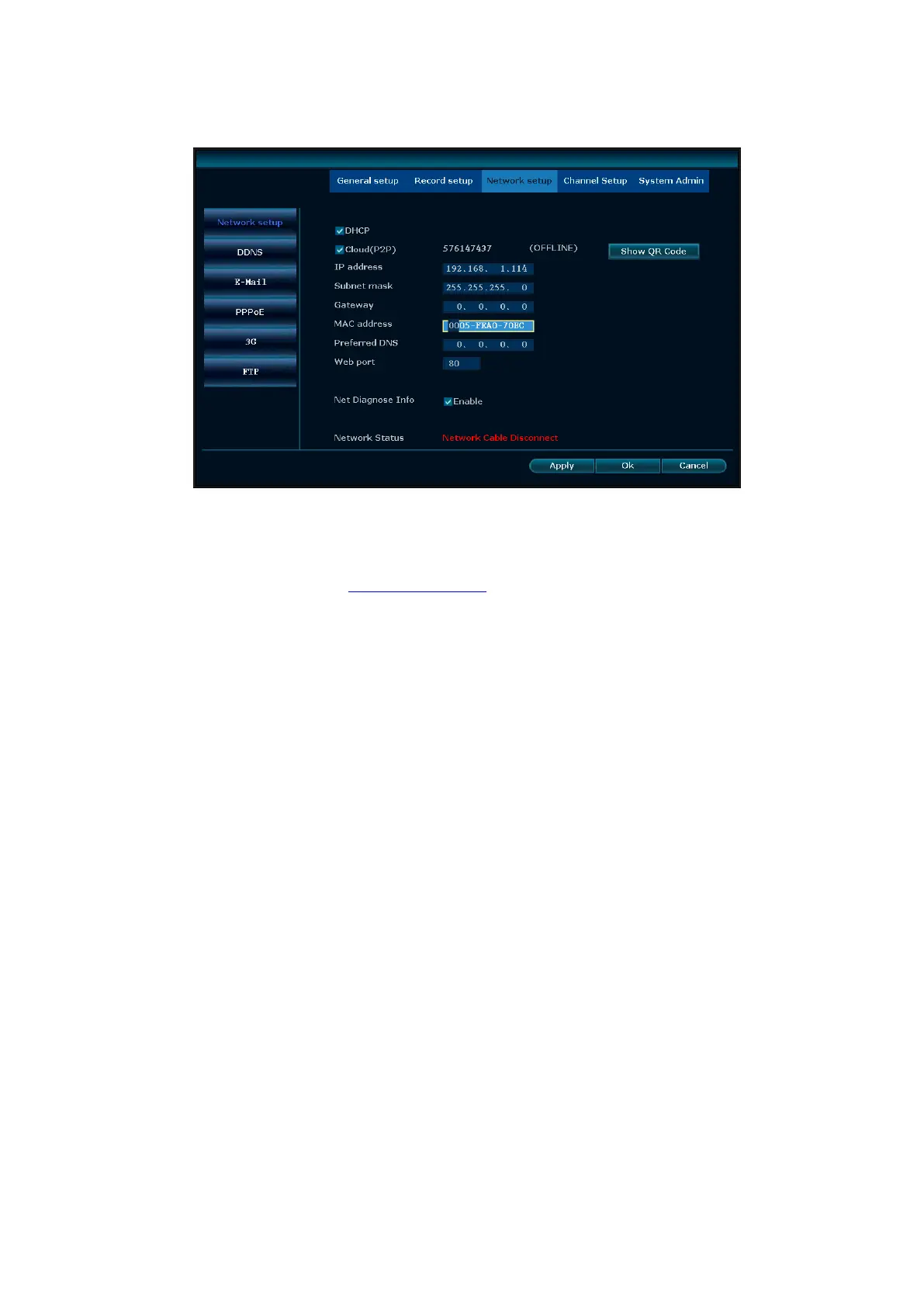
Select “network setup” from “system setup” menu.
DHCP:select DHCP to get IP automatically. “☑”means works ;“□” means non-work.
ESee (P2P): after connecting internet , click“☑ Esee (P2P)” and save the setting, user will get an Esee ID.
You can remote DVR with this ID by www.dvrskype.com. It's free DDNS, no need to apply the domain name
from any server.
IP address:the IP address must be unique and cannot be in conflict with the host or work station which on
the same network segment.
Subnet Mask:use for distinguish the network segment.
Gateway:need to set the gateway address to achieve communication between the different network
segments.
MAC address:device's MAC address
Web port:this port number is used for IE browser visit; default port is "80".
Preferred DNS:preferred DND IP address.
DDNS: The automatic analytic function of dynamic domain name.
In the "Network setup" menu, click " DDNS " to enter it's setup interface
Enable:“☑”means DDNS service start using ;“□”means stop using.
Select the corresponding network server and input user name, password and domain name
After the page setup is completed, click '"Ok" to save the changes and exit ; click "Cancel", to exit the setting.



 To Next Page