12
Programming
ENTRANCE PANEL SETTINGS
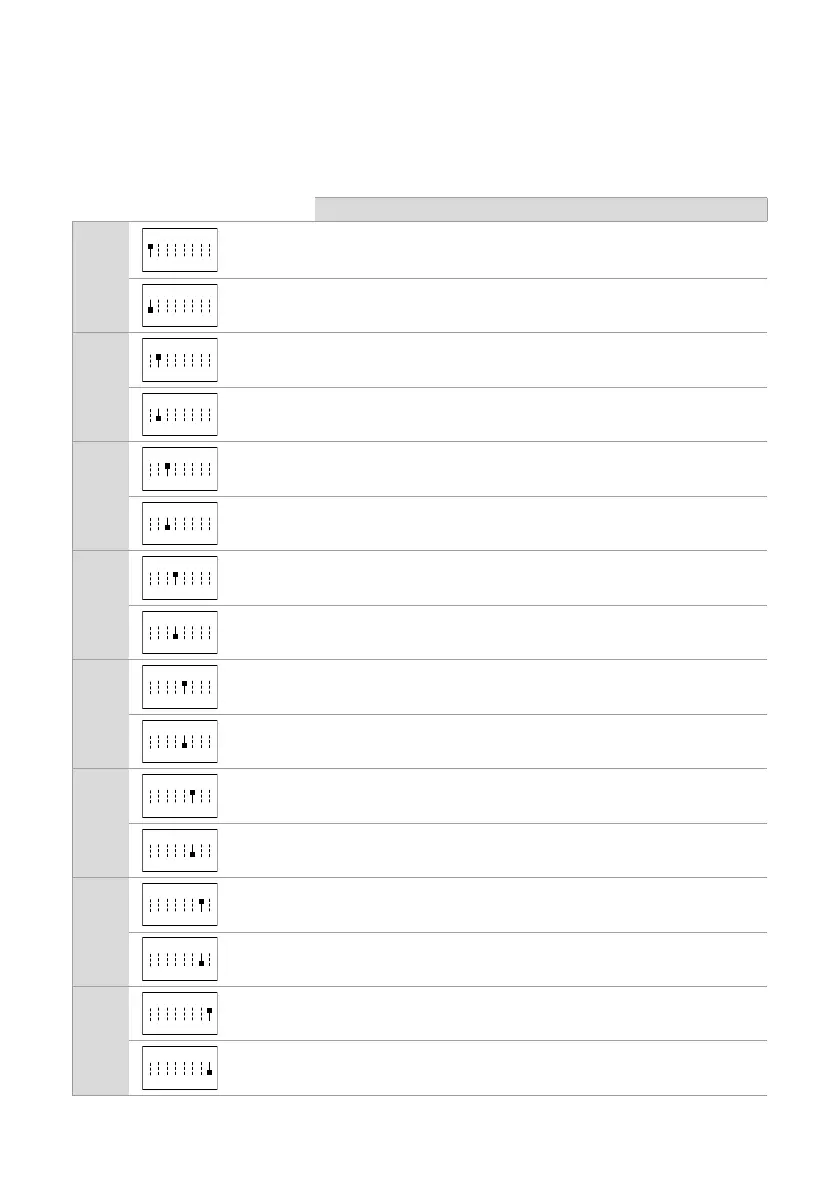
f Permanently set the S1 DIP-switches corresponding to the function you want to program in accordance
with the table below (you do not need to enter programming mode)
FUNCTION
DIP 1
ON
The SE output and the C-NO relay are controlled by 2 separate
buttons on the door entry monitor: the key button (SE) and the generic
actuator button (C-NO)
ON
default
The SE output and the C-NO relay are controlled by a single button
on the door entry monitor: the key button
DIP 2
ON
Lock-release activation time: 8 seconds
default Lock-release activation time: 2 seconds
DIP 3
ON
Relay activation time: 8 seconds
ON
default Relay activation time: 2 seconds
DIP 4
ON
Awaiting reset time: 1 second
default Awaiting reset time: 10 seconds
DIP 5
Call transmission: TRIPLE
ON
1 2 3 4 6 75 8
default Call transmission: SINGLE
DIP 6
ON
Confirmation tones (call, lock-release, relay, audio enabled):
DISABLED
ON
default
Confirmation tones (call, lock-release, relay, audio enabled):
ENABLED
DIP 7
Camera lighting LED: DISABLED
ON
1 2 3 4 6 75 8
default Camera lighting LED: ENABLED
DIP 8
ON
LED lighting of name-holder front panels: OFF
ON
default LED lighting of name-holder front panels: ON











 To Next Page