38
MAIN AND SECONDARY DOOR ENTRY MONITOR
In systems with power supply unit art. 1209, 1 main door entry monitor and 3 secondary door entry monitors
can be programmed per apartment.
On receipt of a call from the entrance panel:
» All door entry monitors ring.
» The image from the entrance panel appears automatically on the main door entry monitor. Any other
secondary door entry monitors in the same family unit will remain off.
» Video can be requested on the secondary door entry monitor(s) (without answering the call) by pressing the
button programmed for self activation (factory set as button
) or by pressing “Start communication” .
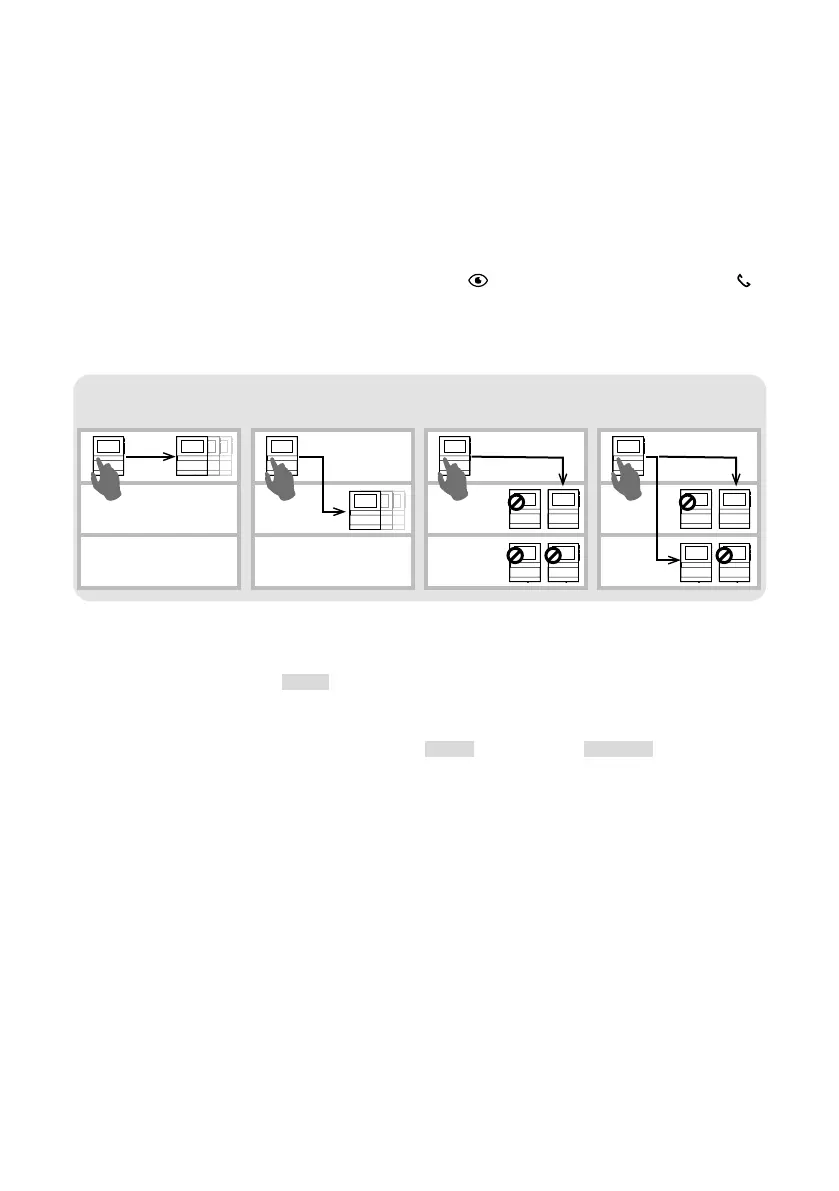
INTERCOM FUNCTION
Various types of intercom call can be programmed:
Intercom to the same
apartment
Selective intercomIntercom to another
apartment
Selective group intercom
INTERCOM
• Intercom call to the same apartment
f Program the intercom call [INT-I] to the chosen button in order to call ALL the door entry monitors in
the same apartment.
• Intercom call to another apartment
f On the desired button, program the intercom call [INT-E] to the user code [ADDRESS] for the apartment
you want to call, to call ALL door entry monitors in that apartment.
SELECTIVE INTERCOM
• Selective intercom
This is an intercom call to a single door entry monitor in the same apartment or another apartment identified
by a dedicated intercom code, dierent from the user code. ONLY that door entry monitor will be called.
The intercom code can be programmed from 1 to 8. The same intercom code can be associated with up to
3 door entry monitors.
NOTE: if even a single user programs this function, the intercom code must be programmed on all
door entry monitors on the riser, even if they do not use the function!
1. Program the intercom code on the door entry monitor you want to call.
2. On the desired button, program the “selective intercom” function for the intercom code of the door entry
monitor you want to call.











 To Next Page