15
ON
1 2 3 4 6 75 8
1
3
2
4
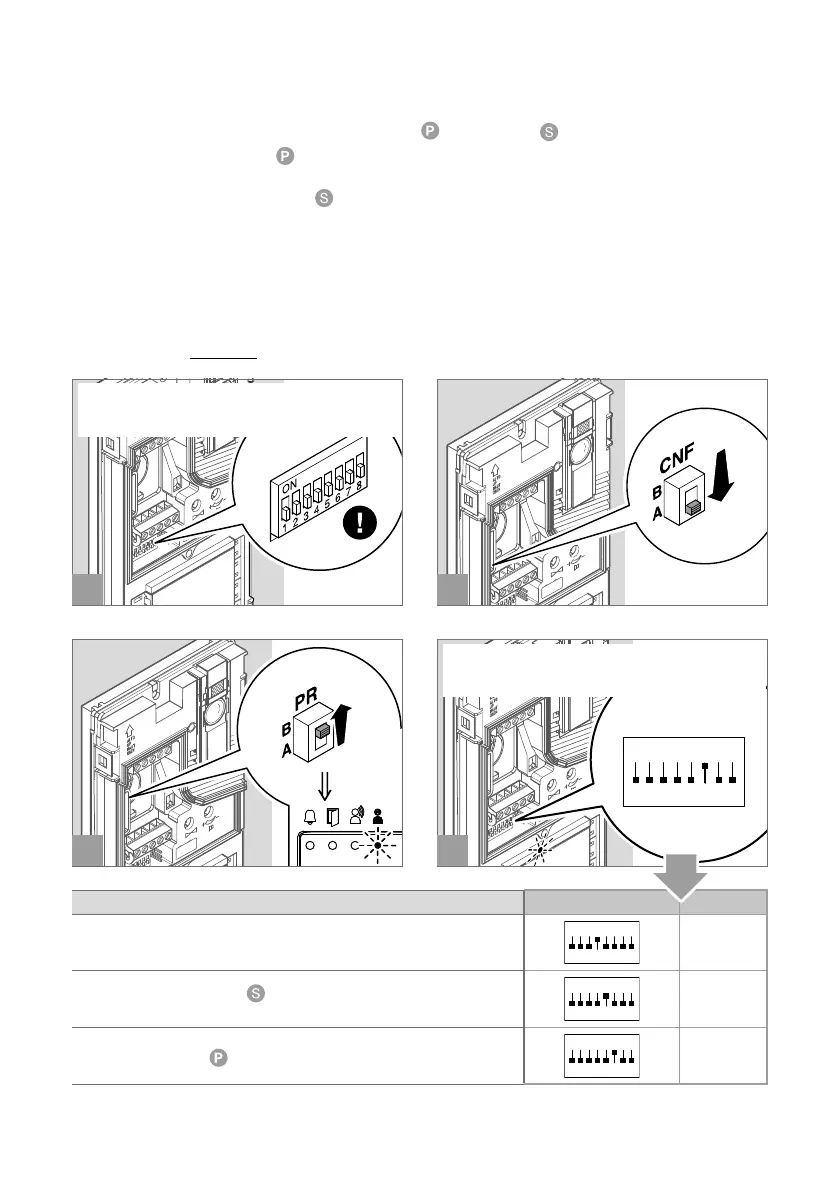
PROGRAMMING AN ADDITIONAL ENTRANCE PANEL
With switching device art. 1405, only one additional entrance panel may be installed.
The two entrance panels must be programmed as main
and secondary ; see table below.
• The “Main entrance panel”
carries out lock-release (or actuator) commands only when it is in call or
self activation status.
• The “Secondary entrance panel”
carries out lock-release (or actuator) commands whether it is in
standby or in call or self activation status.
• If the system is in standby mode the first self-activation command will activate the camera of the secondary
entrance panel. Further commands switch between the two entrance panels, activating the main entrance
panel and the secondary entrance panel alternately.
With switching device art. 1404, more than one additional entrance panel may be installed.
All the entrance panels must be programmed as shown in the table below.
Please refer to the full manual for product 1404, which is available to download from the website pro.
comelitgroup.com
f Take note of the DIP-switch settings.
f Set the code corresponding to the desired
programming (example=32)
PROGRAMMING DIP-SWITCH CODE
Programming an entrance panel with switching device 1404
8
Programming a secondary
entrance panel with switching device
1405
ON
16
Programming a main
entrance panel with switching device 1405
ON
32











 To Next Page