EN
17
MAINTENANCE
Restarting the device
To restart the Touch module:
1. select it
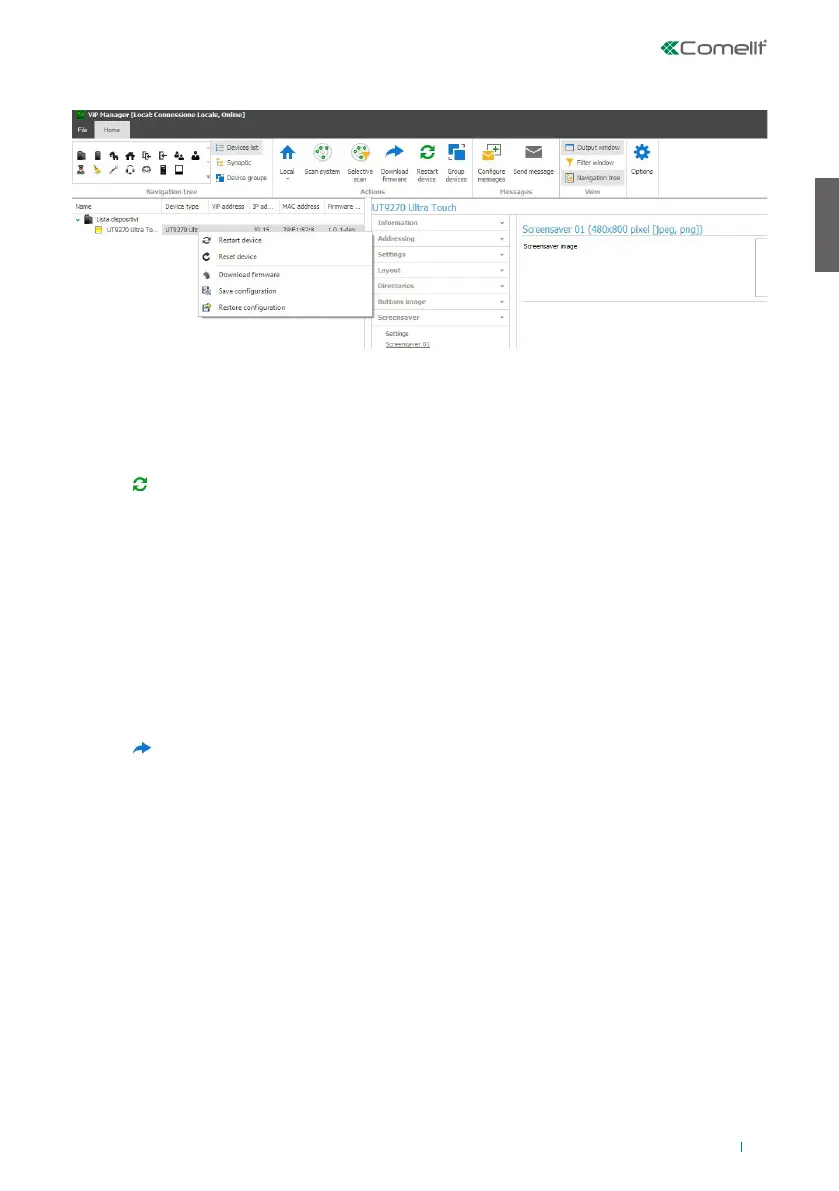
2. right-click on the description (a pop-up with 5 sub-menus will appear)
3. select “Restart device” or
4. click which appears on the menu bar
Resetting the device
To restore the factory settings of the Touch module:
1. select it
2. right-click on the description (a pop-up with 5 sub-menus will appear)
3. select “Reset device” (an alert/confirm procedure request window appears)
Updating device firmware
To update the Touch module firmware:
1. select it
2. right-click on the description (a pop-up with 5 sub-menus will appear)
3. select “Download firmware” or
4. click which appears on the menu bar
Saving the configuration
To save the Touch module configuration:
1. select it
2. right-click on the description (a pop-up with 5 sub-menus will appear)
3. select “Save configuration”
Restoring the configuration
To restore the Touch module configuration:
1. select it
2. right-click on the description (a pop-up with 5 sub-menus will appear)
3. select “Restore configuration”


 To Next Page