
 Need help?
Do you have a question about the Comet S Series and is the answer not in the manual?
Explains the data logger's design for long-term recording and PC-based settings via software.
Details initial setup, including required PC equipment and connection adapters for the data logger.
Guide to download and install the Comet Vision software for operating the data logger.
Instructions on connecting the data logger to a PC using optional COM or USB adapters.
Steps to configure data logger settings like device start, record interval, and cyclic mode via Comet Vision.
Guidance on positioning the data logger or its external probe at the intended monitoring site.
Instructions on downloading and viewing recorded data from the logger using the Comet Vision software.
Suggests using the full manual and Comet Vision manual for more detailed instructions and information.
The Sxxxx, Rxxxx Data Logger is a sophisticated device designed for long-term recording of measured values, storing them in its internal non-volatile memory. Unlike many traditional data loggers, this device features no external control elements. All settings and operations are managed exclusively through a personal computer (PC) running the Comet Vision software, connected via an optional communication adapter. This design emphasizes a streamlined, software-driven approach to data logging, making it suitable for applications requiring precise control and extensive data management capabilities.
The primary function of the Sxxxx, Rxxxx Data Logger is to accurately measure and record various parameters over extended periods. The device's internal non-volatile memory ensures that recorded data is retained even in the event of power loss, providing reliable data integrity. The absence of physical controls on the logger itself means that all configuration, from setting record parameters to managing data, is performed remotely via the Comet Vision software. This centralized control system allows for consistent and reproducible settings across multiple loggers, which is particularly beneficial in large-scale monitoring projects.
The data logger operates by continuously acquiring data at user-defined intervals. Once configured, it autonomously records these measurements until its memory is full or until it is manually stopped. The Comet Vision software provides a comprehensive interface for managing these recording sessions, allowing users to start, stop, and monitor the logger's activity. The software also facilitates the download of recorded data, which can then be analyzed, stored, or exported for further processing.
One of the key features of the data logger is its flexibility in recording modes. Users can choose between a "Cyclic mode" where the oldest recorded values are overwritten by new ones once the memory is full, or a mode where recording stops once the memory is at capacity. This choice allows users to tailor the logger's behavior to specific application needs, whether continuous monitoring with a rolling data window or finite-duration recording of specific events.
To begin using the Sxxxx, Rxxxx Data Logger, users must first install the Comet Vision software on a personal computer running Windows 7 or higher. The software is freely available for download from the manufacturer's website. Once installed, the logger needs to be connected to the PC via a communication adapter, which can be either a COM adapter for serial RS232 ports or a USB adapter for USB ports. The adapter is an optional accessory and must be purchased separately. The connection process involves inserting the adapter into the guide slots on the side of the logger and then connecting the adapter to the appropriate port on the PC. The Comet Vision software is designed to automatically detect and add USB-connected devices, simplifying the initial setup.
After establishing a connection, users can access the logger's settings through the "Configuration" section in the Comet Vision software. Here, critical parameters such as the logging interval, recording mode (cyclic or stop-on-full), and device start/stop settings can be adjusted. It is crucial to ensure that the logger's internal date and time are correctly synchronized with the PC's system time for accurate data timestamping. The software provides options to automatically synchronize the time or set it manually. Once all desired settings are configured, they must be saved to the device, after which the communication adapter can be unplugged, and the logger can be deployed at the monitored location.
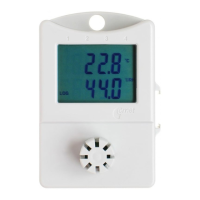
The data logger's operational status is indicated either by an LCD display (for Sxxxx models) or by blinking yellow LEDs (for Rxxxx models without a display). For Sxxxx models, a "LOG" symbol appears in the bottom left corner of the display, while Rxxxx models feature a yellow LED that blinks once every 10 seconds to indicate active logging. These visual cues provide immediate feedback on the device's activity without requiring a PC connection.
When it's time to retrieve data, the logger is reconnected to the PC using the communication adapter. The Comet Vision software's "Download" function allows users to transfer recorded data from the logger's memory to the PC. The software then saves this data to a file and displays it in a user-friendly format, often as a table of timestamped measurements. Users have the option to erase the logger's memory immediately after download or to retain the data on the device for future reference. The software also supports opening previously saved data files from the disk, enabling historical data analysis. In cases where sensor values exceed the logger's range or an external probe is disconnected, the software will display an "Error 2" message, alerting the user to potential issues.
The Sxxxx, Rxxxx Data Logger is designed for minimal maintenance, primarily focusing on battery management and software updates. The device is delivered with an installed battery, and its estimated battery capacity can be monitored through the Comet Vision software, allowing users to anticipate when a replacement might be needed. Regular checks of the battery status are essential to ensure uninterrupted data logging, especially for long-term deployments.
Software maintenance involves keeping the Comet Vision application updated to the latest version. The manufacturer regularly releases updates that may include new features, performance enhancements, or bug fixes. Users are encouraged to download and install these updates from the official website to ensure optimal performance and compatibility with their data loggers.
Physical maintenance is generally limited to ensuring the logger is clean and free from obstructions, particularly around the communication adapter slots. If an optional wall holder with a lock is used for installation, periodic checks of its integrity are recommended to ensure the logger remains securely positioned. The robust design of the data logger, with no external control elements, inherently reduces points of failure and simplifies physical upkeep.
For comprehensive maintenance and troubleshooting, users are advised to consult the detailed manual and other supporting documents available on the manufacturer's website. These resources provide in-depth information on device operation, error codes, and advanced features, supplementing the quick start guide. Adhering to the guidelines provided in these documents ensures the longevity and reliable performance of the Sxxxx, Rxxxx Data Logger.
 General
| Accuracy of temperature | ±0.3 °C |
|---|---|
| Humidity Range | 0 to 100 %RH |
| Communication | USB |
| Measurement Parameters | Temperature, Humidity, Barometric Pressure, CO2 |
| Resolution | 0.1 °C, 0.1 %RH, 0.1 hPa, 1 ppm CO2 |
| Communication Interface | USB |

 To Next Page