
 Need help?
Do you have a question about the Comfort Zone CZTF329WT and is the answer not in the manual?
For indoor residential/office use. Follow instructions, avoid damaged cords, and use caution around children.
Avoid shock in wet areas. Do not touch hot motor. Keep away from flammable materials and blockages.
Use polarized plug in grounded outlet. Do not use with solid-state speed control devices.
Operate fan upright. Place in desired room area. Plug directly into a 120V AC, 60Hz wall outlet.
Dial controls fan speed (LOW, MEDIUM, HIGH) and oscillation. Turn to '0' for OFF.
Steps involve removing screws, positioning the power cord, and reattaching the base.
Clean grille with damp cloth. Do not use harsh cleaners. Motor bearings are permanently lubricated.
Do not operate damaged fan. Keep original carton for storage. Coil cord to avoid damage.
Unplug fan, open fuse cover, replace fuse with identical rating, and close cover.
One-year warranty against defects. Covers retail purchaser. Excludes damage from misuse or alteration.
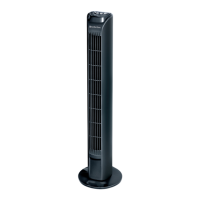
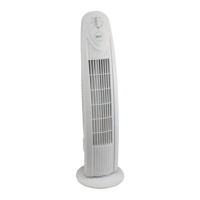
This document describes the Comfort Zone 29" Tower Fan, a device designed for indoor residential and office use. It is not intended for industrial or other commercial applications. The fan offers three fan speeds and features powerful centrifugal fan blades for effective air circulation. Its design includes wide area oscillation, allowing it to cover a larger area, and a space-saving form factor, making it suitable for various room sizes. Assembly is required, but no tools are needed for the process.
The Comfort Zone 29" Tower Fan operates by circulating air through its powerful centrifugal fan blades. Users can select from three different fan speeds: low, medium, and high, to suit their cooling preferences. The fan also offers an oscillation feature, which can be activated to distribute air across a wider area. When oscillation is not desired, the fan can be set to a stationary mode. The fan is controlled via a dial located on the top of the unit, which allows for power on/off and speed selection, as well as activation of the oscillation function.
To operate the fan, it must first be assembled. The assembly process involves attaching the base to the fan body using three wing nut screws, which are removed from the fan's base prior to assembly and then re-secured. The power cord is routed through guides in the base during this process. Once assembled, the fan should be placed on a smooth, non-combustible, level surface for proper operation.
The fan connects directly to a 120-volt A.C., 60 Hz wall outlet. It's crucial to ensure the plug fits tightly to prevent overheating and potential damage. The manufacturer advises against plugging the fan into a circuit that is already servicing other electrical needs to avoid overloading.
The control dial is used to turn the fan on and off and to select the desired speed. Turning the dial clockwise from the "0-OFF" position will activate the fan in stationary mode at speeds 1 (LOW), 2 (MEDIUM), or 3 (HIGH). To activate oscillation, the dial should be turned counter-clockwise to the desired speed level indicated by an arrow. To discontinue use, the dial is turned back to "0-OFF," and the fan should be unplugged.
Safety is paramount when using this fan. Users are instructed to read all instructions before use and to only use the fan as described in the manual. It should not be operated with a damaged power cord, if it malfunctions, or if it has been dropped. Extreme caution is necessary when the fan is used by or near children, disabled persons, or pets, and it should never be left operating unattended. The fan should not be placed on unstable surfaces where it might tip or fall.
The fan is designed for dry environments and should not be used in bathrooms, laundry areas, or similar locations, or near sinks, washing machines, swimming pools, or other sources of water. It should never be placed where it might fall into a bathtub or other water receptacle, nor used in damp environments such as flooded basements. The fan motor can become hot during use, so direct skin contact should be avoided to prevent burns.
To prevent fire hazards, the fan should not be used near combustible materials, flammable gases, or sources of heat. It is explicitly stated not to use the fan in areas where gasoline, paint, or flammable materials are used or stored. To prevent fire, air intakes or exhausts should not be blocked, and foreign objects should not be inserted into any ventilation or exhaust opening, as this could cause electric shock, fire, or damage to the fan.
The fan has a polarized two-prong plug, with one blade wider than the other, designed to fit into a matching, properly grounded outlet. If the plug does not fit, it should be reversed. If it still doesn't fit, a qualified electrician should be contacted. This safety feature should not be defeated. The product should not be used with any solid-state speed control device.
Extension cords are generally discouraged due to fire risk. If one must be used, it should be a minimum of 14 AWG and rated not less than 1875 watts, and the plug must be completely inserted into its receptacle. The power cord should not be run under carpeting or covered with throw rugs or runners, and it should be arranged away from traffic areas to prevent tripping.
The fan should not be operated without its blade guards or any safety devices removed, or if it has a broken blade or any visual imperfections. In case of malfunction, damage, or a blown fuse, the fan should be disconnected from power before servicing.
Regular cleaning is recommended to maintain the fan's performance. Before cleaning, the power cord must be disconnected from the plug. The grille surface can be cleaned with a clean, damp cloth. Harsh chemical or abrasive cleaners should not be used. The fan or any wires should never be immersed in water. After cleaning, the fan should be allowed to dry completely before use. Periodic grille cleaning with a vacuum cleaner will help prevent dust buildup. The motor is sealed and does not require any interior maintenance, cleaning, or lubrication.
The internal motor bearings are permanently lubricated at the factory and do not require additional lubrication throughout the fan's lifespan.
If the fan malfunctions or is damaged in any way, it should not be operated. Specifically, the fan should not be used without the grille in place. For repairs covered under warranty, users should refer to the warranty statement. For other repairs, Comfort Zone Customer Service can be contacted for information and assistance.
The fan is equipped with overload protection in the form of a fuse. If the fuse blows, indicating an overload or short-circuit, the product should be unplugged, and the fuse replaced according to the user servicing instructions. The fuse access cover is located on top of the attachment plug and slides open to reveal the fuse. A small tool can be used to carefully pry the fuse from its holder cavity. The replacement fuse must be identical: a 2.5 or 5.0 Amp, 125 Volt fuse (3.6mm x 10mm), and it must be properly seated within its cavity before closing the fuse cover. If the replacement fuse blows again, a short-circuit may be present, and the product should be discarded or returned to an authorized service facility for examination and/or repair.
For storage, it is recommended to keep the original carton. The power cord should be coiled and tied to prevent damage during storage.
 General
| Type | Tower Fan |
|---|---|
| Speed Settings | 3 |
| Oscillation | Yes |
| Color | White |
| Power Source | Electric |
| Timer | Yes |
| Remote Control | Yes |
| Voltage | 120V |
| Wattage | 50W |
| Size | 32 inches |
| Height | 32 inches |


 To Next Page