Need help?
Do you have a question about the Comica Traxshot PRO and is the answer not in the manual?
Long press to turn on/off, short press to switch 75/150Hz low cut filter.
Switches between automatic (A), programmable mono (PM), and programmable stereo (PS) pickup modes.
Adjusts the microphone gain and monitor volume.
Connect devices via 3.5mm TRS-TRS/TRRS-TRRS audio cable.
Used for charging, firmware upgrading, and audio output via 2-in-1 cable.
Connect headphones for audio monitoring.
Use needle-shaped objects to reset the device.
Automatically switches to mono or stereo based on pickup angle.
Delivers mono audio at any pickup angle.
Delivers stereo audio at any pickup angle.
Connect camera/computer/phone via 3.5mm TRRS-TRRS audio cable for analog output.
Connect computer/phone via 2-in-1 audio cable and OTG adapters for digital output.
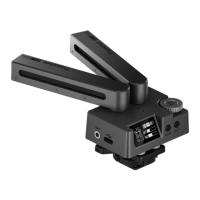
The Comica Traxshot PRO is a super cardioid transformable all-in-one shotgun microphone designed for professional audio recording. It offers a versatile range of features for various recording scenarios, making it suitable for use with cameras, smartphones, and computers.
The Traxshot PRO is primarily a shotgun microphone with a super cardioid pickup pattern, delivering broadcast-quality sound. Its unique transformable design allows for multiple pickup modes, which can be automatically or manually selected. The microphone features two capsules, Mic1 and Mic2, which can be oriented to achieve different pickup angles, including 0°, 30°, 90°, and 180°. This adaptability enables users to capture audio in various configurations, from focused front-facing sound to wider stereo fields or even front-and-back recording.
The device supports both digital and analog output modes, making it universally compatible with a wide range of recording devices. It includes a 3.5mm TRS/TRRS audio output port for analog connections to cameras, phones, and computers, and a USB-C port for digital audio output, charging, and firmware upgrades. An intelligent auto-sensing 3.5mm output and power switch simplify operation by automatically detecting the connected device and adjusting power accordingly.
For monitoring, the Traxshot PRO is equipped with a 3.5mm TRS/TRRS monitoring port, allowing real-time audio checks. It also features a gain control knob to adjust microphone gain and monitor volume, providing precise control over audio levels. To manage unwanted low-frequency noise, the microphone includes a two-stage low-cut filter (75Hz/150Hz), which can be activated or deactivated as needed.
The Traxshot PRO offers intuitive operation through its IPS screen, which displays essential information such as power status, audio dynamics, and the current pickup mode. The device provides three main pickup modes:
When using the 180° pickup angle in A/PS mode, it's important to note that Mic 1 should be positioned in the rear and Mic 2 in the front for optimal stereo separation.
The microphone's auto-power function automatically turns the device on or off when it detects that the connected camera or USB device is powered on or off. For situations where auto-sensing might not work, a manual power button is available.
For connectivity, the Traxshot PRO comes with a 3.5mm TRS-TRS audio cable, a 3.5mm TRRS-TRRS audio cable, and a 2-in-1 audio cable. Users should select the appropriate cable based on their device. For some cameras that may not recognize the 3.5mm TRRS-TRRS cable, the 3.5mm TRS-TRS cable should be used. When connecting to iOS devices, a separate OTG audio adapter cable may be required. It's also important to note that when working with smartphones and laptops in stereo mode via analog output, the stereo signal is automatically merged into mono. For Android smartphones, the Traxshot PRO works well in audio mode, but compatibility with system versions lower than Android 12.0 might be limited, in which case using a third-party app like TikTok or Filmic Pro is suggested. For iPhones, the microphone functions effectively in both audio and video modes.
The Traxshot PRO is designed with an innovative and effective air-float shock-absorption system, which helps to minimize handling noise and vibrations, ensuring cleaner audio recordings. It also incorporates an internal windproof design to effectively reduce basic wind noise. For higher-level wind noise, a high-density wind muff is included, which effectively filters out strong wind interference.
The microphone features a built-in rechargeable battery, offering a long battery life of up to 22 hours, making it suitable for extended recording sessions. The USB-C port serves multiple functions: charging the internal battery, upgrading the system firmware, and digital audio output. Firmware upgrades are straightforward: long-press the MODE button to enter the upgrade interface, connect the microphone to a computer via the USB-C cable, copy the new firmware file to the corresponding disk, safely eject the USB flash disk, and then restart the Traxshot PRO to apply the new firmware.
In case of any operational issues, a reset hole is provided, allowing users to reset the device using a needle-shaped object. The durable construction and thoughtful design contribute to the microphone's overall reliability and ease of maintenance.
 General
| Type | Wireless Microphone System |
|---|---|
| Maximum SPL | 120dB |
| Output Interface | 3.5mm TRS |
| Frequency Response | 20Hz - 20kHz |
| Signal to Noise Ratio | 80dB |
| Power | DC 5V |
| Battery Life | About 8 Hours |
| Transmission Range | 100m (line of sight) |
| Operating Temperature | 0°C to 40°C |
| Storage Temperature | -20°C to 60°C |


 To Next Page