Need help?
Do you have a question about the Comica VS09 TC and is the answer not in the manual?
Critical warnings on Android compatibility, interference, and safe handling practices.
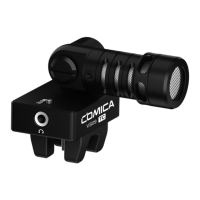
Highlights the microphone's main functionalities, design, and technical capabilities.
Details all the items included in the Comica VS09 TC microphone package.
Explains how to use the muting button and the meaning of the indicator light colors.
Visual representation of the microphone's directional sensitivity.
Shows the microphone's audio sensitivity across various frequencies.
The Comica CVM-VS09 TC is a professional audio equipment designed as a Type-C smartphone microphone. This device is specifically engineered for audio recording with smartphones equipped with a Type-C interface, offering a range of features to enhance the user's recording experience and sound quality.
The primary function of the Comica CVM-VS09 TC is to capture high-quality audio directly from a Type-C smartphone. It operates as an external microphone, bypassing the internal microphone of the smartphone to deliver clearer and more professional sound. The microphone is designed with a cardioid directional pickup pattern, meaning it is most sensitive to sound coming from the front, while rejecting sound from the sides and rear. This characteristic makes it ideal for focusing on a specific sound source, such as a speaker or an instrument, and minimizing background noise.
A key feature of this microphone is its support for audio monitoring. Users can connect earphones to the microphone's 3.5mm monitor connector to listen to the audio in real-time as it is being recorded. This allows for immediate feedback on sound levels and quality, enabling adjustments to be made during the recording process. For Android system smartphones, the microphone works effectively in Audio Mode for real-time monitoring. However, it's noted that some Android smartphones may not support real-time monitoring but will allow for playback monitoring. In Video Mode, some Android smartphones might experience incompatibility issues, in which case using a third-party video application is suggested.
The microphone also includes a muting mode, which can be activated or deactivated by pressing a dedicated muting button. When in normal recording mode, a green indicator light signifies that the microphone is active. When muting mode is engaged, the indicator light turns red, indicating that the microphone's input is temporarily disabled. This feature is particularly useful when replaying recorded audio or video on the phone, as it prevents the microphone's real-time sound from interfering with the playback.
The Comica CVM-VS09 TC is designed for ease of installation and versatile use across various recording scenarios.
Installation of Windscreen: The first step in using the microphone involves installing the included windscreen. This component helps to reduce wind noise and plosives (harsh "p" and "b" sounds), ensuring cleaner audio, especially when recording outdoors or in environments with air movement.
Mounting to Smartphone: The microphone is designed to be directly installed onto a smartphone via its Type-C interface. Once properly connected, a green light that is either constantly on or flickering indicates that the microphone is working correctly. The microphone features a rubber smartphone clamp to securely attach it to the device.
180-Degree Rotation: A significant usage feature is the microphone's ability to rotate 180 degrees. This allows users to adjust the microphone's direction to match different usage scenarios and angles.
Audio Monitoring: As mentioned, the 3.5mm earphone monitor connector allows for real-time audio monitoring. Users can plug in their earphones to ensure the audio is being captured clearly and at appropriate levels. This is crucial for professional-sounding recordings, as it helps to identify and correct any audio issues on the spot.
Muting Function: The muting button provides quick control over the microphone's input. This is particularly useful during breaks in recording, when handling the phone, or when reviewing previously recorded material, preventing unwanted sounds from being picked up.
While the manual does not explicitly detail "maintenance features" in a separate section, it provides important notices and guidelines that can be considered as part of maintaining the device's functionality and longevity.
Careful Handling: Users are advised to avoid falling, collision, or impact when using the microphone. This suggests that the device, like most electronic equipment, is sensitive to physical shocks and should be handled with care to prevent internal damage.
Environmental Protection: The manual warns against using the microphone in rain or humidity, as this could lead to a risk of short circuit. This highlights the importance of keeping the device dry and away from moisture to prevent electrical damage and ensure its continued operation.
Heat and Interference Avoidance: Users are instructed to stay away from heat sources or interference sources when using the microphone. Heat can degrade electronic components over time, while interference can compromise audio quality. Adhering to this guideline helps maintain both the physical integrity of the device and the quality of its audio output.
No Disassembly: A critical maintenance note is the warning against assembling and disassembling the parts by oneself. The product is precisely calibrated at the factory, and unauthorized tampering will invalidate the warranty. This emphasizes that any internal issues should be addressed by authorized service personnel to ensure proper repair and continued warranty coverage.
Software Compatibility Awareness: While not a physical maintenance point, understanding the device's compatibility with Android systems is crucial for its effective use. The manual acknowledges the diversity of Android systems and potential incompatibilities, advising users to refer to the sales website or official website for compatibility information. This proactive approach helps users avoid issues and ensures they can utilize the microphone effectively with their specific smartphone model.
In summary, the Comica CVM-VS09 TC is a user-friendly, versatile, and robust Type-C smartphone microphone designed to elevate the audio recording capabilities of modern smartphones. Its features, from cardioid directionality and audio monitoring to 180-degree rotation and muting, are all geared towards providing a professional and convenient recording experience. Adhering to the provided care instructions will ensure the device's optimal performance and longevity.
 General
| Polar Pattern | Omnidirectional |
|---|---|
| Connector | 3.5mm TRS |
| Maximum SPL | 120dB |
| Frequency Response | 20Hz - 20kHz |
| Type | Lavalier Microphone |
| Signal-to-Noise Ratio | 70dB |
| Power Supply | Battery |

 To Next Page