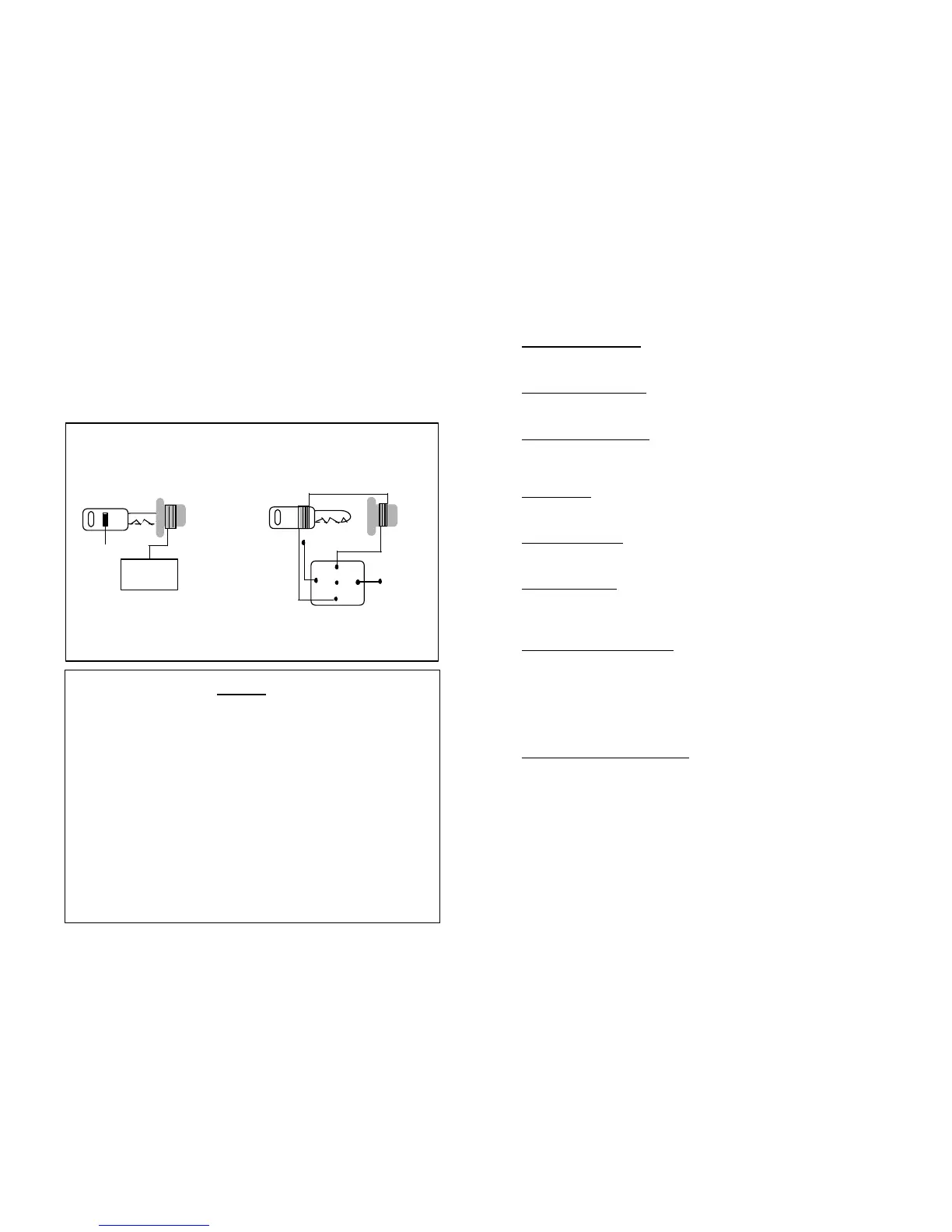
Transponder
GM
86
85
87
87A
30
Ignition
TRANSPONDER
MODULE
29
PASSKEY & P.A.T.S. BYPASS
Ground outwhen
running (-)
From pin 87 run a 22 (G). Wire to the key cylinder where you wrap the wire tightly
8 to 9 times around the cylinder, leave approx. 3 inches before wrapping it around
one of the vehicles keys then returning the end of the wire to pin 30. This will
introduce the key into the circuit only wen the remote starter is activated therefore
maintaining the integrity of the security
OR USE THE OPTIONAL
BPG-1 GM PASSKEY & VATS MODULE
BPF-1 P.A.T.S. BYPASS MODULE
The GM PASSKEY 3 AND FORD P.A.T. Antitheft system works with a glass tube called
a transponder located in the ignition key that sends and receives data via a coil on the
ignition switch. A module that controls fuel distribution to the engine receives this
information. If the module does not receive a proper code or no code when starting, it
will cut the fuel supply to the engine. Some manufacturers of aftermarket security
offer modules to bypass this security to allow you to add a remote starter. If you do
not have one of these modules available to you, can use the following method.
ACTIVE ARMING MODE:
Arm the alarm system by pressing the transmitter button #1, once momentarily. The alarm
will arm and will confirm with 1 siren arming chirp, LED will be solid and start to flash slow
after 10 seconds.
PASSIVE ARMING MODE:
In passive arming mode, upon closing the last door there will be a 30 second arming delay.
The LED will be flashing rapidly indicating that the system is in passive arming phase. After
30 seconds, the alarm will arm by itself. (Programmable)
DISARMING THE SYSTEM:
Disarm the alarm system by pressing transmitter button #1, Alarm disarms and will confirm
with 2 disarming siren chirps, Lights will flash twice, LED will turn off. Optional starter
disable feature will be deactivated, Door locks will unlock automatically - Dome light will be
illuminated for 30 seconds or until ignition key is turned to accessory "ON" position.
PANIC MODE:
For emergency situations, press and hold button #1, of the transmitter for 3 seconds. This
will activate the panic mode. The alarm siren will sound and the parking lights will flash for
60 seconds (or until the transmitter button #1 is pressed again for 1 second).
ALARM TRIGGERED:
If a violation of the vehicle is taking place, the siren will sound and the parking lights will flash
for 60 seconds. After this 60 seconds duration, the alarm will automatically reset and
resume protecting the vehicle.
INTRUSION ALERT:
If a sensor input (door switch, shock sensor) has been violated while the system was
armed, the LED will be flashing rapidly and upon disarming the alarm system, the siren will
confirm with 3 disarming siren chirps and 3 light flashes. Check the vehicle and its contents
to verify if any violation has taken place.
VALET MODE: 2-step procedure
This feature is designed to temporarily disable the alarm and starter for valet parking or
Auto service. While the alarm is in the disarmed state, insert the ignition key and turn to the
ignition "ON" accessory position. Press & hold the valet switch for 5 seconds, the system
will chirp
And LED lights solid, remove the key from the ignition. NowThe alarm & Starter will be in
the valet mode. (ONLY KEYLESS ENTRY WILL WORK)
NOTE: You cannot arm or disarm the alarm while the system is in valet mode. However,
you can still use the transmitter to lock and unlock the doors, while the alarm is in valet mode.
EMERGENCY OVERRIDE SWITCH:
In the event that you lose your transmitter and cannot disarm the alarm:
Open the door, the alarm will sound. Insert the ignition key and turn to the ignition "ON"
accessory position. Press & Hold the valet switch for 5 seconds. The alarm will chirp &
disarm, the LED will be solid, the starter disable feature will be deactivated and you will now
be able to start your car.
PROGRAMMING THE UNIT
NOTES
----------------------------------------------------------------
----------------------------------------------------------------
----------------------------------------------------------------
----------------------------------------------------------------
----------------------------------------------------------------
----------------------------------------------------------------



 To Next Page
 Loading...