5
4..
Product Setting and setting method
4-1. Product installation and setting method
z This product must be used different modes like household input / household floor / lobby.
Ȅ Caution: When changing to each mode, be sure to change the mode after factory reset.
(For the initialization method, refer to "8. CCU-310EV Factory Reaet".)
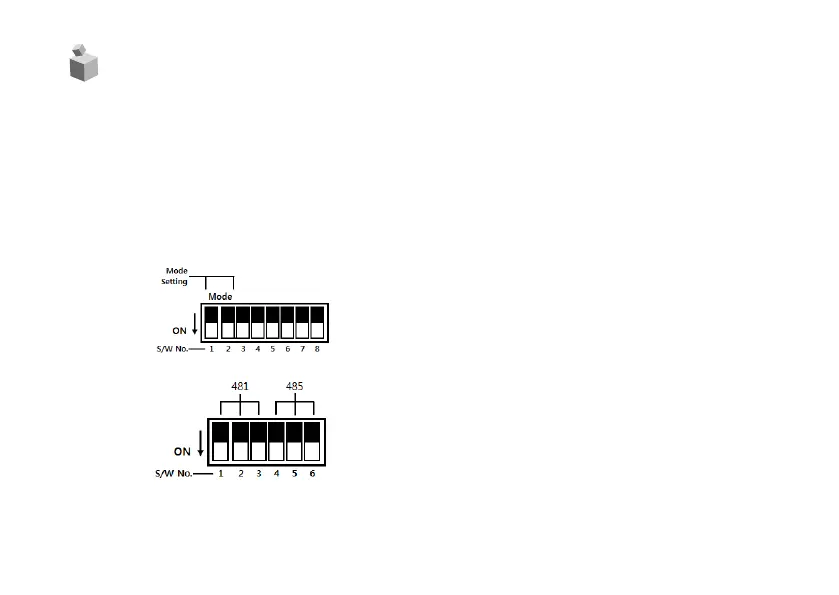
z To select mode, check DIP Switch’s S/W1 and S/W2.
household input mode : S/W1 ΓOFF
,
S/W2 Î “OFF”
household floor mode : S/W1 ΓOFF” S/W2 Î “ON”
lobby mode : S/W1 ΓON”, S/W2 Î “OFF”
z DIP switch(SETTING S/W)
z This product is an elevator call device that can be linked with the lobby phone and the video
phone according to the mode.
zDIP switch(481 or 485 SETTING S/W)
481 Mode : S/W1,2,3 ΓON” , S/W4,5,6 Î “OFF”
(481 Mode : Home Auto System connection)
*481 Mode : Please use after connecting 2P DATA
communication line.
485 Mode : S/W1,2,3 ΓOFF” , S/W4,5,6 Î “ON”
(485 Mode : Home Network System connection)
*485 Mode : Please use after connecting 3P RS-485 line.
*Please refer to the User’s manual of Home Network System.



 To Next Page