EasyManua.ls Logo

Commax CDV-43K - User Manual

Commax CDV-43K
11 pages
Print Icon
To Next Page IconTo Next Page
Loading...
Printed In Korea / 2015.10.104
513-11, Sangdaewon-dong, Jungwon-gu, Seongnam-si, Gyeonggi-do, Korea
Int’l Business Dept. Tel. : +82-31-7393-540~550 Fax. : +82-31-745-2133
Web site : www.commax.com
PM5443A00010
Thank you for purchasing COMMAX products.
Please carefully read this User’s Guide (in particular, precautions for safety) before using a product and follow
instructions to use a product exactly.
The company is not responsible for any safety accidents caused by abnormal operation of the product.
513-11, Sangdaewon-dong, Jungwon-gu, Seongnam-si, Gyeonggi-do, Korea
Int’l Business Dept. Tel. : +82-31-7393-540~550 Fax. : +82-31-745-2133
Web site : www.commax.com
Thank you for purchasing COMMAX products.
Please carefully read this User’s Guide (in particular, precautions for safety) before using a product and follow
instructions to use a product exactly.
The company is not responsible for any safety accidents caused by abnormal operation of the product.
Color Video Door Phone CDV-43K
User Manual
Question and Answer IconNeed help?

Do you have a question about the Commax CDV-43K and is the answer not in the manual?

Summary

Warnings and Cautions

Safety Warning Icons and General Precautions

Explains warning symbols and general safety adherence.

Electrical and Environmental Safety Precautions

Details precautions for electrical safety and installation environment to prevent fire and shock.

Product Handling and Maintenance Precautions

Guides on product handling, maintenance, installation, and usage to prevent damage or failure.

Wiring and Connection Instructions

Operation

Visitor Calling and Interaction

Explains the process of a visitor calling and how the user interacts with the system.

Settings

Installation

Safe Operation guide

Essential Safe Operation Practices

Provides essential rules for safe product operation and maintenance.

Summary

Warnings and Cautions

Safety Warning Icons and General Precautions

Explains warning symbols and general safety adherence.

Electrical and Environmental Safety Precautions

Details precautions for electrical safety and installation environment to prevent fire and shock.

Product Handling and Maintenance Precautions

Guides on product handling, maintenance, installation, and usage to prevent damage or failure.

Wiring and Connection Instructions

Operation

Visitor Calling and Interaction

Explains the process of a visitor calling and how the user interacts with the system.

Settings

Installation

Safe Operation guide

Essential Safe Operation Practices

Provides essential rules for safe product operation and maintenance.

Overview

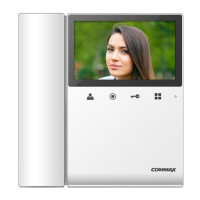
The COMMAX CDV-43K is a color video door phone designed for smart home and security applications. It serves as a communication and monitoring device, allowing users to interact with visitors at their entrance and manage door access.

Function Description:

The primary function of the CDV-43K is to provide visual and audio communication with visitors. When a visitor presses the call button on the door camera, the monitor displays the visitor's image, and a chime sounds. The user can then initiate a two-way conversation with the visitor. The device also supports door release, allowing the user to remotely unlock the door for the visitor. This door release function is active only when the visitor's image is displayed on the screen, ensuring security.

Beyond visitor interaction, the CDV-43K offers a monitoring function, enabling users to view the entrance area at any time, even in standby mode. This is achieved by repeatedly pressing the "Monitor" button, which cycles through "Camera," "OFF," and "Camera" modes.

The system can be expanded with an optional interphone, facilitating communication between the main monitor and the interphone unit. When a visitor calls, both the monitor and interphone ring simultaneously, allowing either unit to pick up the call and engage in a three-way conversation (monitor, interphone, and visitor). Communication between the interphone and the camera is possible only when the visitor's image is visible on the monitor screen.

Important Technical Specifications:

  • Rated Voltage: 100-240V~, 50/60Hz
  • Power Consumption: Standby: 2.5W, Operating: 8W
  • Wiring:
    • 4 wires with door camera (Polarity)
    • 4 wires with an Interphone (Polarity)
  • Screen Size: Color 4.3" TFT LCD
  • Communication: Simultaneous communication
  • Call Sound:
    • From a door camera: Electric chime
    • From an interphone: Beep sound
  • Time to display the screen: 60 ± 10sec
  • Distance from camera: 28m (Ø0.5) / 50m (Ø0.65) / 70m (Ø0.8)
  • Operating Temperature: 0 ~ +40℃ (32°F ~ 104°F)

Usage Features:

The CDV-43K offers several user-adjustable settings to customize the viewing experience and audio levels. These settings are accessed via the "Menu" button on the front of the product, either in video talk mode or standby monitoring.

  • Screen Settings (Brightness/Contrast/Color Adjustment): Users can adjust the brightness, contrast, and color of the screen. This is done by navigating to the "DOOR VIDEO SET" menu, selecting the desired parameter (Brightness, Contrast, or Color), and then using the up/down buttons to adjust the value. The "SELECT" button confirms the setting.
  • Screen Mode (Screen Ratio): The device supports different screen ratios:
    • ZOOM: Zooms in on the image, maintaining the actual 4:3 ratio to fill the screen.
    • 4:3: Displays the image in its actual 4:3 ratio without expansion.
    • WIDE: Expands the image to fill the entire LCD screen, which is a wide LCD ratio, not the actual 4:3 ratio. These modes are accessible through the "UTILITY" menu under "SCREEN MODE."
  • CHIME-BELL VOLUME: Users can adjust the call sound level (0 (MUTE) to 3 (MAX)) for incoming calls. This setting is found in the "UTILITY" menu.
  • Reset Function: The "DOOR VIDEO SET" menu includes a "RESET" option to initialize all settings.
  • Information Display: The "INFORMATION" menu provides details about the product, including:
    • MODEL (model name)
    • VERSION (model version)
    • SYSTEM (SINGLE (FINE VIEW VIDEOPHONE))
    • TOUCH (touch-key version)
    • VIDEO (video transmission formats: NTSC / PAL)
    • SOURCE (position of the camera (DOOR) currently shown on the screen)

Maintenance Features:

The manual emphasizes several safety and maintenance guidelines to ensure the longevity and proper functioning of the CDV-43K:

  • Installation Environment:
    • Avoid installing the product in areas with direct sunlight, excessive oil, smoke, humidity, or near lightning and thunder.
    • For heat-generating products, ensure a minimum 10cm clearance from walls for ventilation.
    • The recommended installation height for the monitor is 1450 ~ 1500mm.
    • Do not install the door camera in direct sunlight or backlight.
  • Power Management:
    • Do not use multiple products on a single power socket to prevent overheating and fire.
    • Avoid bending the power cable excessively or using damaged power cables, as this can cause electric shock or fire.
    • Do not handle the power cable with wet hands.
    • Unplug the power cable from the socket when not in use for extended periods to prolong product lifespan and prevent fire.
    • Ensure all electric power is blocked by the building blocking device when installing or repairing the product.
    • The plug serves as a disconnection device and should remain readily accessible.
  • Cleaning:
    • When cleaning the product, use a soft, dry cloth. Do not use chemical products like benzene or alcohol.
    • Keep the door camera lens clean for clear image reflection.
  • General Precautions:
    • Do not disassemble, repair, or rebuild the product. Contact a service center if repairs are needed.
    • Do not insert any metallic or flammable materials into the product.
    • Do not use the product with other devices that have different rated voltages.
    • Do not place water bottles or flowerpots on the product.
    • The apparatus should not be exposed to dripping or splashing liquids, and no liquid-filled objects (like vases) should be placed on it.
    • In case of physical damage or operational failure, contact the Service Center immediately.
    • Do not hold the handset to your ear when pressing the hook switch to switch calls.

Commax CDV-43K Specifications

General IconGeneral
BrandCommax
ModelCDV-43K
CategoryIntercom System
LanguageEnglish

Related product manuals