EasyManua.ls Logo

Commax CDV-43Y - User Manual

Commax CDV-43Y
12 pages
Print Icon
To Next Page IconTo Next Page
Loading...
Printed In Korea / 2016.05.105
513-11, Sangdaewon-dong, Jungwon-gu, Seongnam-si, Gyeonggi-do, Korea
Int’l Business Dept. Tel. : +82-31-7393-540~550 Fax. : +82-31-745-21 33
Web site : www.commax.com
PM
Thank you for purchasing COMMAX products.
Please carefully read this User’s Guide (in particular, precautions for safety) before using a product and follow
instructions to use a product exactly.
The company is not responsible for any safety accidents caused by abnormal operation of the product.
Thank you for purchasing COMMAX products.
Please carefully read this User’s Guide (in particular, precautions for safety) before using a product and follow
instructions to use a product exactly.
The company is not responsible for any safety accidents caused by abnormal operation of the product.
User Manual
Color Video Door Phone CDV-43Y
Question and Answer IconNeed help?

Do you have a question about the Commax CDV-43Y and is the answer not in the manual?

Summary

Warnings and Caution

Safety Guidelines and Precautions

Overview of product safety guidelines, prohibitions, and mandatory actions.

Parts Names

Monitor and Button Identification

Identifies the main components and buttons of the video door phone monitor.

Component List and Functions

Details the parts and their corresponding functions listed in the table.

How to Use This Product

Call from the Visitor

Explains how to handle incoming calls from visitors via the door camera.

Call with Additional Interphone

Details communication between the door camera, main monitor, and additional interphones.

Monitoring

Stand-by Mode Operation

Describes how to view the entrance image in stand-by mode by pressing the MONITOR button.

Settings

Screen Setting (Brightness;Contrast;Color)

Adjusts screen brightness, contrast, and color settings for optimal display.

Utility Functions

Configures speaker volume, chime volume, and screen aspect ratio modes.

Information Check

Provides access to product model, version, system, touch-key, and video formats.

RESET: Initializing

Installation

Installation Method of Camera Monitor

Instructions and notes for mounting the camera monitor unit.

Installation Method of Camera

Instructions and notes for mounting the external camera unit.

Wiring

Wiring Diagram Overview

Illustrates the connection points and polarity for cameras and interphones.

Wiring Precautions

Guidelines for using separated cables and UTP cable for connections.

DOOR Camera Wiring

Specific wiring instructions for connecting the monitor to the door camera using UTP cable.

INTERPHONE Wiring

Specific wiring instructions for connecting the monitor to the interphone using UTP cable.

Package Contents

Specification

Summary

Warnings and Caution

Safety Guidelines and Precautions

Overview of product safety guidelines, prohibitions, and mandatory actions.

Parts Names

Monitor and Button Identification

Identifies the main components and buttons of the video door phone monitor.

Component List and Functions

Details the parts and their corresponding functions listed in the table.

How to Use This Product

Call from the Visitor

Explains how to handle incoming calls from visitors via the door camera.

Call with Additional Interphone

Details communication between the door camera, main monitor, and additional interphones.

Monitoring

Stand-by Mode Operation

Describes how to view the entrance image in stand-by mode by pressing the MONITOR button.

Settings

Screen Setting (Brightness;Contrast;Color)

Adjusts screen brightness, contrast, and color settings for optimal display.

Utility Functions

Configures speaker volume, chime volume, and screen aspect ratio modes.

Information Check

Provides access to product model, version, system, touch-key, and video formats.

RESET: Initializing

Installation

Installation Method of Camera Monitor

Instructions and notes for mounting the camera monitor unit.

Installation Method of Camera

Instructions and notes for mounting the external camera unit.

Wiring

Wiring Diagram Overview

Illustrates the connection points and polarity for cameras and interphones.

Wiring Precautions

Guidelines for using separated cables and UTP cable for connections.

DOOR Camera Wiring

Specific wiring instructions for connecting the monitor to the door camera using UTP cable.

INTERPHONE Wiring

Specific wiring instructions for connecting the monitor to the interphone using UTP cable.

Package Contents

Specification

Overview

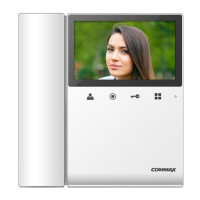
This document provides a user manual for the COMMAX CDV-43Y Color Video Door Phone, a device designed for smart home and security applications.

Function Description

The COMMAX CDV-43Y serves as a central unit for managing visitor calls and communication within a household, integrating with a door camera and optional interphone units. Its primary functions include:

  • Visitor Monitoring: Displays live video feed from the door camera on its 4.3" TFT-DIGITAL LCD screen.
  • Two-Way Communication: Allows users to talk with visitors at the door camera.
  • Door Release: Enables remote unlocking of the door when communicating with a visitor.
  • Interphone Communication: Facilitates internal communication between the video door phone and additional interphone units within the household.
  • Settings Adjustment: Provides options to customize display settings (brightness, contrast, color), audio levels (speaker and chime-bell volume), and screen ratio.
  • System Information: Displays product model name, version, system type, touch-key version, video transmission formats (NTSC/PAL), and active camera source.

Important Technical Specifications

  • Model: CDV-43Y
  • Screen: 4.3" TFT-DIGITAL LCD
  • Wiring:
    • Door camera: 4 wires (Polarity)
    • Interphone: 4 wires (Polarity)
  • Rating Voltage: 100V-240V~, 50/60Hz (FREE VOLTAGE)
  • Power Consumption:
    • Stand-by: 3W
    • Maximum: 12W
  • Transmission Way: HANDS FREE (Voice switch circuit)
  • Ringtone:
    • Door: Electronic chime (Sol Mi Do)
    • Interphone: Beep
  • Display Time:
    • Monitoring: 30 ±5sec
    • Talk: 60 ±5sec
  • Distance (Cable thickness):
    • Pie 0.5mm: 28m
    • 0.65mm: 50m
    • 0.8mm: 70m
  • Working Temperature: 0 ~ +40°C (32°F ~ 104°F)

Usage Features

The CDV-43Y offers intuitive operation through its front panel buttons and on-screen menu.

Call from Visitor:

  1. When a visitor calls from the door camera, the device rings, and the visitor's image appears on the LCD screen.
  2. Press the "Talk Button" to initiate communication with the visitor.
  3. Press the "Door Release Button" to unlock the door (only active during a call).
  4. Three-way communication is possible if an extended interphone handset is picked up while talking to the door camera, allowing simultaneous communication between the entrance, household, and interphone.
  5. Pressing the "Talk Button" again ends the conversation and returns the device to stand-by mode.

Call with Additional Interphone:

  • From Door Camera to Interphone/Video Door Phone: Both the interphone and video door phone ring when a visitor calls. Picking up the interphone handset allows communication with the door camera, and the door can be released from the interphone.
  • Between Interphone and Video Door Phone (Household):
    • Receiving a call from interphone: To call the household from an interphone, pick up the handset and press the call button. The video phone will ring. The household can answer by pressing the "Talk Button." Three-way communication is also possible in this scenario if a visitor calls the door camera.
    • Calling interphone from household: Press the "Talk Button" and then the "Interphone Button" on the monitor to call the interphone.

Monitoring: In stand-by mode, repeatedly pressing the "Monitor Button" cycles through Camera1, Camera2, and OFF, allowing users to view images from connected cameras.

Settings: The device features a menu system accessible via the "Menu Button" for various adjustments.

  • Screen Settings (Brightness/Contrast/Color): Accessed through "DOOR VIDEO SET" in the menu. Users can adjust these parameters using the UP/DOWN buttons and confirm with the SELECT button.
  • RESET: Initializes screen settings and call volume by pressing and holding the interphone and door release buttons for 3 seconds. This action will reset all related data.
  • UTILITY (Additional Functions): Accessed through "UTILITY" in the menu.
    • SPEAKER-VOLUME: Adjusts the receiver sound level (1-3) during communication with the door camera.
    • CHIME-BELL VOLUME: Adjusts the call sound level (0-3, MUTE to MAX) during a call.
    • SCREEN MODE: Sets the screen ratio (ZOOM, 4:3, WIDE). ZOOM expands the image while maintaining a 4:3 ratio, 4:3 shows the actual ratio for the camera, and WIDE expands the image to fit the 16:9 LCD ratio.
  • INFORMATION: Provides details about the product, including model, version, system type, touch-key version, video transmission formats, and current camera source (DOOR1/DOOR2).

Maintenance Features

  • Cleaning: When cleaning the product, always unplug the power cable first. Use a soft, dry cloth. Avoid chemical products like wax, benzene, alcohol, or cleansers, as they may damage the device.
  • Installation Precautions:
    • Monitor: Avoid direct sunlight. Recommended installation height is 1450-1500mm. Do not install near magnetic activity, humid temperatures, or gas.
    • Camera: Do not install where exposed to direct sunlight. Regularly clean the lens to ensure clear image capture.
    • General: Do not disassemble, repair, or rebuild the product. Contact a service center if repairs are needed. If abnormal sounds, burning smells, or smoke occur, unplug the power cable immediately and contact a service center. Avoid inserting metallic or flammable materials into ventilation holes.
  • Power Cable Handling: Do not use multiple products on one power socket to prevent overheating and fire. Do not bend the power cable excessively or use a damaged cable. Avoid handling the power cable with wet hands. Unplug the power cable if the device will not be used for a long period to prevent shortening its lifespan or fire.
  • Installation Environment: Do not install in places with excessive oil, smoke, or humidity. Avoid installation during lightning and thunder.
  • Compatibility: Do not use or connect this product with other products that have different rated voltages to prevent disorder or fire.
  • Ventilation: When installing the product, ensure it is at least 10cm away from walls to allow for proper ventilation and prevent increased internal temperature and potential fire.

The manual emphasizes strict adherence to safety precautions to prevent danger or property damage, highlighting warnings for electric shock and fire hazards.

Commax CDV-43Y Specifications

General IconGeneral
BrandCommax
ModelCDV-43Y
CategoryIntercom System
LanguageEnglish

Related product manuals