11
ྛ
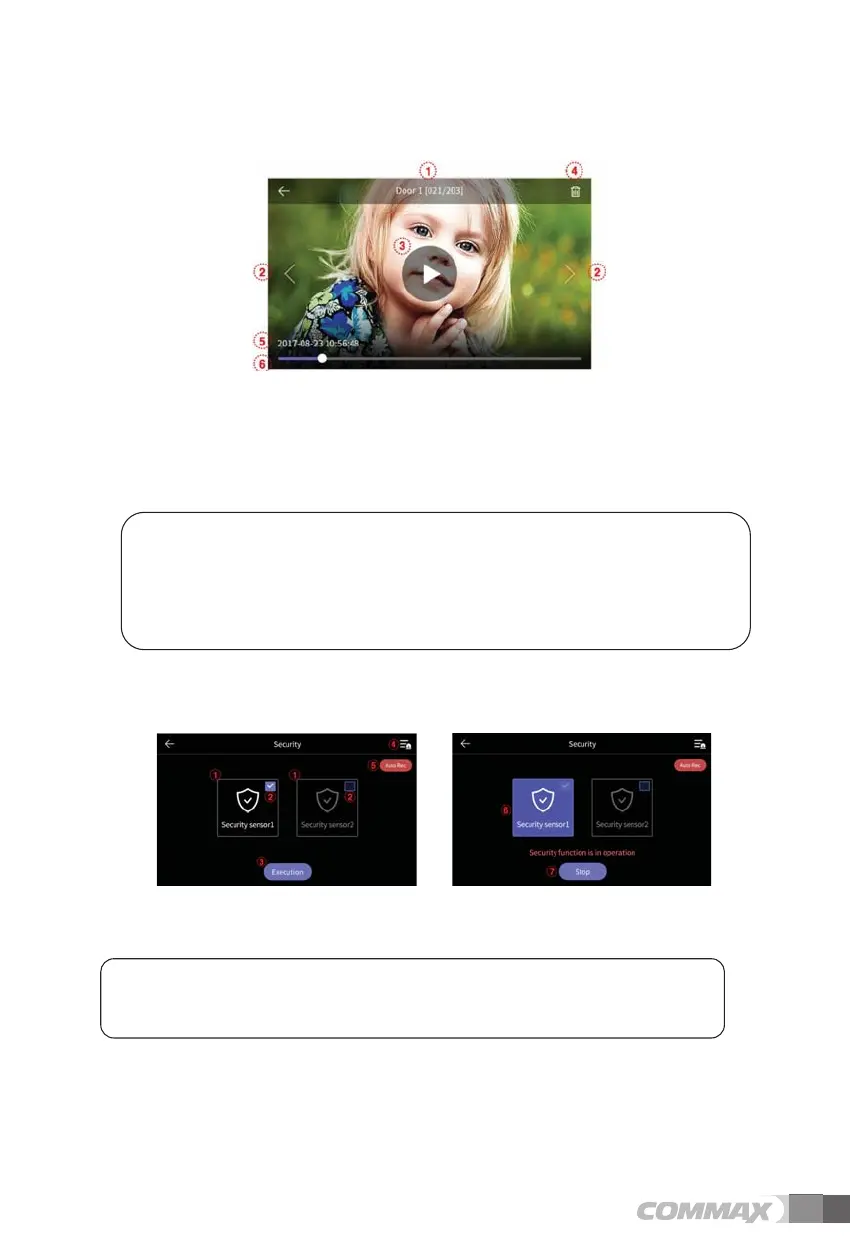
Date &Time : Current date and time will be indicated.
ྜ
Delete files: To delete images.
- To verify video-clip.
ྙ CD Storage source & file No.
ྚ CT Left/Right movement: To move the previous/next file.
ྛ
Playing the file: To play the current video-clip.
During playback, the icon is changed by the pause button.
ྜ
Delete the file: To delete the current playing file.
ྜྷ
Date & Time: Current date and time will be indicated.
ྞ
Video-clip time indication: The remaining time is displayed
<Note>
- Immediately after inserting SD card, the loading time depends on the number of stored file
size.
- If you press Playback button before loading completes, pop-up window will appear.
In this case, please wait a moment.
3-6. Security (Can be used with security sensor)
- Touch the Security button to display the following screen.
- Using this function, the door is detected when the sensor is connected.
< Before operation > < During Operation >
1) Before operating Security mode
Caution
Be aware of the password before proceeding.
You cannot turn off the alarm if you don’t know current password. (Factory default : 1234)
ྙ Security Sensor 1, Security Sensor 2: Select sensor to operate.
ྚ Select check box : If the sensor is selected by check box. (Turn on & Turn off)
ྛ Execute button: Activate the selected sensor. (Please note that the alarm occurs when sensor is
detected)
ྜ Emergency log : You can check emergency log. (Up to 255 log can be stored)
ྜྷ Auto recording: CCTV is automatically recorded for 10 seconds when an emergency occurs.



 To Next Page