13
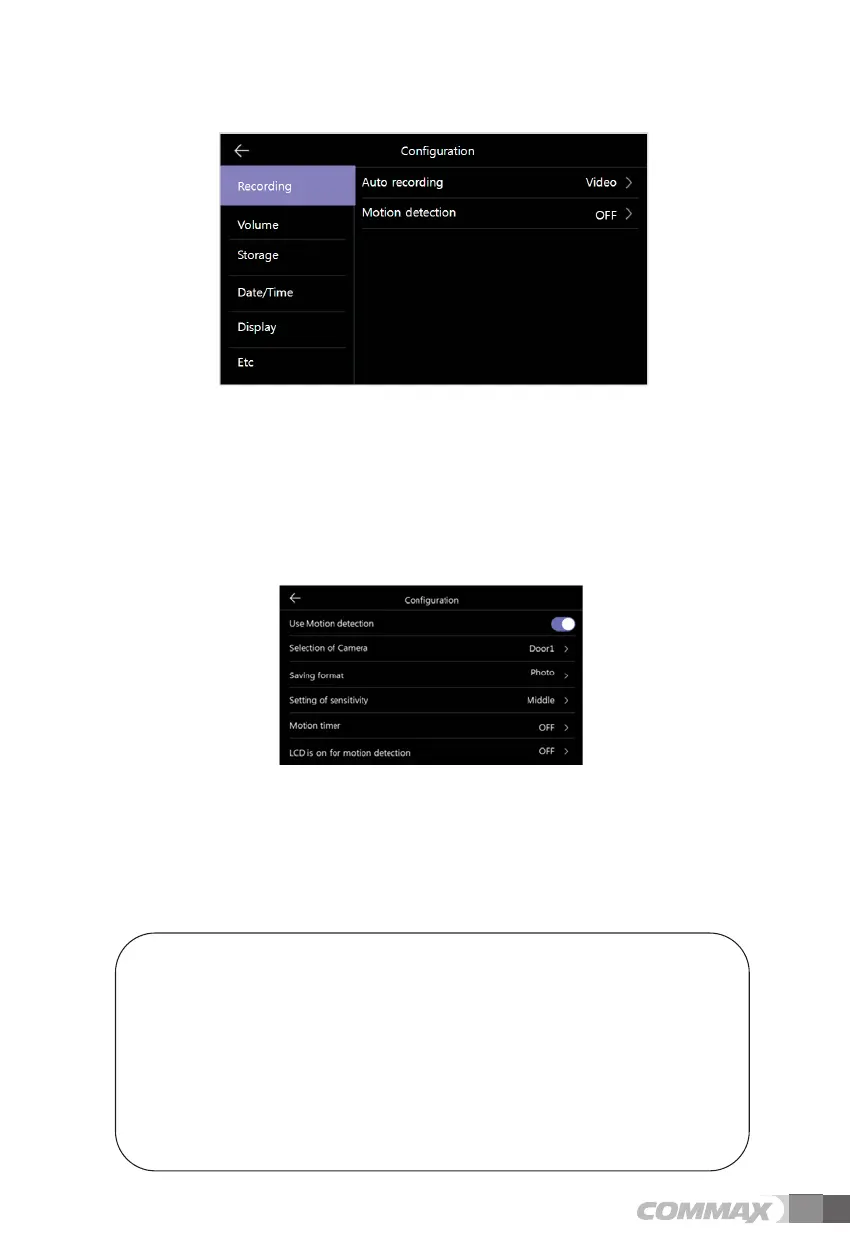
1) Auto recording
- To set the auto save mode. (Select between Photo / Video)
However, if there is no SD card, video mode cannot be selected.
- This function is only available when a call comes from a door camera (entrance). And you cannot
save photos and video-clip manually until the automatic saving is started.
- Selecting OFF disables the auto save function.
2) Motion detecting
- To set motion detection of the previously set camera.
- Functions of each menu are as following.
Motion detector: To set enable / disable function.
Select camera: To select camera for monitoring. (Select from Door1/2, CCTV1/2)
Storage format: To select storage method. (Select between Photo / Video)
Sensing sensitivity: To set sensitivity. (Select among High / Middle / Low)
Motion timer: To set up the timer function activation. (Motion detection activation time)
Once activated, you can set the timer, start / end time.
LCD is on for motion detection : During video recording, it shows video on LCD.
(for 10 seconds)
* Reference
- When detecting motion, the photo is saved for 1 scene and the video-clip is saved
for 10 seconds.
- The LED is flickering during the saving of the video-clip. And, when you touch the screen,
the saving is stopped.
- After saving, the front LED stops blinking, and the motion detection is started within 3
seconds.
- In the night or dark place, the LED of door camera is always on while this function is
working.
ྙ Recording



 To Next Page