6
4-2 Monitor
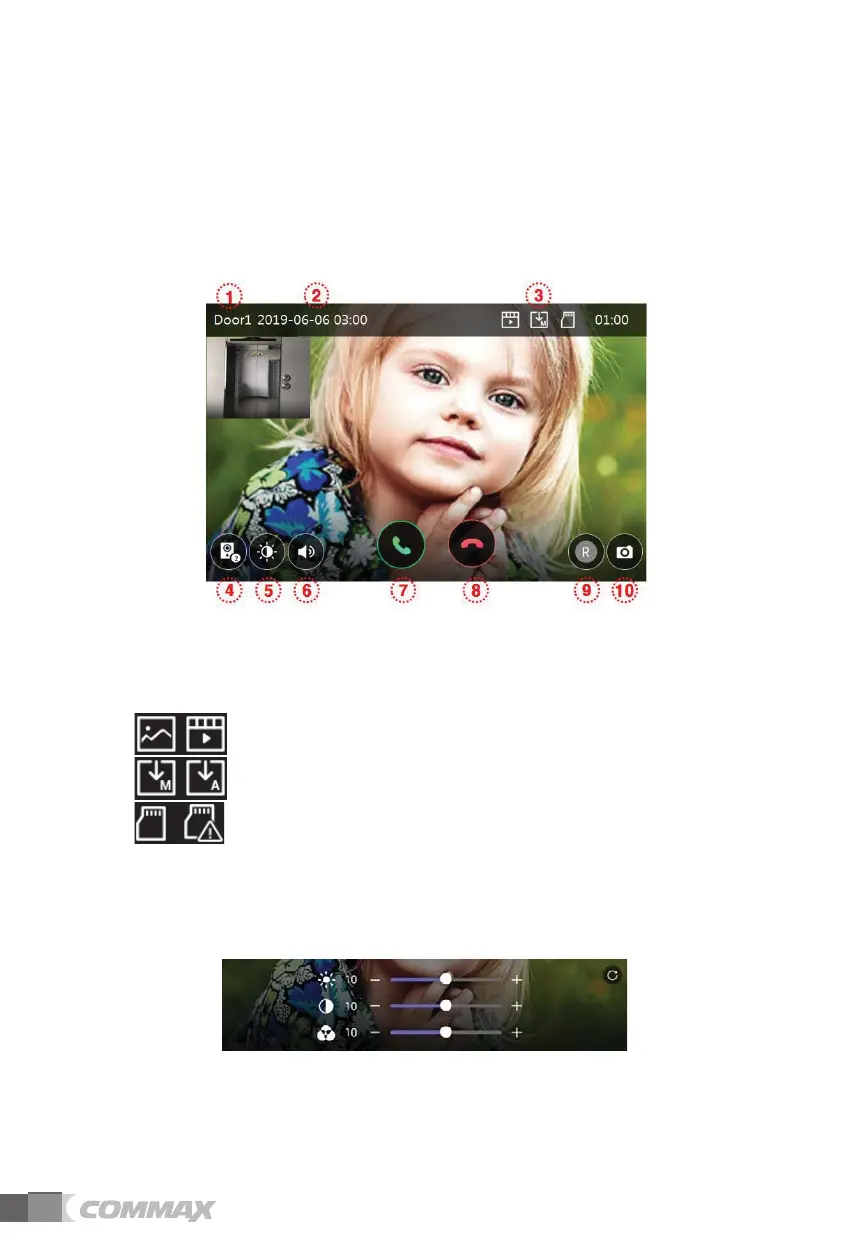
- The following screen will be shown when calling from door camera or touching the
button ’Monitor'
(CCTV1 with Door1, CCTV2 with Door2 are displayed as PIP.)
(When CCTV is connected)
- Max. time : Monitoring (30 sec.), Call and Talk (60 sec.)
- If the camera is not installed, it cannot be executed.
ྙ Selected camera: Selected camera will be shown on the screen.
ྚ Date & Time: Current date and time will be indicated.
ྛ Storage (Saving) icons: Icons for motion detection and recording will be indicated.
- Details of icons
Storage format: Images / Videos (In Motion detection mode)
Storage mode: MANUAL / AUTO
SD card status: Insertion / Full memory
ྜ Split screen view: Split monitoring of door cameras is available.
It’s not available to use if there is only one camera installed.
ྜྷ Image quality adjustment: Display setting for door camera (Door camera #1, #2).
- Brightness/ Luminosity / Chroma adjustment is available after pushing the button.
- The range for adjustment is 0-20. There is a button located on the right upper for initialization.
ྞ Volume control: You can control calling tone volume and receiving tone volume.
- Push the button in order to adjust the volume.
- Volume adjustment level: Ring (0-3), Speaker (1-3)



 To Next Page