EasyManua.ls Logo

Commodore 1084S-P1 - Picture Settings; Colourpurity; Static Convergence

Commodore 1084S-P1
29 pages
Print Icon
To Next Page IconTo Next Page
To Previous Page IconTo Previous Page
Loading...
2.
PICTURE
SETTINGS
Remarks:
The
following
adjustments
only
apply
to
monitors
which
are
fitted
with
a
replaceable
deflection
unit.
In
case
of
combi
tube
replacement,
no
picture
settings
is
required
because
it
has
been
done
by
factory
already
The
colour
purity
and
convergence
adjustments
,
described
hereafter
need
only
to
be
carried
out
if
a
completely
new
setting
is
required
or
if
a
new
picture
tube
has
been
fitted.
In
other
cases,
for
example
after
replacing
the
deflection
unit,
it
will
not
usually
be
necessary
to
remove
the
rubber
wedges
(G
in
figure
3).
Corrections
by
means
of
the
multi-pole
unit
will
then
suffice.
Focusing
adjustment
described
in
item
1.5
must
be
done
prior
to
picture
settings.
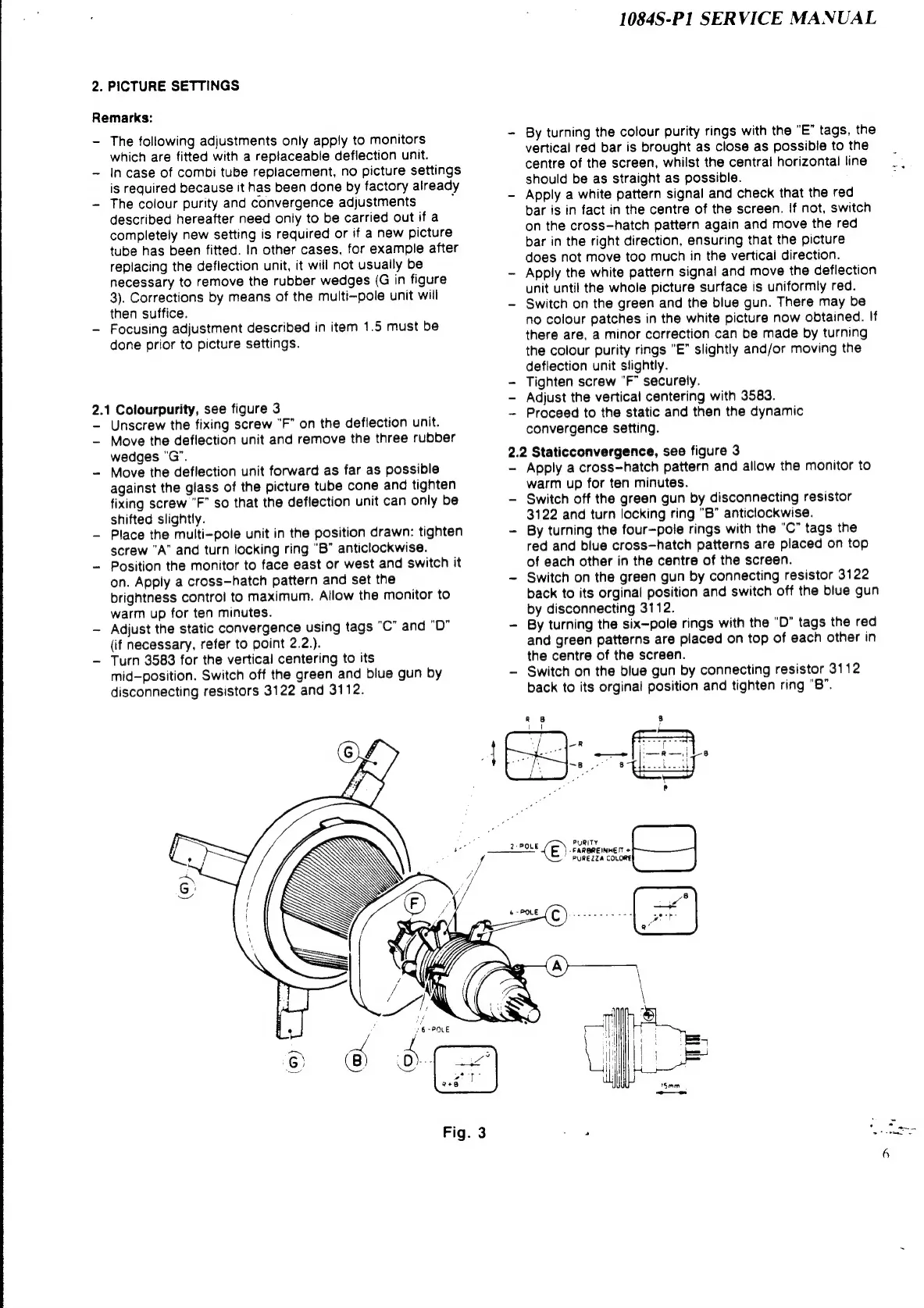
2.1
Colourpurity,
see
figure
3
Unscrew
the
fixing
screw
"F”
on
the
deflection
unit.
Move
the
deflection
unit
and
remove
the
three
rubber
wedges
"G".
Move
the
deflection
unit
forward
as
far
as
possible
against
the
glass
of
the
picture
tube
cone
and
tighten
fixing
screw
"F”
so
that
the
deflection
unit
can
only
be
shifted
slightly.
Place
the
multi-pole
unit
in
the
position
drawn:
tighten
screw
A”
and
turn
locking
ring
"B”
anticlockwise.
Position
the
monitor
to
face
east
or
west
and
switch
it
on.
Apply
a
cross—hatch
pattern
and
set
the
brightness
control
to
maximum.
Allow
the
monitor
to
warm
up
for
ten
minutes.
Adjust
the
static
convergence
using
tags
"C”
and
"D"
(if
necessary,
refer
to
point
2.2.).
Turn
3583
for
the
vertical
centering
to
its
mid-position.
Switch
off
the
green
and
blue
gun
by
disconnecting
resistors
3122
and
3112.
1084S-P1
SERVICE
MANUAL
By
turning
the
colour
purity
rings
with
the
"E”
tags,
the
vertical
red
bar
is
brought
as
close
as
possible
to
the
centre
of
the
screen,
whilst
the
central
horizontal
line
=,
should
be
as
straight
as
possible.
°
Apply
a
white
pattern
signal
and
check
that
the
red
bar
is
in
fact
in
the
centre
of
the
screen.
if
not,
switch
on
the
cross—hatch
pattern
again
and
move
the
red
bar
in
the
right
direction,
ensuring
that
the
picture
does
not
move
too
much
in
the
vertical
direction.
Apply
the
white
pattern
signal
and
move
the
deflection
unit
until
the
whole
picture
surface
is
uniformly
red.
Switch
on
the
green
and
the
blue
gun.
There
may
be
no
colour
patches
in
the
white
picture
now
obtained.
If
there
are,
a
minor
correction
can
be
made
by
turning
the
colour
purity
rings
"E”
slightly
and/or
moving
the
deflection
unit
slightly.
Tighten
screw
"F”
securely.
Adjust
the
vertical
centering
with
3583.
Proceed
to
the
static
and
then
the
dynamic
convergence
setting.
2.2
Staticconvergence,
see
figure
3
Apply
a
cross—hatch
pattern
and
allow
the
monitor
to
warm
up
for
ten
minutes.
Switch
off
the
green
gun
by
disconnecting
resistor
3122
and
turn
locking
ring
"B”
anticlockwise.
By
turning
the
four—pole
rings
with
the
"C”
tags
the
red
and
blue
cross—hatch
patterns
are
placed
on
top
of
each
other
in
the
centre
of
the
screen.
Switch
on
the
green
gun
by
connecting
resistor
3122
back
to
its
orginal
position
and
switch
off
the
blue
gun
by
disconnecting
3112.
By
turning
the
six—-pole
rings
with
the
"D”
tags
the
red
and
green
patterns
are
placed
on
top
of
each
other
in
the
centre
of
the
screen.
Switch
on
the
blue
gun
by
connecting
resistor
3112
back
to
its
orginal
position
and
tighten
ring
"B”.
Pp
PURITY
soot
POLE
{E)
-FAROREINHETT
+
PUREZZA
COLORE

Related product manuals