If
APPEND
PRINTS CHRI PRINTS CHR» PRINTS CHRS PRINTS CHHS
r* ^»
r
id
CHR-
D 68
m
97
E
126
ffl
lfi5
ASCII ai Codes
i *»*v
E 69
i.
98
H
127
Ml
156
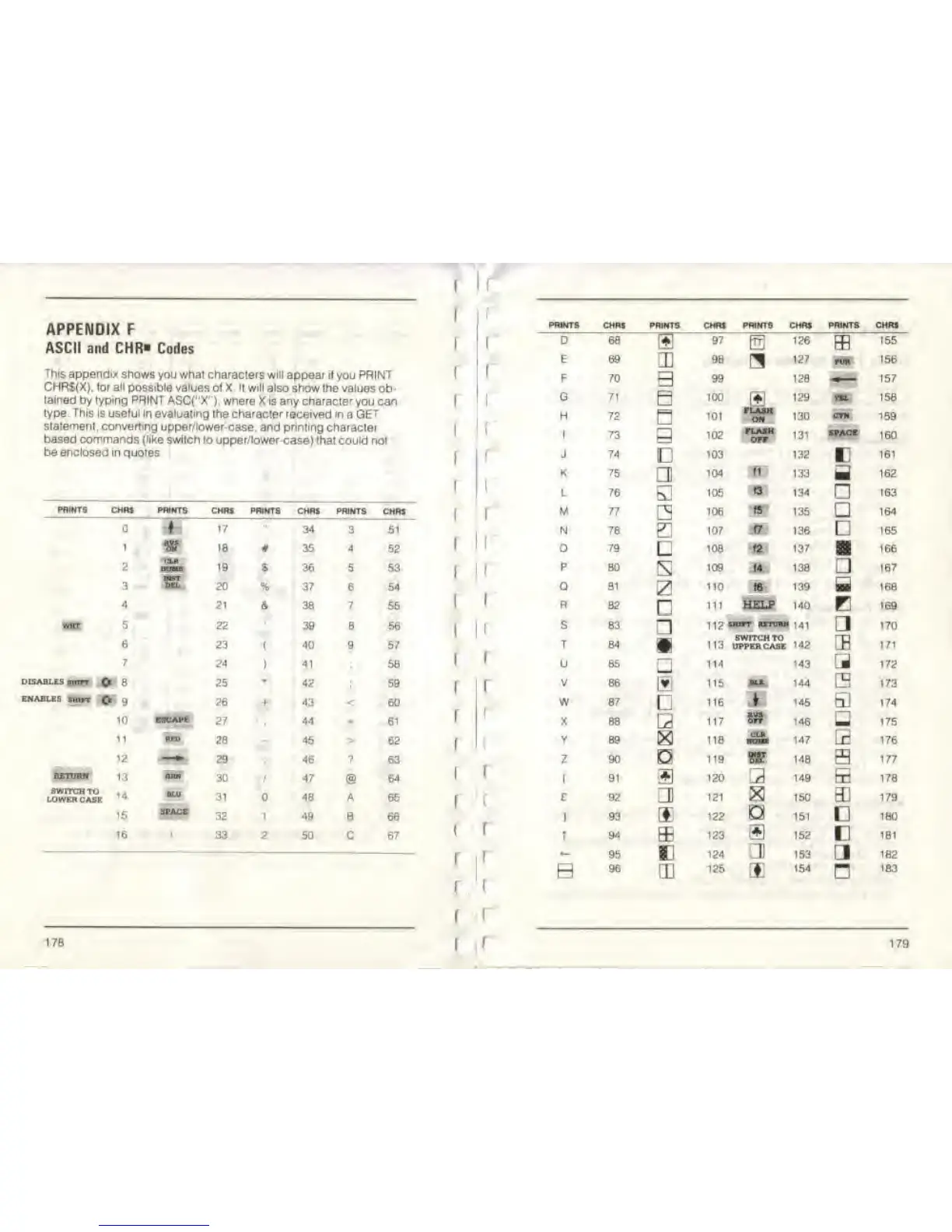
This appendix
shows
you what
characters will appear
ii[you
PRINT
F 70
B
B
99 128 157
CHR$(X).
(or
all
possible values of X li will also
show the
values
ob-
f
«
tained by typing PAINT
ASC(">
'").
where X is any character
you
can
G
71
100
FLASR
ON
129 m 158
type.
This
ts
useful
in evaluating the character
received in a
GET
i
H
72
a
'01
130
CYN
159
statement
.
converting upper/
lower-case,
and
printing
c
haracler
1
73 102
FLASH
131
5PACE
160
based commands (like switch
to upper/lower-case) that could
not
OFT
J '» ^ - »
be enclosed in quotes
J 74
ii
103
132
c
161
i
K
75
a
104
H
133
a
162
L
M
N
76
77
78
105
106
107
f5
134
135
136
163
PWNT5
CHRS PRINTS CHRJ PRINTS CMRS PRINTS
CMRS
164
17
"
34
3
51
165
i
• 18
# 35
4
52
I
79 108
*
137
166
2
SL
19
S 36
5 53 |
, P
BO
s
109
'* 138
3
167
3
K 20 % 37 6 54
Q
81 110
«
139
B
168
4
5
21
4 38
7
55 '
R
82 111
HELP 140
B
169
Bt 22 39 8 56
i
I
s 63
L]
112
«"
«T™»
'41
170
6 23
(
40
9
57 T 84 113
SWITCH
TO
UPPERCASE '42
CB
171
7
24
!
41
1
* 58
I
U 85
-
114 143 . 172
DISABLES BITOT
O
8
25
•
42
59 ,
V 86
Ii
115
1L»
144 ^ 173
ENABLES rairt
O
9 26 + 43 <
60
*
w 87 116
1
145
v
174
10
ESCAPE
27
i
44
-
61
I
X
88
Lr
117
8S
146
_
175
11
'2
—
2B
29
-
45
46
>
?
62
r
63
v
z
89
90
D
118
119
147 r 176
»
148
S
177
imm
13
~
30 47
@
64
I
1
91 +1 120
3
149
Q
178
SWITCH
TO ,
,
LOWER
CASE
m,
31 48 A
65 r
c 92
CD
121 X 150 3.! 179
15
space
32 1 49 B
66
]
93
122
a
151
1
180
16
1
33 2
50
C 67
T
94
95
ffi
E
123
124
m
i:
152
153
a
181
j
I
>
L
182
i
r
i
96
CD
125
ES
154
n
183
178
a
1
179



 To Next Page