'
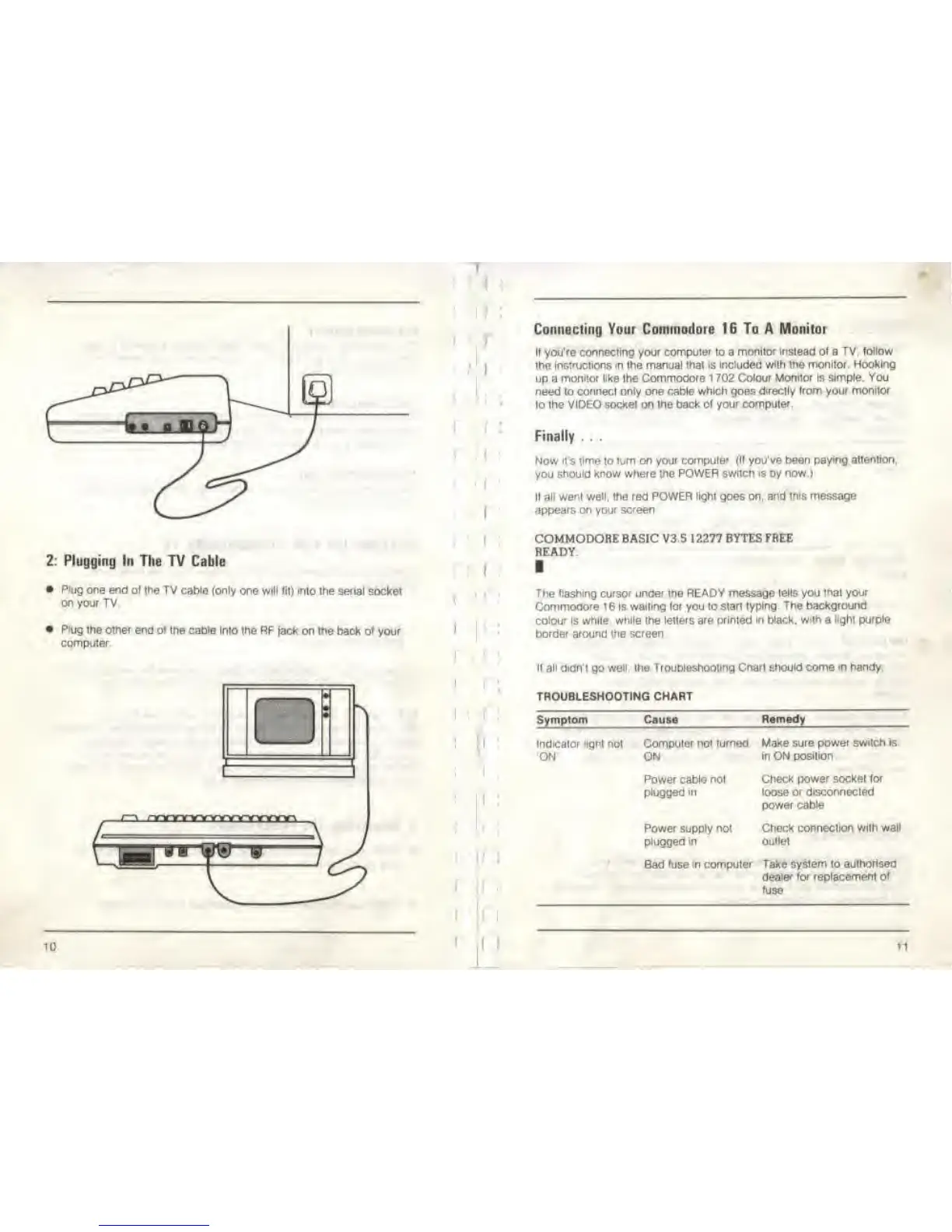
2: Plugging In The TV Cable
• Plug ore end of the
TV cable (only one will fit)
mlo Ihe
serial
socket
on your TV
• P'ug Ihe other end or
me
cable
Into the RF
fack
on the
back
of
your
computer
10
'
i
I
Connecting Your Commodore 16 To A Monitor
If you're connecting your computer to a
monitor Instead ot
a
TV, follow
the
instructions
m Ihe manual
that is included with the monitor.
Hooking
up a
monitor tike
the
Commodore 1
702
Colour Monitor is simple. You
need to connect only one cable which goes
directly from your monitor
to the VIDEO socket on Ihe back
of your
compuler
Finally . . .
Now it's time lo turn on
your compuler (If you've been
paying attention,
you
should know where the POWER switch is by now.)
It
all wen| well, the
red
POWER light goes on, and this message
appears on your screen
COMMODORE BASIC V3 5
12277 BYTES FREE
READY.
The flashing cursor unoer ihe READY message
tells
you
that your
Commodo'e
1
6 is
wailing lor
you lo
start typing The
background
colour
is white,
while Ihe letters are printed In black,
with
a
light purple
border around the screen
If all didn't
go
well, the Troubleshooting
Cnarl should
come m
handy
TROUBLESHOOTING CHART
Symptom Cause
Remedy
Indicator light nol
ON'
Computer not turned Make sure
power switch is
ON
Power cable not
plugged in
Power supply not
plugged in
in ON posilion
Check power socket tor
loose or disconnected
power cable
Check
connection
with
wall
outlet
Bad fuse m computer Take
system
lo
authorised
dealer for replacement
of
fuse
11



 To Next Page