EasyManua.ls Logo

Commodore C64 - Page 10

Commodore C64
10 pages
Print Icon
To Previous Page IconTo Previous Page

Loading...
tL
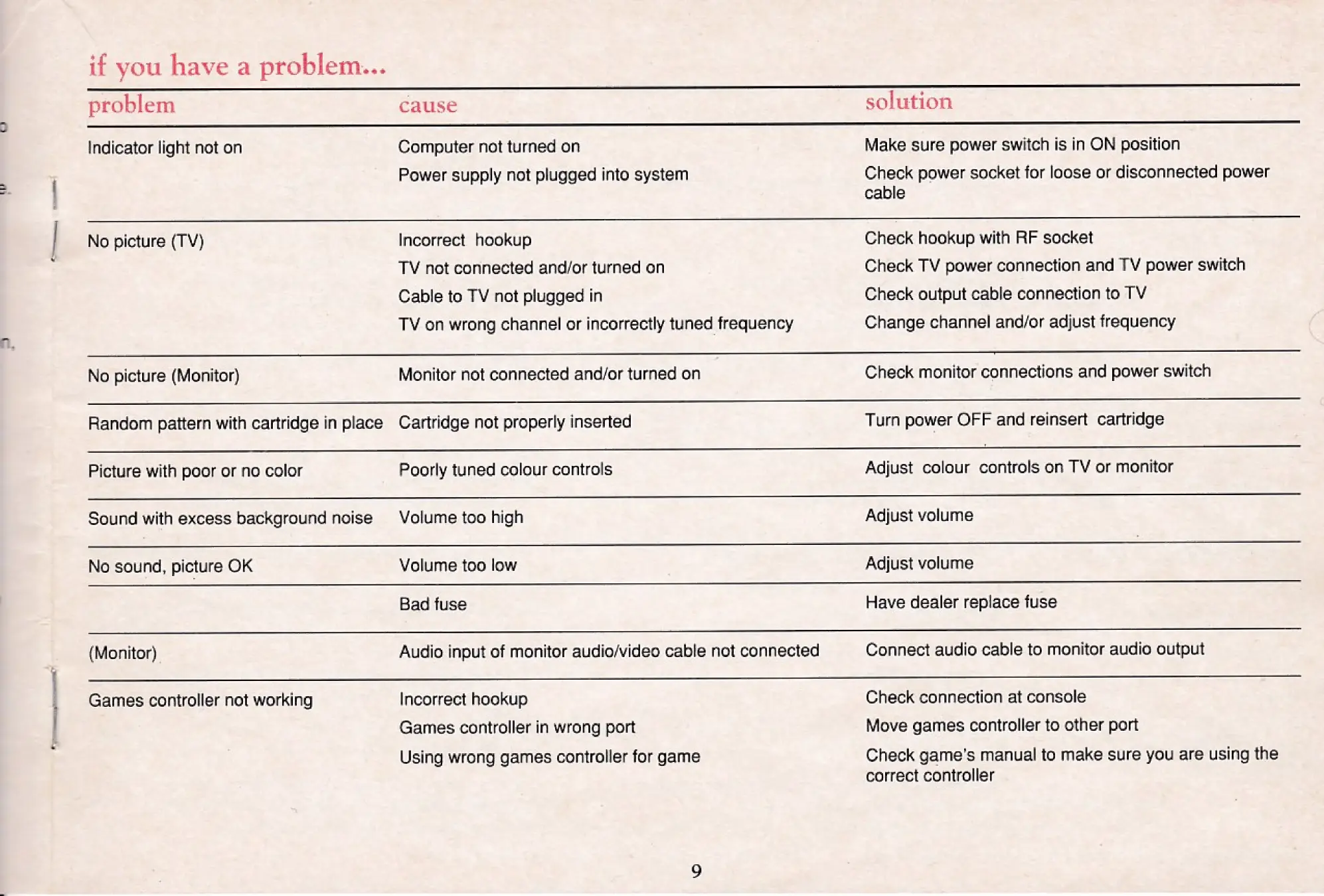
if
you
have
a
problem...
a
———————EeR_
=
=
=
problem
cause
solution
Indicator
light
not
on
Computer
not
turned
on
Make
sure
power
switch
is in
ON
position
Power
supply
not
plugged
into
system
Check
power
socket
for
loose
or
disconnected
power
cable
No
picture
(TV)
Incorrect
hookup
Check
hookup
with
RF
socket
TV
not
connected
and/or
turned
on
Check
TV
power
connection
and
TV
power
switch
Cable
to
TV
not
plugged
in
Check
output
cable
connection
to
TV
TV
on
wrong
channel
or
incorrectly
tuned
frequency
Change
channel
and/or
adjust
frequency
No
picture
(Monitor)
Monitor
not
connected
and/or
turned
on
Check
monitor
connections
and
power
switch
Random
pattern
with
cartridge
in
place
Cartridge
not
properly
inserted
Turn
power
OFF
and
reinsert
cartridge
Picture
with
poor
or
no
color
Poorly
tuned
colour
controls
Adjust
colour
controls
on
TV
or
monitor
Sound
with
excess
background
noise
Volume
too
high
Adjust
volume
fac
eee
I
De
fa
a
ee
Ne
ee
ee
eee
eee
eS
No
sound,
picture
OK
Volume
too
low
Adjust
volume
=
=
x
eee
ooo
Bad
fuse
Have
dealer
replace
fuse
(Monitor)
Audio
input
of
monitor
audio/video
cable
not
connected
Connect
audio
cable
to
monitor
audio
output
Games
controller
not
working
Incorrect
hookup
Check
connection
at
console
Games
controller
in
wrong
port
Move
games
controller
to
other
port
Using
wrong
games
controller
for
game
Check
game's
manual
to
make
sure
you
are
using
the
correct
controller

Other manuals for Commodore C64

Related product manuals